
Setting Up the C Development Environment: GCC, Clang & Make (2026 Guide)
Complete guide to setting up a professional C development environment in 2026. Install GCC or Clang, configure Make, and compile your first C23 program on Windows, Linux, and macOS.
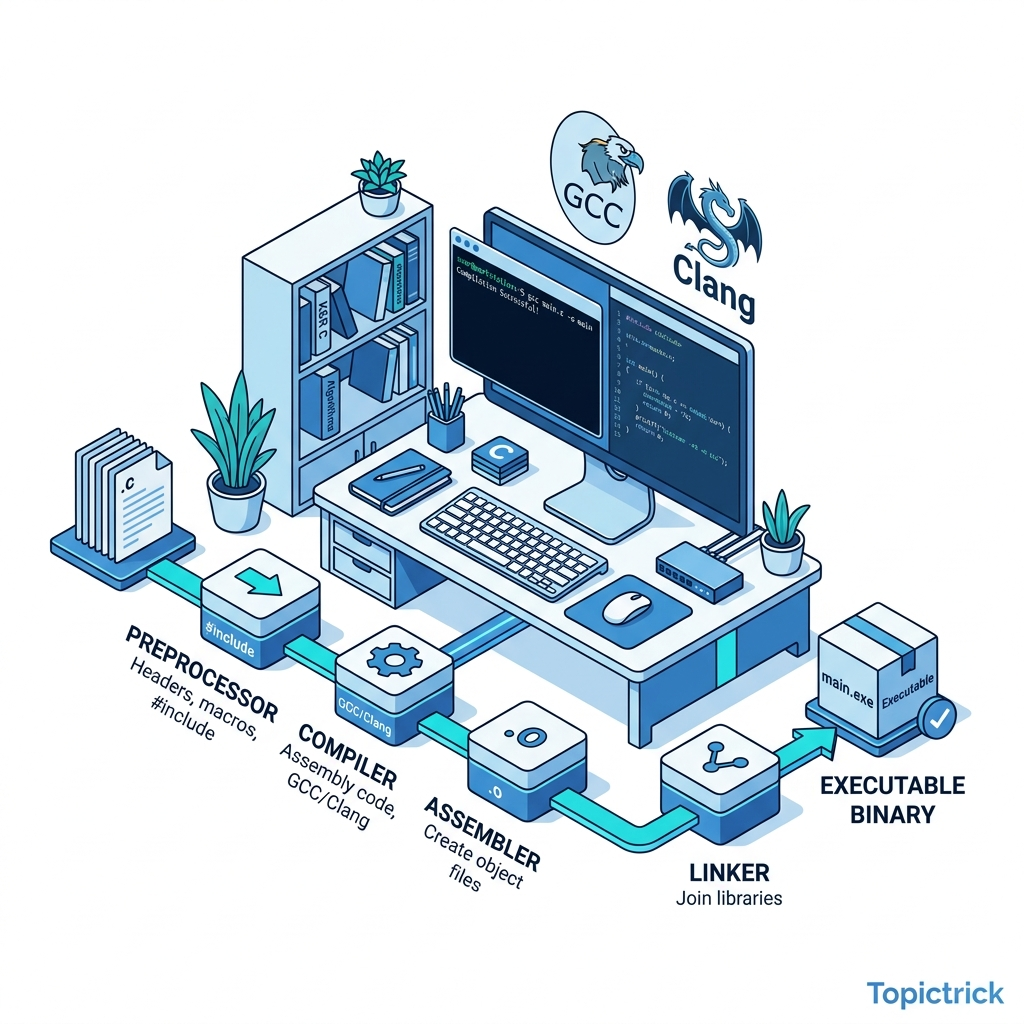
Setting Up the C Development Environment: GCC, Clang & Make (2026 Guide)
Table of Contents
- Why the Toolchain Matters
- The C Compilation Pipeline Explained
- GCC vs. Clang: Which Compiler Should You Use?
- Installing the Toolchain on Windows, Linux & macOS
- Your First C23 Program
- Compiler Flags That Matter
- Automating Builds with Make
- Setting Up VS Code for C Development
- Debugging with GDB
- Frequently Asked Questions
- Key Takeaway
Why the Toolchain Matters
In high-level languages like Python or JavaScript, you simply run a script and the runtime handles everything. C is fundamentally different. C does not have a runtime in the traditional sense. Your source code goes through a multi-stage transformation process - the toolchain - that converts human-readable text into binary machine instructions that the CPU executes directly.
This is why C is so fast, so portable, and so trusted in safety-critical systems. There is no virtual machine interpreting your code. There is no garbage collector pausing your program. When a C program runs, it is talking directly to the hardware, and every decision about memory, performance, and safety was made by you, the programmer.
Understanding your toolchain is the first step to thinking like a systems engineer. Unlike web developers who configure a package.json, C developers must understand what a compiler, linker, and build system actually do - because the differences between them will affect the performance, security, and portability of your code.
The C Compilation Pipeline Explained
When you "compile" a C program, you are not just pressing a button. There are four distinct stages happening in sequence:
Stage 1: Preprocessing
The preprocessor handles all directives that begin with #. This includes #include (which literally copies the content of header files into your source), #define macro expansions, and conditional compilation with #ifdef. You can inspect the preprocessed output yourself:
gcc -E main.c -o main.iStage 2: Compilation
The compiler translates the preprocessed C code into assembly language - the human-readable version of machine instructions for a specific CPU architecture (like x86-64 or ARM64). You can see this output:
gcc -S main.c -o main.sThis is where most optimizations happen. Flags like -O2 or -O3 tell the compiler how aggressively to rearrange, inline, and transform your code for speed.
Stage 3: Assembly
The assembler converts the human-readable assembly (.s) into a binary object file (.o). Object files contain machine code but are not yet executable - they still have unresolved references to functions defined in other files or libraries.
gcc -c main.c -o main.oStage 4: Linking
The linker resolves all those external references. It takes one or more object files, finds the actual memory addresses of library functions like printf, and stitches everything together into a final executable binary.
gcc main.o -o my_programUnderstanding these four stages is crucial for debugging build errors. A "linker error" (undefined reference) is fundamentally different from a "compiler error" (syntax/type mistake) - and the stage where an error occurs tells you exactly where to look.
GCC vs. Clang: Which Compiler Should You Use?
In the professional world, two compilers dominate C development:
| Feature | GCC (GNU Compiler Collection) | Clang (LLVM Project) |
|---|---|---|
| Primary use | Linux, embedded, servers | macOS (default), cross-platform |
| Error messages | Functional but verbose | Excellent, pinpoint accurate |
| Compilation speed | Slightly slower | Faster |
| Optimization | Extremely mature (-O3, LTO) | Excellent, especially for ARM |
| Static analysis | Limited | clang --analyze built-in |
| C23 support | Full (GCC 14+) | Full (Clang 17+) |
Recommendation for 2026: Use Clang for development (better error messages catch mistakes faster) and GCC for production Linux builds (broader platform maturity and profile-guided optimization). Professional teams often compile with both to catch compiler-specific warnings.
Installing the Toolchain
Windows
The easiest professional setup for Windows is one of these two options:
Option A - w64devkit (Recommended for pure Windows):
Download w64devkit - a single portable ZIP containing GCC, GDB, Make, and all necessary tools. Add it to your PATH and you are done.
# Add w64devkit to your PATH in PowerShell profile
$env:PATH += ";C:\w64devkit\bin"
Option B - WSL 2 (Recommended for serious development): Windows Subsystem for Linux gives you a real Ubuntu environment with full POSIX compatibility:
# In WSL terminal
sudo apt update && sudo apt install build-essential clang gdb make
Linux (Ubuntu/Debian)
sudo apt update
sudo apt install build-essential clang gdb make valgrind
The build-essential package installs GCC, G++, Make, and the standard C library headers. valgrind is a critical memory debugging tool you will use throughout this course.
macOS
# Install Xcode Command Line Tools (Clang is the default on macOS)
xcode-select --install

# Install GCC and GNU Make via Homebrew
brew install gcc make
Verify installation:
gcc --version   # Should show GCC 13+ or 14+
clang --version # Should show Clang 17+
make --version  # Should show GNU Make 4+
Your First C23 Program
C23 is the most recent ratified C standard, bringing several quality-of-life improvements. Let us write a proper C23 Hello World that demonstrates some of these features:
#include <stdio.h>
#include <stdint.h>

// C23: constexpr is now available in C (not just C++)
constexpr int32_t VERSION_MAJOR = 1;

int main(void) {
    // C23: auto keyword for type inference
    auto message = "C Masterclass: Environment Initialized";

    printf("Version %d - %s\n", VERSION_MAJOR, message);

    // C23: [[nodiscard]] attribute on functions
    return 0;
}
Save this as main.c and compile with:
gcc -std=c23 -Wall -Wextra -Wpedantic -Werror main.c -o program
./program
Compiler Flags That Matter
Learning the right compiler flags is as important as learning the language itself. Here are the essential flags every professional C developer uses:
| Flag | Purpose |
|---|---|
-std=c23 | Use the C23 standard (or -std=c17 for C17) |
-Wall | Enable most common warnings |
-Wextra | Enable additional useful warnings |
-Wpedantic | Enforce strict standard compliance |
-Werror | Treat all warnings as errors (prevents silent bugs) |
-O0 | No optimization (use for debugging) |
-O2 | Recommended for production (balance of speed/size) |
-O3 | Maximum optimization (may increase binary size) |
-g | Include debug symbols (for GDB) |
-fsanitize=address | Enable AddressSanitizer to detect memory errors |
-fsanitize=undefined | Enable UBSan to catch undefined behavior |
The definitive development build command:
gcc -std=c23 -Wall -Wextra -Wpedantic -Werror -g -fsanitize=address,undefined main.c -o programThe definitive production build command:
gcc -std=c23 -Wall -Werror -O2 main.c -o programAutomating Builds with Make
As your project grows to multiple .c files, typing compile commands manually becomes unsustainable. Make solves this by defining explicit rules for how your software is built. Make also performs incremental builds - it only recompiles files that have actually changed, saving significant time on large codebases.
# Professional Makefile for C23 projects
CC      = gcc
CFLAGS  = -std=c23 -Wall -Wextra -Wpedantic -Werror
DBGFLAGS= -g -fsanitize=address,undefined
TARGET  = program
SRCS    = main.c utils.c data.c
OBJS    = $(SRCS:.c=.o)

# Default target: build the program
all: $(TARGET)

# Link all object files into the final executable
$(TARGET): $(OBJS)
	$(CC) $(CFLAGS) $(OBJS) -o $(TARGET)

# Compile each .c file into an .o file
%.o: %.c
	$(CC) $(CFLAGS) -c $< -o $@

# Build with debug flags
debug: CFLAGS += $(DBGFLAGS)
debug: $(TARGET)

# Remove all compiled artifacts
clean:
	rm -f $(OBJS) $(TARGET)

.PHONY: all debug clean
Key Make concepts to understand:
- Target: The file to be created (e.g.,
program,main.o) - Prerequisites: Files the target depends on (listed after the colon)
- Recipe: The shell command to create the target (must start with a Tab, not spaces)
.PHONY: Marks targets that are not real files (likeclean)
Setting Up VS Code for C Development
While a true systems engineer must be comfortable with the command line, VS Code provides excellent C support through the C/C++ Extension by Microsoft:
- Install the
C/C++extension (ms-vscode.cpptools) - Create a
.vscode/c_cpp_properties.jsonfile:
{
    "configurations": [
        {
            "name": "Linux",
            "includePath": ["${workspaceFolder}/**"],
            "defines": [],
            "compilerPath": "/usr/bin/gcc",
            "cStandard": "c23",
            "intelliSenseMode": "linux-gcc-x64"
        }
    ],
    "version": 4
}- Create a
.vscode/tasks.jsonto integrate Make with VS Code's build system.
This gives you IntelliSense, Go-to-Definition, and integrated debugging through GDB - while keeping your real build process in Control via the Makefile.
Debugging with GDB
GDB (GNU Debugger) is your primary tool for understanding what your C program is actually doing at runtime. Compile with -g to include debug symbols, then:
gcc -g -std=c23 main.c -o program
gdb ./program
Essential GDB commands:
(gdb) break main        # Set breakpoint at the start of main
(gdb) run               # Run the program
(gdb) next              # Step over one line
(gdb) step              # Step into a function call
(gdb) print age         # Print the value of variable 'age'
(gdb) info locals       # Show all local variables
(gdb) backtrace         # Show the call stack
(gdb) quit              # Exit GDB
Learning GDB early will save you countless hours. When your program crashes with a segmentation fault, GDB's backtrace command will tell you exactly which function called which function and where the crash occurred.
Frequently Asked Questions
Why not use an IDE like Visual Studio or Code::Blocks? IDEs are powerful, but they hide the mechanics of compilation. A true systems engineer must understand the command line because servers, embedded boards, Docker containers, and CI/CD pipelines have no GUI. You build and debug remotely over SSH, and Make is your interface.
Is C still relevant in 2026? Absolutely. The Linux kernel, CPython interpreter, PostgreSQL, Redis, Nginx, Git, and SQLite are all written in C. Every IoT device, automotive computer, and industrial controller runs C code. Mastering C gives you "hardware sympathy" - a deep intuition for how computers actually work that makes you a better engineer in every language.
Should I learn C before C++? Yes, strongly recommended. C++ is a superset of C, but its abstractions (classes, templates, RAII) are much easier to understand when you already know what memory allocation, stack frames, and pointer arithmetic look like at the C level. The C Mastery course deliberately teaches C first so you understand what C++ is actually doing under the hood.
What is valgrind and when do I use it?
Valgrind is a memory analysis tool that runs your program in a virtual CPU and detects memory leaks, use-after-free errors, and invalid memory reads/writes. Run it with valgrind --leak-check=full ./program after any session where you've manually allocated heap memory with malloc.
GCC or Clang for embedded development?
For deeply embedded systems (ARM Cortex-M, RISC-V), you typically use a cross-compiler like arm-none-eabi-gcc - a version of GCC targeting a different architecture. Clang also supports cross-compilation via LLVM's target triple system. We cover embedded toolchains in Module 18 (Processes & Fork).
Key Takeaway
A professional C environment is built on Explicit Control. You understand every stage of the compilation pipeline. You know the difference between GCC and Clang. You use compiler warnings as a safety net and Make as your automation layer.
This foundation separates developers who write C from engineers who master it. With your toolchain configured, you are ready for the most important concept in the language: how variables, types, and data physically live in your computer's memory.
Read next: Variables, Types & Memory Layout in C ->
This post is part of the C Mastery Course - a complete 30-module journey from systems programming fundamentals to building high-performance C applications.