
C File I/O & Binary Streams: Complete Guide to fopen, fread, fwrite and Serialization
Master C file I/O from basic text files to binary serialization. Learn fopen modes, buffered vs unbuffered I/O, fread/fwrite for structs, fseek/ftell for random access, mmap for memory-mapped files, and cross-platform binary file portability.
C File I/O & Binary Streams: Complete Guide to fopen, fread, fwrite and Serialization
Table of Contents
- Files as Byte Streams: The Buffered I/O Pipeline
- Opening and Closing Streams: fopen Modes
- Text File I/O: fprintf, fscanf, fgets, fputs
- Binary File I/O: fread and fwrite
- Random Access: fseek, ftell and rewind
- Flushing and Sync: fflush and fsync
- Binary Serialization: Saving and Loading Structs
- Endianness in Binary Files: Cross-Platform Portability
- Memory-Mapped Files with mmap
- Error Handling in File I/O
- Frequently Asked Questions
- Key Takeaway
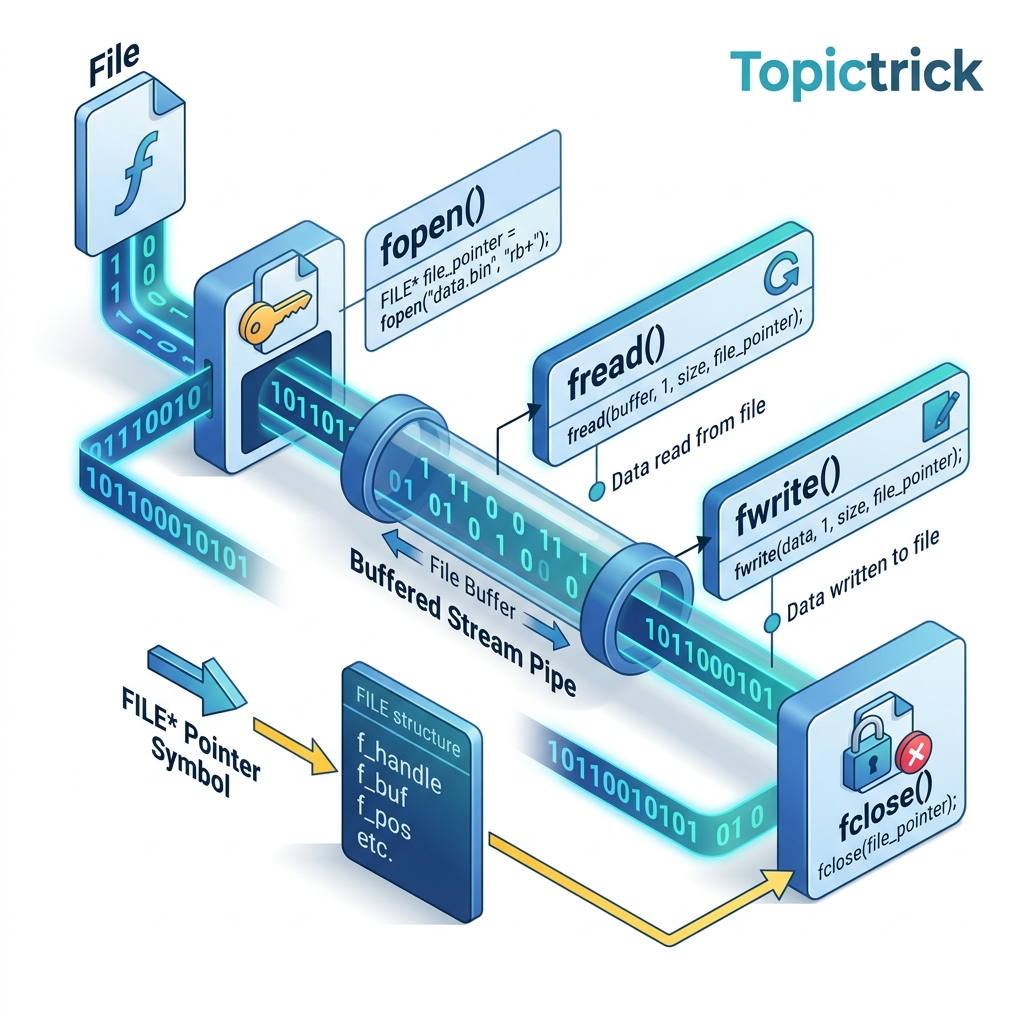
Files as Byte Streams: The Buffered I/O Pipeline
In C, a file is accessed through a FILE* - a handle to a buffered stream. When you call fwrite, your data does not go directly to disk. It goes through a three-layer pipeline:
Why buffering? Writing to a disk one byte at a time would be catastrophically slow - each write would require a system call. Buffering accumulates writes in RAM, then flushes to disk in large, efficient chunks (typically 4-8KB matching the disk's sector/block size).
The implications:
- Data written with
fwriteis not on disk until the internal buffer is flushed (byfflush,fclose, or buffer full). - If the program crashes before flushing, unflushed data is permanently lost.
- For critical data (transactions, user data), always call
fflush(file)orfsync(fileno(file))after writing.
Opening and Closing Streams: fopen Modes
fopen(filename, mode) returns a FILE* on success or NULL on failure:
| Mode | Meaning |
|---|---|
"r" | Read text; file must exist |
"w" | Write text; creates/truncates |
"a" | Append text; creates if missing |
"r+" | Read+write text; file must exist |
"w+" | Read+write; creates/truncates |
"rb" | Read binary |
"wb" | Write binary |
"ab" | Append binary |
"rb+" | Read+write binary |
#include <stdio.h>
#include <stdlib.h>

int main(void) {
    // Open for writing (creates or truncates)
    FILE *outfile = fopen("output.txt", "w");
    if (!outfile) {
        perror("fopen failed");
        return EXIT_FAILURE;
    }

    fprintf(outfile, "Hello, File!\n");
    fprintf(outfile, "Line %d\n", 2);

    fclose(outfile); // ALWAYS close - flushes buffer and releases OS file descriptor

    // Verify: open for reading
    FILE *infile = fopen("output.txt", "r");
    if (!infile) { perror("fopen"); return 1; }

    char line[256];
    while (fgets(line, sizeof(line), infile) != NULL) {
        printf("Read: %s", line);
    }

    fclose(infile);
    return EXIT_SUCCESS;
}
Text File I/O: fprintf, fscanf, fgets, fputs
Text mode provides formatted I/O:
#include <stdio.h>

// Writing formatted text
void write_report(const char *filename) {
    FILE *f = fopen(filename, "w");
    if (!f) return;

    fprintf(f, "%-20s %10s %10s\n", "Name", "Score", "Grade");
    fprintf(f, "%-20s %10d %10c\n", "Alice Johnson", 95, 'A');
    fprintf(f, "%-20s %10d %10c\n", "Bob Smith",    82, 'B');

    fputs("--- END OF REPORT ---\n", f);
    fclose(f);
}

// Reading structured text
void read_students(const char *filename) {
    FILE *f = fopen(filename, "r");
    if (!f) return;

    char name[64];
    int score;
    char grade;

    // Skip header line
    char buf[256];
    fgets(buf, sizeof(buf), f);

    while (fscanf(f, "%63s %d %c", name, &score, &grade) == 3) {
        printf("%s: %d (%c)\n", name, score, grade);
    }

    fclose(f);
}
[!WARNING]
fgetsvsgets: Never usegets()- it was removed from C11. It has no buffer size limit and is guaranteed to cause buffer overflows on long input. Always usefgets(buffer, sizeof(buffer), fp).
Binary File I/O: fread and fwrite
Binary mode writes raw bytes - no character translation, no formatting:
#include <stdio.h>
#include <stdint.h>

int main(void) {
    // Write an array of integers as raw binary
    uint32_t data[5] = {100, 200, 300, 400, 500};

    FILE *f = fopen("data.bin", "wb");
    if (!f) return 1;

    size_t written = fwrite(data, sizeof(uint32_t), 5, f);
    printf("Wrote %zu elements\n", written); // 5
    fclose(f);

    // Read back
    uint32_t readback[5] = {0};
    f = fopen("data.bin", "rb");
    if (!f) return 1;

    size_t read = fread(readback, sizeof(uint32_t), 5, f);
    printf("Read %zu elements\n", read); // 5

    for (int i = 0; i < 5; i++) {
        printf("readback[%d] = %u\n", i, readback[i]); // 100, 200, ...
    }

    fclose(f);
    return 0;
}
fwrite(ptr, size, count, stream) semantics:
ptr: Pointer to the data to write.size: Size of each element in bytes.count: Number of elements to write.- Returns: Number of elements successfully written (check against
countfor errors).
Random Access: fseek, ftell and rewind
By default, file I/O is sequential. fseek moves the stream position indicator to any byte offset:
#include <stdio.h>
#include <stdint.h>

// Seek to element N in a binary array file - O(1) access!
int read_element_at(FILE *f, size_t index, uint32_t *out) {
    long offset = (long)(index * sizeof(uint32_t));

    if (fseek(f, offset, SEEK_SET) != 0) return -1; // SEEK_SET = from file start
    if (fread(out, sizeof(uint32_t), 1, f) != 1) return -1;
    return 0;
}

int main(void) {
    FILE *f = fopen("data.bin", "rb");
    if (!f) return 1;

    // Get file size
    fseek(f, 0, SEEK_END);    // Seek to end
    long file_size = ftell(f); // Get current position (= file size)
    rewind(f);                 // Seek back to start

    printf("File size: %ld bytes = %ld uint32 elements\n",
           file_size, file_size / sizeof(uint32_t));

    // Random access to element at index 3
    uint32_t val;
    if (read_element_at(f, 3, &val) == 0) {
        printf("Element[3] = %u\n", val); // 400
    }

    fclose(f);
    return 0;
}
fseek whence values:
SEEK_SET: Offset from beginning of file.SEEK_CUR: Offset from current position.SEEK_END: Offset from end of file (use with negative offsets to seek from end).
Flushing and Sync: fflush and fsync
fflush(file) forces the C library buffer to flush to the OS page cache. But the OS may still hold the data in RAM before writing to disk. For true durability:
#include <stdio.h>
#include <unistd.h>  // POSIX: fsync

void write_critical_data(const char *path, const void *data, size_t size) {
    FILE *f = fopen(path, "ab");
    if (!f) return;

    fwrite(data, 1, size, f);

    fflush(f);              // Flush C library buffer -> OS page cache
    fsync(fileno(f));       // Flush OS page cache -> physical disk (POSIX)
    // On Windows: FlushFileBuffers(handle)

    fclose(f);
}
Use fsync for: transaction logs, database write-ahead logs, configuration files, anything that must survive a system crash.
Binary Serialization: Saving and Loading Structs
Directly writing structs to binary files is the fastest serialization in C:
#include <stdio.h>
#include <stdint.h>
#include <string.h>

// Savegame format - pure binary
typedef struct {
    uint32_t magic;          // File format identifier: 0x53415645 "SAVE"
    uint16_t version;        // Format version for compatibility
    char     player_name[32];
    int32_t  health;
    int32_t  level;
    double   position_x;
    double   position_y;
    uint64_t playtime_seconds;
} __attribute__((packed)) SaveGame; // packed: no alignment padding

int write_savegame(const char *path, const SaveGame *save) {
    FILE *f = fopen(path, "wb");
    if (!f) return -1;

    size_t written = fwrite(save, sizeof(SaveGame), 1, f);
    fclose(f);
    return written == 1 ? 0 : -1;
}

int load_savegame(const char *path, SaveGame *save) {
    FILE *f = fopen(path, "rb");
    if (!f) return -1;

    size_t read = fread(save, sizeof(SaveGame), 1, f);
    fclose(f);

    if (read != 1) return -1;
    if (save->magic != 0x53415645) return -2; // Magic number mismatch
    return 0;
}

int main(void) {
    SaveGame game = {
        .magic           = 0x53415645,
        .version         = 1,
        .player_name     = "Alice",
        .health          = 100,
        .level           = 5,
        .position_x      = 123.45,
        .position_y      = -678.90,
        .playtime_seconds = 3600,
    };

    write_savegame("save.dat", &game);

    SaveGame loaded = {0};
    if (load_savegame("save.dat", &loaded) == 0) {
        printf("Player: %s, Level: %d, HP: %d\n",
               loaded.player_name, loaded.level, loaded.health);
    }

    return 0;
}
Endianness in Binary Files: Cross-Platform Portability
When writing multi-byte integers to binary files, endianness becomes critical for cross-platform compatibility. A file written on a little-endian x86-64 machine and read on a big-endian SPARC will have byte-reversed integers:
#include <stdint.h>
#include <arpa/inet.h> // POSIX: htonl, ntohl, htons, ntohs

// Store values in big-endian (network byte order) for portability
void write_portable_uint32(FILE *f, uint32_t value) {
    uint32_t network_order = htonl(value); // Host to network (big-endian)
    fwrite(&network_order, sizeof(uint32_t), 1, f);
}

uint32_t read_portable_uint32(FILE *f) {
    uint32_t network_order;
    fread(&network_order, sizeof(uint32_t), 1, f);
    return ntohl(network_order); // Network to host
}
For modern, professional serialization, consider:
- Protocol Buffers / FlatBuffers: Cross-platform, version-tolerant, handles endianness.
- MessagePack: Binary JSON alternative with explicit type encoding.
- Custom tagged binary format: Define your own TLV (Type-Length-Value) encoding.
Memory-Mapped Files with mmap
For large files or random access patterns, mmap maps a file directly into the process's virtual address space - you access it like an array, and the kernel handles the actual disk I/O:
#include <sys/mman.h>
#include <sys/stat.h>
#include <fcntl.h>
#include <unistd.h>
#include <stdio.h>

int main(void) {
    int fd = open("data.bin", O_RDONLY);
    if (fd < 0) { perror("open"); return 1; }

    struct stat sb;
    fstat(fd, &sb);
    size_t file_size = sb.st_size;

    // Map the entire file into virtual address space
    uint32_t *data = mmap(NULL, file_size, PROT_READ, MAP_PRIVATE, fd, 0);
    close(fd); // fd can be closed after mmap

    if (data == MAP_FAILED) { perror("mmap"); return 1; }

    size_t count = file_size / sizeof(uint32_t);
    printf("First element: %u\n", data[0]);   // No fread needed - just index!
    printf("Last element:  %u\n", data[count-1]);

    munmap(data, file_size); // Release the mapping
    return 0;
}
mmap provides: zero-copy access, demand paging (only read pages you actually touch), and the ability to use pointer arithmetic across the entire file as if it were an in-memory array. Used extensively in database engines (SQLite WAL), compilers (linking large object files), and log processing.
Error Handling in File I/O
#include <stdio.h>
#include <errno.h>
#include <string.h>

int read_config(const char *path, char *buf, size_t bufsize) {
    FILE *f = fopen(path, "r");
    if (!f) {
        fprintf(stderr, "Cannot open '%s': %s\n", path, strerror(errno));
        return -1;
    }

    size_t n = fread(buf, 1, bufsize - 1, f);

    if (ferror(f)) {
        fprintf(stderr, "Read error: %s\n", strerror(errno));
        fclose(f);
        return -1;
    }

    buf[n] = '\0'; // Null-terminate
    fclose(f);
    return (int)n;
}
Key error-checking functions:
ferror(f): Non-zero if a read/write error occurred.feof(f): Non-zero if end-of-file was reached.clearerr(f): Clears both error and EOF flags.
Frequently Asked Questions
Why does my file lose data when my program crashes?
Buffered I/O: data written with fwrite/fprintf sits in the C library's buffer until it's full or explicitly flushed. If the program crashes before flushing, that unwritten data is lost. Solutions: call fflush(f) after critical writes, open files in unbuffered mode (setvbuf(f, NULL, _IONBF, 0)), or use fsync() for disk durability.
What is the difference between fread and read?
fread is part of the C standard library - it uses buffered I/O and works on FILE* handles. read is a POSIX system call - it bypasses the C library buffer and operates directly on file descriptors (integers). fread is more portable and typically higher performance for sequential access; read gives more control for async I/O and polling.
Can I use fseek/ftell with large files > 2 GB?
The standard ftell returns long, which is 32-bit on some platforms (max 2 GB). For large files, use fseek64/ftello64 on Linux or _fseeki64/_ftelli64 on Windows. Define _FILE_OFFSET_BITS=64 before including <stdio.h> on POSIX systems to make fseek/ftell 64-bit automatically.
When is mmap better than fread?
mmap wins for: random access patterns (no seek overhead), large files where you don't need every byte (only touched pages load), and zero-copy processing (data is accessed directly without a read buffer). fread wins for: sequential streaming of medium-sized files, portable code (mmap is POSIX-only), and simplicity.
Key Takeaway
File I/O in C is State that Persists. Mastering the buffered stream model - understanding when data is flushed, how to seek randomly through binary files, and how to serialize structs directly to disk - gives you the tools to build databases, configuration managers, cache engines, and logging systems.
The combination of fread/fwrite for sequential binary I/O and mmap for random access to large files covers virtually every file I/O pattern you'll encounter in real-world systems programming.
Read next: Error Handling & errno: Defensive C Programming ->
Part of the C Mastery Course - 30 modules from C basics to production-grade systems engineering.