
C++ Toolchain Setup: CMake, Clang & vcpkg (2026)
Install CMake 3.25+, Clang/LLVM, and clangd, then wire up vcpkg and AddressSanitizer for a working C++ toolchain. Presets and flags included. 2026.
C++ Environment Setup: CMake, LLVM, Clang, and the Modern Build Pipeline (2026)
Table of Contents
- The Modern C++ Build Pipeline
- Choosing Your Compiler
- Installing and Configuring Clang
- CMake: The Industry Standard Build System
- CMake Presets: Managing Multiple Build Configurations
- IDE Setup: VS Code with clangd
- Dependency Management: vcpkg and Conan
- Runtime Safety: Sanitizers and Static Analysis
- Compiler Explorer: Instant Assembly Feedback
- Professional CMakeLists: A Production Template
- Frequently Asked Questions
- Key Takeaway
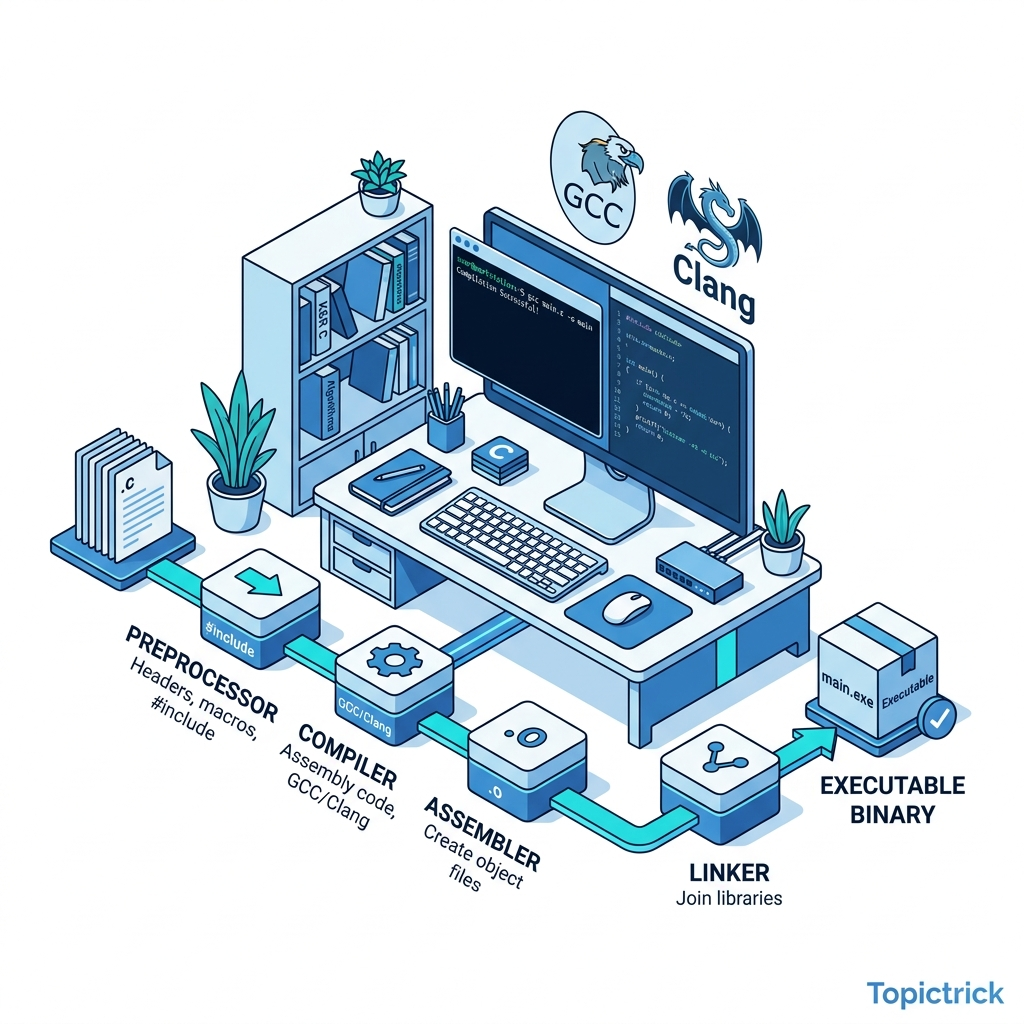
The Modern C++ Build Pipeline
Understanding the complete pipeline from source to binary is essential for mastering compilation errors, optimization, and debugging:
Each stage is separately invocable: clang++ -E for preprocessor, clang++ -S for assembly, clang++ -c for object files. Understanding these stages makes you dramatically better at diagnosing build failures.
Choosing Your Compiler
Three production-quality compilers exist for C++ in 2026, each with distinct strengths:
| Compiler | C++26 Support | Diagnostics | Best Platform |
|---|---|---|---|
| Clang 18+ (LLVM) | Full | ⭐⭐⭐⭐⭐ Best | macOS, Linux, Windows |
| GCC 14+ | Full | ⭐⭐⭐⭐ Excellent | Linux, Embedded |
| MSVC 2022 (17.9+) | Full | ⭐⭐⭐ Good | Windows-native |
Recommendation: Use Clang as your primary compiler. Clang's error messages are significantly more actionable, especially for template errors, concepts violations, and SFINAE failures that produce multi-page GCC errors. Also run GCC for CI - it catches different warnings.
Example of Clang's superior diagnostics:
# Clang error (clear, actionable):
# error: use of undefined variable 'value'; did you mean 'val'?
#     return value + 1;
#            ^~~~~
#            val

# GCC error (same bug, harder to parse):
# error: 'value' was not declared in this scope
Installing and Configuring Clang
# Ubuntu/Debian - latest Clang via LLVM official repo
wget https://apt.llvm.org/llvm.sh && chmod +x llvm.sh
sudo ./llvm.sh 18  # Install Clang 18

# Set as default
sudo update-alternatives --install /usr/bin/clang++ clang++ /usr/bin/clang++-18 100
sudo update-alternatives --install /usr/bin/clang clang /usr/bin/clang-18 100

# macOS via Homebrew
brew install llvm
echo 'export PATH="/opt/homebrew/opt/llvm/bin:$PATH"' >> ~/.zprofile

# Windows: Download LLVM installer from https://releases.llvm.org/
# Or via winget:
winget install LLVM.LLVM

# Verify installation
clang++ --version   # Clang 18.x.x
clang++ -std=c++23 -Wall -Wextra test.cpp -o test && ./test
CMake: The Industry Standard Build System
CMake doesn't compile your code - it generates build files (Makefile, Ninja, Visual Studio project) for your platform. Write your build logic once; CMake handles every platform:
# CMakeLists.txt - Modern CMake (3.25+)
cmake_minimum_required(VERSION 3.25)

project(
    TopictrickApp
    VERSION 1.0.0
    DESCRIPTION "Modern C++ Application"
    LANGUAGES CXX
)

# ═══ C++ Standard ═══
set(CMAKE_CXX_STANDARD 23)
set(CMAKE_CXX_STANDARD_REQUIRED ON)
set(CMAKE_CXX_EXTENSIONS OFF)  # Disable GNU extensions - use pure ISO C++

# ═══ Compiler Warnings ═══
add_compile_options(
    -Wall          # All general warnings
    -Wextra        # Extra warnings
    -Wpedantic     # Strict ISO compliance
    -Werror        # Treat warnings as errors in CI
    -Wshadow       # Warn on variable shadowing
    -Wconversion   # Warn on implicit type conversions
)

# ═══ Main Executable ═══
add_executable(app
    src/main.cpp
    src/engine.cpp
    src/config.cpp
)

target_include_directories(app PRIVATE include)
target_compile_features(app PRIVATE cxx_std_23)

# ═══ Linking ═══
target_link_libraries(app PRIVATE
    pthread    # POSIX threads (Linux/macOS)
    ${CMAKE_DL_LIBS}  # Dynamic linker
)
Building with CMake:
# Configure (generates build files):
cmake -B build -G Ninja -DCMAKE_BUILD_TYPE=Release

# Build with all CPU cores:
cmake --build build -j$(nproc)

# Run:
./build/app
CMake Presets: Managing Multiple Build Configurations
CMakePresets.json standardizes Debug, Release, and Sanitizer builds:
{
  "version": 6,
  "configurePresets": [
    {
      "name": "debug",
      "displayName": "Debug with ASan",
      "generator": "Ninja",
      "binaryDir": "${sourceDir}/build/debug",
      "cacheVariables": {
        "CMAKE_BUILD_TYPE": "Debug",
        "CMAKE_CXX_COMPILER": "clang++",
        "CMAKE_CXX_FLAGS": "-fsanitize=address,undefined -g -fno-omit-frame-pointer"
      }
    },
    {
      "name": "release",
      "displayName": "Release with LTO",
      "generator": "Ninja",
      "binaryDir": "${sourceDir}/build/release",
      "cacheVariables": {
        "CMAKE_BUILD_TYPE": "Release",
        "CMAKE_CXX_COMPILER": "clang++",
        "CMAKE_CXX_FLAGS": "-O3 -march=native -flto=thin"
      }
    },
    {
      "name": "tsan",
      "displayName": "ThreadSanitizer",
      "generator": "Ninja",
      "binaryDir": "${sourceDir}/build/tsan",
      "cacheVariables": {
        "CMAKE_BUILD_TYPE": "RelWithDebInfo",
        "CMAKE_CXX_FLAGS": "-fsanitize=thread -g"
      }
    }
  ]
}# Use presets:
cmake --preset debug && cmake --build --preset debug # Debug + ASan
cmake --preset release && cmake --build --preset release # Optimized releaseIDE Setup: VS Code with clangd
clangd is the Language Server Protocol (LSP) implementation for C++. It provides instant code completion, go-to-definition, inline error highlighting, and include organization - dramatically faster than IntelliSense:
# Install clangd
sudo apt install clangd-18

# VS Code: Install "clangd" extension (not "C/C++" extension)
# Search: "clangd" by LLVM

# Generate compile_commands.json (tells clangd how to compile each file):
cmake -B build -DCMAKE_EXPORT_COMPILE_COMMANDS=ON
ln -s build/compile_commands.json compile_commands.json  # Link to project root
VS Code settings.json:
{
  "clangd.arguments": [
    "--background-index",
    "--clang-tidy",
    "--header-insertion=iwyu",
    "--completion-style=detailed"
  ],
  "[cpp]": {
    "editor.defaultFormatter": "llvm-vs-code-extensions.vscode-clangd"
  }
}
Dependency Management: vcpkg and Conan
vcpkg (Microsoft) - CMake-integrated package manager:
# Install vcpkg
git clone https://github.com/microsoft/vcpkg.git ~/vcpkg
~/vcpkg/bootstrap-vcpkg.sh

# Add to CMakeLists.txt:
# set(CMAKE_TOOLCHAIN_FILE "$ENV{HOME}/vcpkg/scripts/buildsystems/vcpkg.cmake")

# Install packages (vcpkg.json manifest):{
"dependencies": [
"fmt",
"nlohmann-json",
"boost-asio",
"gtest"
]
}# CMake automatically installs dependencies from vcpkg.json
cmake -B build -DCMAKE_TOOLCHAIN_FILE=~/vcpkg/scripts/buildsystems/vcpkg.cmakeRuntime Safety: Sanitizers and Static Analysis
AddressSanitizer (ASan): Detects buffer overflows, use-after-free, double-free:
clang++ -fsanitize=address,leak -fno-omit-frame-pointer -g main.cpp -o main
./main  # Prints detailed report on any memory error
UndefinedBehaviorSanitizer (UBSan): Catches integer overflow, null dereference, misaligned access:
clang++ -fsanitize=undefined -g main.cpp -o mainThreadSanitizer (TSan): Detects data races in multithreaded code:
clang++ -fsanitize=thread -g main.cpp -o main -pthreadStatic analysis with clang-tidy:
# Run clang-tidy checks on your source
clang-tidy src/main.cpp --checks='modernize-*,performance-*,bugprone-*' -- -std=c++23

# Useful checks:
# modernize-use-auto, modernize-use-nullptr, modernize-use-override
# performance-unnecessary-copy-initialization, performance-avoid-endl
# bugprone-use-after-move, bugprone-integer-division
Compiler Explorer: Instant Assembly Feedback
Compiler Explorer (godbolt.org) is the C++ developer's most valuable tool - paste code, see generated assembly instantly for any compiler/flag combination:
// Paste this into Compiler Explorer with -O2:
#include <algorithm>
#include <vector>

int sum_vector(const std::vector<int>& v) {
    int total = 0;
    for (auto x : v) total += x;
    return total;
}
// Observe: -O0 generates a loop, -O3 generates SIMD instructions (vectorized)
Use Compiler Explorer to: verify that constexpr computations are compile-time, compare GCC vs Clang code generation, understand why a specific loop pattern is slow.
Production Template
project/
+-- CMakeLists.txt          # Root build definition
+-- CMakePresets.json       # Debug/Release/TSan presets
+-- vcpkg.json              # Package dependencies
+-- .clang-tidy             # Static analysis config
+-- .clang-format           # Code formatting rules
+-- src/
|   +-- main.cpp
|   +--- engine.cpp
+-- include/
|   +--- engine.hpp
+--- tests/
    +-- CMakeLists.txt      # Test targets
    +--- test_engine.cpp     # GoogleTest tests
Frequently Asked Questions
Why CMake 3.25+ instead of older versions?
CMake 3.25 introduced cmake_language(GET_PROPERTY) and major improvements to presets. CMake 3.28+ (released 2023) added import std; support for C++23 modules. Always target the latest LTS version for new projects.
Can I use Meson or Bazel instead of CMake? Yes - Meson is excellent (used by GStreamer, Mesa, systemd) and has cleaner syntax. Bazel (used by Google, Android) provides hermetic builds and remote execution. CMake remains the most universally supported option (every CI system, IDEs, and most open-source projects use it).
Should I use Conan or vcpkg for packages? vcpkg integrates more tightly with CMake and supports CMake presets. Conan is more flexible but requires more configuration. For new projects in 2026, vcpkg is the simpler choice. Both support private package registries for enterprise use.
How do I know which C++ standard I'm actually compiling with?
#if __cplusplus >= 202302L
    // C++23
#elif __cplusplus >= 202002L
    // C++20
#elif __cplusplus >= 201703L
    // C++17
#endif
// Or print: std::cout << __cplusplus << std::endl;  // 202302
Key Takeaway
Your toolchain is your foundation. Clang + CMake + clangd + sanitizers is the 2026 professional C++ stack - it catches more bugs earlier, gives you better error messages, and scales from single-file experiments to million-LOC production codebases.
Every module in this masterclass assumes this environment. Spending an hour on setup now saves hundreds of hours of debugging confusion later.
Read next: Modern C++ Basics: auto, const, and Type Safety ->
Part of the C++ Mastery Course - 30 modules from modern C++ basics to expert-level systems engineering.