
DB2 Architecture: Subsystems, Buffer Pools & Storage on z/OS (2026)
DB2 internals for mainframe developers — subsystem components, tablespace types, buffer pool tuning, the transaction log, and z/OS vs LUW differences.
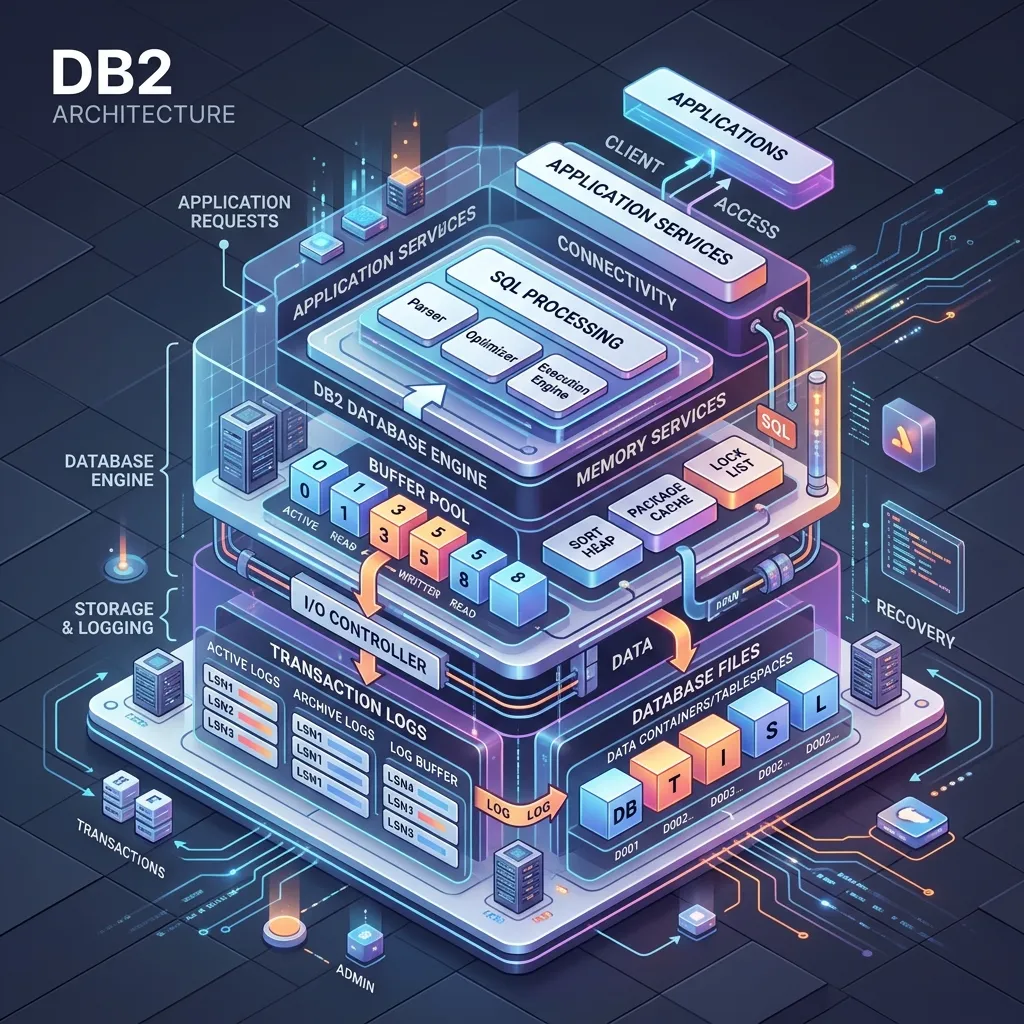
DB2 Architecture Explained: Instances, Databases, Buffer Pools & Storage
Understanding how DB2 is architected internally is the difference between being a developer who can write SQL and a professional who can troubleshoot performance problems, design schemas that scale, and understand what happens when things go wrong. This deep-dive covers the full internal architecture of DB2 LUW, with notes on how DB2 for z/OS differs at key points.
For an introduction to DB2 before reading this guide, see IBM DB2 Introduction: The Complete Beginner's Guide. For a quick command reference, see the DB2 Cheat Sheet.
The DB2 Architecture Stack
Before going deep on any individual component, it helps to visualise the full stack:
┌─────────────────────────────────────────────────────────┐
│                    Client Applications                  │
│           (JDBC, ODBC, CLI, COBOL, CICS, etc.)         │
└───────────────────────────┬─────────────────────────────┘
                            │  SQL / API calls
┌───────────────────────────▼─────────────────────────────┐
│                   DB2 Instance (DBM)                    │
│  ┌──────────────────────────────────────────────────┐   │
│  │              Database (one of many)              │   │
│  │  ┌────────────┐  ┌────────────┐  ┌───────────┐  │   │
│  │  │ Buffer Pool│  │ Log Buffer │  │Lock Table │  │   │
│  │  └─────┬──────┘  └─────┬──────┘  └───────────┘  │   │
│  │        │               │                          │   │
│  │  ┌─────▼──────────────────────────────────────┐  │   │
│  │  │              Tablespaces                   │  │   │
│  │  │  [SYSCATSPACE] [TEMPSPACE1] [USERSPACE1]   │  │   │
│  │  └─────────────────────┬──────────────────────┘  │   │
│  └────────────────────────┼─────────────────────────┘   │
└───────────────────────────┼─────────────────────────────┘
                            │
┌───────────────────────────▼─────────────────────────────┐
│                  Physical Storage                       │
│     [Data Containers]  [Transaction Log Files]          │
└─────────────────────────────────────────────────────────┘
Now let us examine each layer in detail.
DB2 Instance vs Database: A Critical Distinction
This distinction confuses many developers coming from MySQL or PostgreSQL backgrounds.
The Instance
A DB2 instance is an installation of the DB2 database manager. It is represented at the operating system level by a set of processes and a home directory structure. An instance:
- Has its own
db2systmanddb2diag.logfiles - Listens on its own TCP port (default 50000)
- Has its own Database Manager Configuration (
dbm cfg) - Can contain multiple databases
- Is started and stopped independently
# List all DB2 instances on a Linux server
db2ilist

# Get the current instance name
db2 GET INSTANCE

# Start an instance
db2start

# Stop an instance (force disconnects all applications)
db2stop force

# View database manager configuration
db2 GET DBM CFG
The Database
A database lives within an instance and contains all the actual data structures: tables, indexes, views, stored procedures, user-defined functions, sequences, and so on. Each database has:
- Its own
database configuration(db cfg) - Its own buffer pools
- Its own tablespaces and containers
- Its own transaction log
# List all databases catalogued in the current instance
db2 LIST DATABASE DIRECTORY

# Connect to a specific database
db2 CONNECT TO MYDB

# View database configuration
db2 GET DB CFG FOR MYDB

# Update a database configuration parameter
db2 UPDATE DB CFG FOR MYDB USING LOGFILSIZ 4096
Why This Matters
A common production mistake is running all databases in a single instance without considering isolation. If the instance crashes or is stopped for maintenance, all databases in that instance are unavailable. For production systems with different availability requirements, separate instances are often the right design.
The DB2 Process Model
DB2 LUW is a multi-process, multi-threaded database engine. Understanding the process model helps you diagnose runaway processes, connection pool exhaustion, and deadlocks.
Engine Dispatchable Units (EDUs)
DB2 uses Engine Dispatchable Units (EDUs) as its fundamental unit of concurrency. An EDU can be either an operating system thread or a process, depending on the platform and DB2 version. On modern Linux/UNIX installations, DB2 uses a threaded model where multiple EDUs run within a small number of OS processes.
Key EDU types:
| EDU Name | Role |
|---|---|
| db2sysc | Main DB2 engine process (Linux) |
| db2agent | Application agent — one per connected application |
| db2pfchr | Prefetcher — reads ahead from disk into buffer pool |
| db2pclnr | Page cleaner — writes dirty pages from buffer pool to disk |
| db2loggr | Log reader — reads log for restart recovery |
| db2loggw | Log writer — writes log records to disk |
| db2redom | Redo log manager for crash recovery |
| db2resync | Resync agent for two-phase commit recovery |
Agent Architecture
When an application connects to DB2, the instance assigns it an agent. The agent is the EDU that executes SQL on behalf of the application.
Application (JDBC client)
    │
    │  TCP/IP connection
    ▼
DB2 Dispatcher
    │
    │  Assigns an agent
    ▼
db2agent (EDU)
    │  Executes SQL, accesses buffer pool, acquires locks
    ▼
Buffer Pool / Data Pages / Lock Table
The maximum number of simultaneous agents is controlled by MAXAGENTS (older DB2) or MAX_CONNECTIONS in DB2 11.5+. Running out of agents is a common cause of "SQL30081N" connection errors under heavy load.
-- Check current number of active connections
SELECT COUNT(*) AS ACTIVE_CONNECTIONS
FROM SYSIBMADM.APPLICATIONS
WHERE APPL_STATUS = 'UOW-Executing';

-- Check agent-related configuration
db2 GET DBM CFG | grep -i agent
Buffer Pool Architecture
The buffer pool is the most important performance component in DB2. It deserves detailed attention.
How the Buffer Pool Works
The buffer pool is divided into pages of a fixed size (4 KB, 8 KB, 16 KB, or 32 KB — the same size as the tablespace it serves). When an agent needs to read a data page:
- DB2 calculates the page's identifier (tablespace ID + page number)
- DB2 checks the buffer pool's hash table to see if the page is already in memory
- If yes (buffer pool hit): the page is returned immediately — no disk I/O
- If no (buffer pool miss): DB2 reads the page from disk into a free buffer pool slot, then returns it
Buffer Pool Hit Ratio
The buffer pool hit ratio is the percentage of page requests satisfied from memory rather than disk:
Hit Ratio = (Logical Reads - Physical Reads) / Logical Reads × 100A well-tuned OLTP system should have a hit ratio above 95%. Analytical workloads with large table scans naturally have lower hit ratios because they read data that was not previously cached.
-- Check buffer pool hit ratio for all buffer pools
SELECT BP_NAME,
       POOL_DATA_L_READS    AS LOGICAL_READS,
       POOL_DATA_P_READS    AS PHYSICAL_READS,
       CASE
         WHEN POOL_DATA_L_READS = 0 THEN 0
         ELSE DECIMAL((1 - FLOAT(POOL_DATA_P_READS) /
                           FLOAT(POOL_DATA_L_READS)) * 100, 5, 2)
       END AS HIT_RATIO_PCT
FROM SYSIBMADM.BP_HITRATIO
ORDER BY HIT_RATIO_PCT;
Buffer Pool Sizing
Undersizing the buffer pool is the single most common DB2 performance mistake. DB2's SELF_TUNING_MEM feature (STMM) can automatically size the buffer pool, but understanding the manual sizing principles is essential for environments where STMM is disabled or overridden.
A rough formula for OLTP buffer pool sizing:
- Start with 20–30% of working set data in memory
- Increase until hit ratio exceeds 95%
- Limit total buffer pool allocation to 75% of available server RAM (leaving room for sort heaps, log buffer, application memory, and OS)
-- Create a 1 GB buffer pool (32K pages = 32,768 bytes, 32768 pages)
CREATE BUFFERPOOL MYOLTP_BP
  SIZE 32768
  PAGESIZE 32K;

-- Assign a tablespace to this buffer pool
CREATE TABLESPACE MYOLTP_TS
  PAGESIZE 32K
  MANAGED BY AUTOMATIC STORAGE
  BUFFERPOOL MYOLTP_BP;

-- Enable self-tuning memory management
db2 UPDATE DB CFG FOR MYDB USING SELF_TUNING_MEM ON
Prefetching
DB2's prefetcher EDU (db2pfchr) reads pages from disk into the buffer pool ahead of when they are requested, based on sequential access patterns. This is critical for table scan performance.
-- Set prefetch size for a tablespace (in pages)
ALTER TABLESPACE MYOLTP_TS PREFETCHSIZE 32;

-- Or use AUTOMATIC to let DB2 decide
ALTER TABLESPACE MYOLTP_TS PREFETCHSIZE AUTOMATIC;
Page Cleaners
Page cleaners (db2pclnr) write dirty pages (modified but not yet persisted) from the buffer pool to disk. If DB2 needs to read a new page into the buffer pool but there is no free slot, a page cleaner must flush a dirty page first — this causes a write synchronous operation that stalls the reading agent. Configuring enough page cleaners prevents this stall.
-- Configure number of page cleaners
db2 UPDATE DB CFG FOR MYDB USING NUM_IOCLEANERS 6

-- Configure changed pages threshold that triggers page cleaning
db2 UPDATE DB CFG FOR MYDB USING CHNGPGS_THRESH 20
Tablespace Architecture
SMS vs DMS vs Automatic Storage
| Type | Management | Containers | Best For |
|---|---|---|---|
| SMS (System Managed Storage) | Operating System | Regular directories | Simple dev/test environments |
| DMS (Database Managed Storage) | DB2 Engine | Pre-allocated files or raw devices | Controlled production environments |
| Automatic Storage | DB2 Engine | DB2-managed in storage group paths | Recommended for most new deployments |
SMS tablespaces are the simplest: DB2 creates regular OS files in a directory. The OS manages growth. SMS tablespaces cannot be resized manually and do not support striping across multiple containers.
DMS tablespaces give DB2 full control over pre-allocated file containers or raw disk devices. DMS supports striping data across multiple containers (which improves I/O parallelism) and allows explicit resizing.
Automatic storage tablespaces are the modern default. They are backed by storage groups, and DB2 automatically adds and extends containers as tables grow.
-- Create a storage group pointing to fast NVMe storage
CREATE STOGROUP FAST_SG
  ON '/nvme/db2data', '/nvme2/db2data';

-- Create automatic storage tablespace using the storage group
CREATE TABLESPACE ACCOUNTS_TS
  PAGESIZE 32K
  MANAGED BY AUTOMATIC STORAGE
  USING STOGROUP FAST_SG
  BUFFERPOOL MYOLTP_BP
  INITIALSIZE 10 G
  AUTORESIZE YES
  MAXSIZE 500 G;
System Tablespaces
Every DB2 database has three mandatory tablespaces created automatically:
- SYSCATSPACE — stores the system catalog (SYSCAT.TABLES, SYSCAT.COLUMNS, etc.). Never put user data here.
- TEMPSPACE1 — used for sort operations, hash joins, and result sets that spill to disk. Critical for analytical query performance.
- USERSPACE1 — default tablespace for user objects (tables, indexes) if no explicit tablespace is specified.
-- List all tablespaces and their buffer pool assignments
SELECT TBSPACE, TBSPACEID, TBSPACETYPE, PAGESIZE, BUFFERPOOLID
FROM SYSCAT.TABLESPACES
ORDER BY TBSPACEID;

-- Check tablespace utilisation
SELECT TBSP_NAME,
       TBSP_TOTAL_PAGES,
       TBSP_USED_PAGES,
       TBSP_FREE_PAGES,
       DECIMAL(FLOAT(TBSP_USED_PAGES) /
               FLOAT(TBSP_TOTAL_PAGES) * 100, 5, 1) AS USED_PCT
FROM SYSIBMADM.TBSP_UTILIZATION
ORDER BY USED_PCT DESC;
The Transaction Log
The transaction log is DB2's mechanism for ensuring data durability and enabling crash recovery. DB2 uses write-ahead logging (WAL): every change is written to the log before the corresponding data page is modified on disk.
Log Buffer
The log buffer (LOGBUFSZ) is an area of memory where log records are accumulated before being written to the log file on disk. A large log buffer reduces the frequency of log file writes, improving transaction throughput. The tradeoff is that a larger buffer means more log records are at risk if DB2 crashes (though DB2's recovery mechanism handles this correctly — the log buffer is written to disk on every COMMIT).
-- Set log buffer size (in 4KB pages)
db2 UPDATE DB CFG FOR MYDB USING LOGBUFSZ 1024

-- Set log file size (in 4KB pages)
db2 UPDATE DB CFG FOR MYDB USING LOGFILSIZ 8192

-- Set number of primary log files
db2 UPDATE DB CFG FOR MYDB USING LOGPRIMARY 20

-- Set number of secondary log files (allocated on demand)
db2 UPDATE DB CFG FOR MYDB USING LOGSECOND 10
Circular vs Linear Logging
Circular logging is the default. Log files are reused in a circular fashion. This minimises log storage requirements but means you can only recover to the point of the last full backup (no roll-forward recovery). Circular logging is appropriate for test and development databases.
Linear (archive) logging retains log files after they are no longer needed for crash recovery, archiving them to a specified location. This enables:
- Roll-forward recovery (point-in-time restore)
- Online backup (backup while the database is in use)
# Enable archive logging with log archiving to a directory
db2 UPDATE DB CFG FOR MYDB USING LOGARCHMETH1 LOGRETAIN
db2 UPDATE DB CFG FOR MYDB USING LOGARCHOPT1 /db2/archive/mydb

# Take an online backup (requires archive logging)
db2 BACKUP DB MYDB ONLINE TO /db2/backup COMPRESS

# Restore and roll forward
db2 RESTORE DB MYDB FROM /db2/backup
db2 ROLLFORWARD DB MYDB TO END OF LOGS AND STOP
DB2 Memory Model
DB2 organises its memory into several distinct regions. Understanding this model is essential for diagnosing memory-related performance problems.
Database Shared Memory
Database shared memory is allocated when the first connection is made to a database and is shared by all agents connected to that database. It contains:
- Buffer pools — the largest consumer
- Lock manager heap (
LOCKLIST) — the lock table, storing all currently held locks - Database heap — metadata and control structures
- Log buffer — staging area for log records before disk write
- Package cache — compiled SQL packages (parsed and optimised SQL plans)
- Catalog cache — frequently accessed catalog metadata
-- View current memory allocation breakdown
SELECT MEMORY_SET_TYPE, MEMORY_POOL_TYPE,
       POOL_CUR_SIZE / 1024 AS SIZE_KB,
       POOL_WATERMARK / 1024 AS PEAK_KB
FROM SYSIBMADM.DBMEMUSE
ORDER BY POOL_CUR_SIZE DESC;
Application Shared Memory
Each connection group can have a region of application shared memory used for shared sort heaps and other inter-connection resources.
Agent Private Memory
Each agent has its own private memory region used for:
- Sort heap (
SORTHEAP) — memory for sort operations. If a sort operation exceeds the sort heap, DB2 spills to the TEMPSPACE tablespace on disk. - Statement heap — compiled SQL statement
- Application heap — result set buffers
-- Set sort heap size (in 4KB pages, per sort operation)
db2 UPDATE DB CFG FOR MYDB USING SORTHEAP 4096

-- Set sort heap threshold (total across all concurrent sorts)
db2 UPDATE DB CFG FOR MYDB USING SHEAPTHRES_SHR 40960
Instance Shared Memory
At the top level, instance shared memory is shared across all databases in the instance and contains the FCM (Fast Communication Manager) buffers used for inter-partition communication in partitioned database environments.
Partitioned Database Environments (DPF)
DB2's Database Partitioning Feature (DPF) allows a single database to be spread across multiple physical servers (or multiple partitions on the same server). Each partition holds a subset of the data.
┌─────────────────────────────────────┐
│          DB2 Partitioned Database   │
│                                     │
│  ┌────────┐  ┌────────┐  ┌───────┐  │
│  │ Node 0 │  │ Node 1 │  │Node 2 │  │
│  │ (Cat.) │  │        │  │       │  │
│  │ 33%    │  │ 33%    │  │ 34%   │  │
│  │ of data│  │ of data│  │of data│  │
│  └────────┘  └────────┘  └───────┘  │
└─────────────────────────────────────┘
Data is distributed across partitions using a distribution key (a hash of one or more columns). DPF enables massive parallelism for analytical queries because each partition processes its local data simultaneously.
-- Create a distributed tablespace
CREATE TABLESPACE DIST_TS
  IN DATABASE PARTITION GROUP IBMDEFAULTGROUP
  PAGESIZE 32K
  MANAGED BY AUTOMATIC STORAGE;

-- Create a distributed table with a distribution key
CREATE TABLE ORDERS (
  ORDER_ID   BIGINT    NOT NULL,
  CUST_ID    INTEGER   NOT NULL,
  ORDER_DATE DATE      NOT NULL,
  AMOUNT     DECIMAL(12,2),
  CONSTRAINT PK_ORDERS PRIMARY KEY (ORDER_ID)
)
IN DIST_TS
DISTRIBUTE BY HASH (CUST_ID);
DB2 LUW vs DB2 for z/OS: Architectural Differences
While both share the same SQL dialect and conceptual data model, DB2 LUW and DB2 for z/OS have significant architectural differences.
| Aspect | DB2 LUW | DB2 for z/OS |
|---|---|---|
| High Availability | pureScale (shared-disk clustering) | Parallel Sysplex + Data Sharing Groups |
| Shared Cache | FCM between nodes | Coupling Facility (CF) |
| Process Model | Threaded EDUs | z/OS enclaves and task control blocks |
| Lock Management | Local lock manager | Global lock manager via coupling facility |
| Buffer Pools | Per-database, per-instance | Per-member, but CF enables cross-member sharing |
| Log Archiving | LOGARCHMETH1/2 to file or TSM | BSDS (Bootstrap Data Set) + active/archive logs |
| Administration | CLP, db2top, IBM Data Server Manager | SDSF, SPUFI, DB2I ISPF panels, IFI |
| Utilities | db2move, db2look, LOAD utility | LOAD, REORG, RUNSTATS, COPY, RECOVER utilities via JCL |
| Storage | SMS, DMS, Automatic Storage | VSAM datasets managed by z/OS |
Coupling Facility (z/OS)
The Coupling Facility is a specialised processor in IBM Z mainframes that provides high-speed shared memory between multiple processors (members) in a Parallel Sysplex. DB2 for z/OS uses the coupling facility for:
- Group Buffer Pools (GBP) — shared buffer pool across all DB2 members in a data sharing group
- Lock structure — global lock manager ensuring serialisation across members
- SCA (Shared Communications Area) — cross-member communication
This architecture allows DB2 for z/OS to scale horizontally across multiple mainframe processors while maintaining full ACID semantics — a capability that is extremely difficult to achieve with conventional distributed database architectures.
Connection Pooling
Direct DB2 connections are relatively expensive to establish (authentication, agent allocation, memory initialisation). Production applications should always use connection pooling.
DB2 Connection Concentrator
DB2 LUW includes a built-in Connection Concentrator that allows more client applications to share a smaller pool of server-side agents:
# Enable connection concentrator (set max_connections > maxagents)
db2 UPDATE DBM CFG USING MAX_CONNECTIONS 5000
db2 UPDATE DBM CFG USING MAX_COORDAGENTS 200
Application-Level Connection Pools
Java applications typically use HikariCP or c3p0 with the IBM DB2 JDBC driver:
// HikariCP configuration for DB2
HikariConfig config = new HikariConfig();
config.setJdbcUrl("jdbc:db2://localhost:50000/MYDB");
config.setUsername("db2admin");
config.setPassword("mypassword");
config.setMaximumPoolSize(20);
config.setMinimumIdle(5);
config.setConnectionTimeout(30000);
config.setIdleTimeout(600000);
config.setMaxLifetime(1800000);
// DB2-specific validation query
config.setConnectionTestQuery("SELECT 1 FROM SYSIBM.SYSDUMMY1");

HikariDataSource dataSource = new HikariDataSource(config);
Practical Architecture Tips
Based on real-world DB2 deployments, these are the architectural decisions that most commonly determine production success or failure:
- Separate tablespaces for tables and indexes — gives independent I/O paths and allows different buffer pool assignments
- Use 32K page size for large tables — larger pages reduce the number of I/O operations for large sequential scans
- Enable STMM in development, understand its decisions in production — Self-Tuning Memory Manager is excellent for most workloads but understand what it is doing
- Size TEMPSPACE generously — spills to disk from sort and hash join operations are among the most common causes of query slowdowns
- Configure archive logging from day one — switching from circular to archive logging requires taking the database offline
The DB2 Mastery course covers all of these topics with hands-on labs and production scenarios. For the z/OS-specific architecture and coupling facility details, the Mainframe Mastery course provides the depth needed by mainframe professionals.
Summary
DB2's architecture is designed for reliability, performance, and scalability. The key components are:
- Instance — the DB2 engine installation, containing one or more databases
- Database — the container for all user objects, with its own configuration, logs, and memory
- Buffer pool — the in-memory page cache that is the primary performance lever
- Tablespace — the logical-to-physical storage mapping layer
- Transaction log — the write-ahead log that guarantees durability
- EDUs — the thread-based concurrency model that handles thousands of simultaneous connections
Understanding how these components interact — how a buffer pool miss triggers a disk read, how the write-ahead log ensures committed data survives a crash, how tablespace containers determine I/O parallelism — is what separates competent DB2 professionals from beginners.
Frequently Asked Questions
Q: What are the main components of DB2 for z/OS architecture? DB2 for z/OS consists of an address space structure including the System Services Address Space (SSAS), Database Services Address Space (DSAS), Internal Resource Lock Manager (IRLM) for locking, and Allied Address Spaces where applications run. The Buffer Pool Manager caches data pages in memory, and the Log Manager handles write-ahead logging for recovery. These components work together under z/OS's 64-bit virtual memory and hardware-assisted I/O.
Q: What is a DB2 subsystem and how does it relate to databases and table spaces? A DB2 subsystem is a single installation of DB2 identified by a four-character subsystem ID (SSID). Within a subsystem, databases are logical groupings of table spaces. A table space is a physical storage unit — a collection of VSAM data sets — that holds one or more tables. This three-level hierarchy (subsystem → database → table space → table) maps directly to z/OS storage management.
Q: How does DB2's buffer pool affect query performance? Buffer pools are areas of memory where DB2 caches recently accessed data pages. A page read from disk is placed in the buffer pool; subsequent reads of the same page are served from memory. Properly sized buffer pools dramatically reduce I/O. DB2 supports multiple buffer pools (BP0 through BPn) with configurable page sizes (4K, 8K, 16K, 32K), allowing you to tune hot tables and index pages independently.