
Git Internals: Objects, Blobs, Trees, and the .git Folder
Understand how Git works under the hood. Learn how the .git/objects directory stores blobs, trees, commits, and tags using content-addressable storage, SHA hashing, and packfiles - and how this design makes Git tamper-proof.
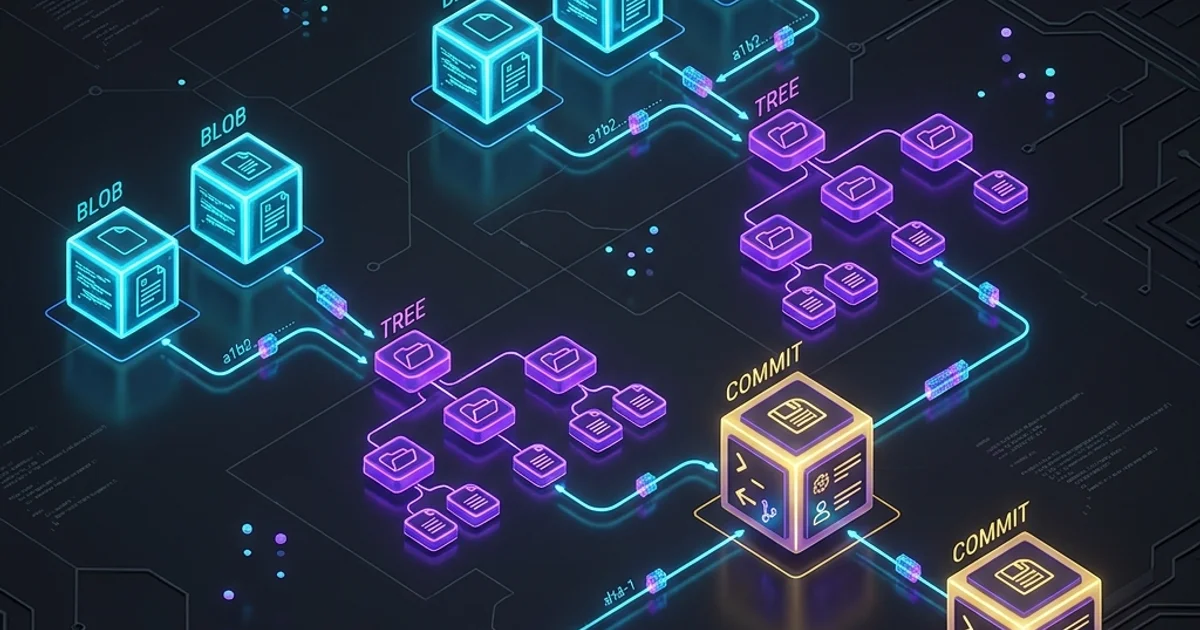
Git Internals: Objects, Blobs, Trees, and the .git Folder
Most developers use git every day without understanding how it works. They know git commit saves their work and git log shows history - but when something goes wrong (detached HEAD, rebase conflicts, a corrupted repository), the lack of internal understanding makes debugging nearly impossible.
This guide opens the black box. You will see exactly what git creates on disk when you run a commit, understand how SHA hashes provide tamper-proof history, and learn why git is so efficient with disk space despite storing every version of every file.
The .git Directory Structure
When you run git init, git creates a .git directory. This single directory is your entire repository - the working files are separate from the repository itself.
.git/
+-- objects/          ← The database - all your content lives here
|   +-- 2c/           ← Objects stored in subdirectories (first 2 chars of SHA)
|   |   +--- abc123...
|   +-- info/
|   +--- pack/         ← Packfiles for compressed storage
+-- refs/             ← Branch and tag pointers
|   +-- heads/        ← Local branches
|   |   +--- main      ← Contains the SHA of the latest commit on main
|   +-- remotes/      ← Remote tracking branches
|   |   +--- origin/
|   |       +--- main
|   +--- tags/         ← Tag pointers
+-- HEAD              ← Pointer to current branch
+-- config            ← Repository-level git config
+-- COMMIT_EDITMSG    ← Last commit message
+-- index             ← Staging area (binary file)
+--- logs/             ← Reflog (history of HEAD movements)
    +-- HEAD
    +--- refs/heads/main
The Four Git Object Types
Everything in .git/objects/ is one of four types. Every object is stored as a compressed, SHA-256-identified file.
1. Blob (Binary Large Object)
A blob stores the raw content of a file - no filename, no permissions, just bytes.
# Create a blob manually
echo "Hello, World!" | git hash-object --stdin -w
# Output: 8ab686eafeb1f44702738c8b0f24f2567c36da6d
Git stores this object at .git/objects/8a/b686eafeb1f44702738c8b0f24f2567c36da6d. The directory name is the first two characters; the filename is the remaining 38.
Inspect the stored blob:
git cat-file -t 8ab686ea    # -> blob
git cat-file -p 8ab686ea    # -> Hello, World!
Key insight: If you have two files with identical content in different directories, git stores only one blob. This is content-addressable storage - the key is derived from the content, not the location.
2. Tree
A tree is like a directory listing. It maps filenames and permissions to blob SHAs (for files) or other tree SHAs (for subdirectories).
# After a commit, inspect the root tree
git cat-file -p HEAD^{tree}100644 blob 8ab686ea README.md
100644 blob a1b2c3d4 package.json
040000 tree e5f6g7h8 srcThe format is: [mode] [type] [sha]\t[name]
Modes:
100644- regular file100755- executable file120000- symbolic link040000- directory (another tree)
Inspect a subdirectory tree:
git cat-file -p e5f6g7h8
# 100644 blob bc4def12  app.ts
# 100644 blob cd7890ab  utils.ts
3. Commit
A commit object stores:
- A pointer to the root tree (the snapshot of your entire project at that moment)
- A pointer to parent commit(s) (zero for the first commit, two for a merge commit)
- Author name, email, and timestamp
- Committer name, email, and timestamp (can differ from author when cherry-picking)
- The commit message
git cat-file -p HEADtree a3b4c5d6e7f8...
parent 1b2c3d4e5f6a...
author Alice Smith <alice@example.com> 1713436800 +0000
committer Alice Smith <alice@example.com> 1713436800 +0000
feat: add user authentication
Implement JWT-based auth with refresh tokens.
Closes #123This is what creates the immutable chain of history. Each commit SHA is computed from all of its contents - including the parent SHA. Change anything in history and every descendant commit's SHA changes too.
4. Tag (Annotated Tag)
A lightweight tag is just a reference (a file in refs/tags/) pointing to a commit SHA. An annotated tag is a full git object:
git tag -a v1.2.0 -m "Release version 1.2.0"
git cat-file -p v1.2.0object 8c9d10e11f12...
type commit
tag v1.2.0
tagger Alice Smith <alice@example.com> 1713436800 +0000
Release version 1.2.0
New features: user auth, dashboard redesign
Bug fixes: session expiry, timezone handlingAnnotated tags have their own SHA, their own tagger identity, and their own message. They are permanently stored in the object database, unlike lightweight tags which are just file pointers.
Content-Addressable Storage: The Architecture
Git is a content-addressable filesystem. The key to any object is derived entirely from the object's content.
How git computes a SHA:
sha256("blob " + content_length + "\0" + content)For a commit:
sha256("commit " + content_length + "\0" + tree_sha + parent_sha + author + committer + message)Why This Design Is Brilliant
Deduplication: Two files with the same content share one blob. Rename a file? Git doesn't re-store the content - the tree changes but the blob stays.
Integrity: Any change to any object produces a completely different SHA. If a bit flips in a stored object, the SHA won't match, and git reports corruption. Your history cannot be silently tampered with.
Efficient diffing: When comparing two commits, git can quickly check if their trees share the same blobs. If two trees point to the same blob SHA for src/app.ts, that file didn't change - no need to compare content.
How a Commit Creates Objects
Let's trace exactly what git does when you run git commit:
Before: You have modified src/app.ts and staged it.
Step 1: Git creates a blob for the new content of src/app.ts:
blob: sha=abc123 -> content of src/app.tsStep 2: Git creates a tree for the src/ directory, referencing the new blob:
tree: sha=def456 ->
  100644 blob abc123 app.ts
  100644 blob (unchanged) utils.ts
Step 3: Git creates a new root tree:
tree: sha=ghi789 ->
  100644 blob (unchanged) README.md
  040000 tree def456 src
Step 4: Git creates a commit object:
commit: sha=jkl012 ->
  tree ghi789
  parent (previous commit sha)
  author ...
  message "feat: update app.ts"
Step 5: Git updates .git/refs/heads/main to contain jkl012.
That's it. Four new objects: one blob, two trees, one commit. The rest of your project's files are unchanged in the object database - only the modified file and the trees leading to it needed new objects.
HEAD and References
HEAD is a file at .git/HEAD. It contains either:
A branch reference (normal state):
ref: refs/heads/mainA commit SHA (detached HEAD state):
a1b2c3d4e5f6...When you git checkout main, HEAD is set to ref: refs/heads/main. When you git checkout a1b2c3d4 (a specific commit), HEAD is set directly to that SHA - this is "detached HEAD."
Following the Chain
# See what HEAD points to
cat .git/HEAD
# -> ref: refs/heads/main

# See what main points to
cat .git/refs/heads/main
# -> jkl012...

# Inspect that commit
git cat-file -p jkl012
# -> shows the commit object

# Inspect the tree
git cat-file -p ghi789
# -> shows the root tree
The Staging Area (Index)
The staging area is a binary file at .git/index. It represents the state of your next commit - what git will use to build the tree when you run git commit.
# See what's in the index in human-readable form
git ls-files --stage100644 abc123... 0 README.md
100644 def456... 0 package.json
100644 ghi789... 0 src/app.tsWhen you git add src/app.ts, git:
- Creates a blob for the current file content
- Updates the index entry for
src/app.tsto point to the new blob
When you git commit, git:
- Creates trees from the index
- Creates a commit pointing to the root tree
- Updates the current branch reference
Packfiles: Efficient Long-Term Storage
Initially, git stores every object as a separate file. A repository with 10,000 commits and 50,000 file versions would have 50,000+ individual files. This is called "loose objects."
Git periodically runs garbage collection (git gc, also triggered automatically and when you push/fetch), which packs loose objects into packfiles.
How Packfiles Work
A packfile stores objects using delta compression:
- Instead of storing version N of a file in full, store "version N = version N-1 + these changes"
- Only one version of each file needs to be stored in full; all others are stored as deltas
# See how many loose objects and packfiles you have
git count-objects -v

# Manually trigger packing (usually not needed)
git gc

# See what's in a packfile
git verify-pack -v .git/objects/pack/pack-*.idx | sort -k3 -n | tail -10
A 1GB history of a large project compresses to 50-200MB in a packfile. This is why git clone is much smaller than the sum of all individual file versions.
Reflog: Git's Safety Net
The reflog records every time a reference (HEAD, a branch) changes. It is your safety net for recovering from git reset --hard, accidental branch deletion, or a bad rebase.
# See all movements of HEAD
git reflog

# Output:
# jkl012 HEAD@{0}: commit: feat: add user auth
# abc789 HEAD@{1}: checkout: moving from feature to main
# def456 HEAD@{2}: rebase (finish): returning to refs/heads/feature
To recover a lost commit:
# Find the SHA in the reflog
git reflog | grep "before the bad rebase"
# abc789 HEAD@{5}: commit: the commit I accidentally deleted

# Restore it
git checkout -b recovery-branch abc789
The reflog is local - it is not pushed to GitHub and expires after 90 days by default.
Practical Commands for Exploring Internals
# Low-level object inspection
git cat-file -t <sha>      # Type of object (blob/tree/commit/tag)
git cat-file -p <sha>      # Pretty-print the object
git cat-file -s <sha>      # Size of the object in bytes

# Show the tree at a commit
git ls-tree HEAD           # Root tree of current commit
git ls-tree -r HEAD        # Recursively list all files
git ls-tree HEAD src/      # Just the src/ directory

# Show object database stats
git count-objects -v

# Verify object integrity
git fsck

# Show the SHA of specific files
git hash-object src/app.ts

# Show what the index contains
git ls-files --stage
Frequently Asked Questions
Q: Can I delete the .git folder?
Yes, but you will permanently lose your entire project history. Your working files remain, but they become untracked, unversioned files. There is no recovery unless you have a remote (GitHub) backup. Never delete .git unless you intentionally want to start over.
Q: What is "detached HEAD" and why does git warn about it?
Detached HEAD means HEAD points directly to a commit SHA instead of to a branch reference. Changes you commit in this state are not on any branch - they will be garbage collected after 30 days if you don't create a branch. To exit detached HEAD safely: git checkout -b my-branch (creates a branch at the current commit) or git checkout main (discards any new commits and returns to main).
Q: Does git use SHA-1 or SHA-256?
Git historically uses SHA-1. A SHA-1 collision attack was demonstrated in 2017 (SHAttered), so git added SHA-256 support (Git 2.29+). Most repositories still use SHA-1 for compatibility. GitHub and major hosting providers are planning SHA-256 migration. For most developers in 2026, SHA-1 is still the default - the collision risk for git history is theoretical, not practical.
Q: Why does git status sometimes say "nothing to commit" when I changed a file?
If a file's content returns to exactly its last-committed state, the blob SHA matches the committed blob SHA - git sees zero change. Also, if you're on a different branch or in a detached HEAD pointing to the commit that already has your changes, there is genuinely nothing to commit.
Key Takeaway
Git is a content-addressable key-value store where every object is identified by the SHA hash of its content. Blobs store file content, trees store directory structure, commits store snapshots and history, and tags store named pointers. This architecture gives git three superpowers: automatic deduplication (identical content = identical SHA = one blob), tamper-proof history (changing any object changes every descendant SHA), and efficient delta compression in packfiles. Understanding the internal model transforms frustrating git mysteries into predictable, debuggable behavior.
Read next: Mastering the Git Workflow: Pro Tips for Senior Developers ->
Part of the GitHub Mastery Course - masters of the machine.