
Layered (N-Tier) Architecture: 4 Layers, Sinkhole Anti-Pattern & Trade-offs
Learn how to structure applications using layered (N-tier) architecture. Covers the four core layers, strict vs. relaxed layering, the sinkhole anti-pattern, testing strategies, and how layered architecture compares to Clean and Hexagonal Architecture.
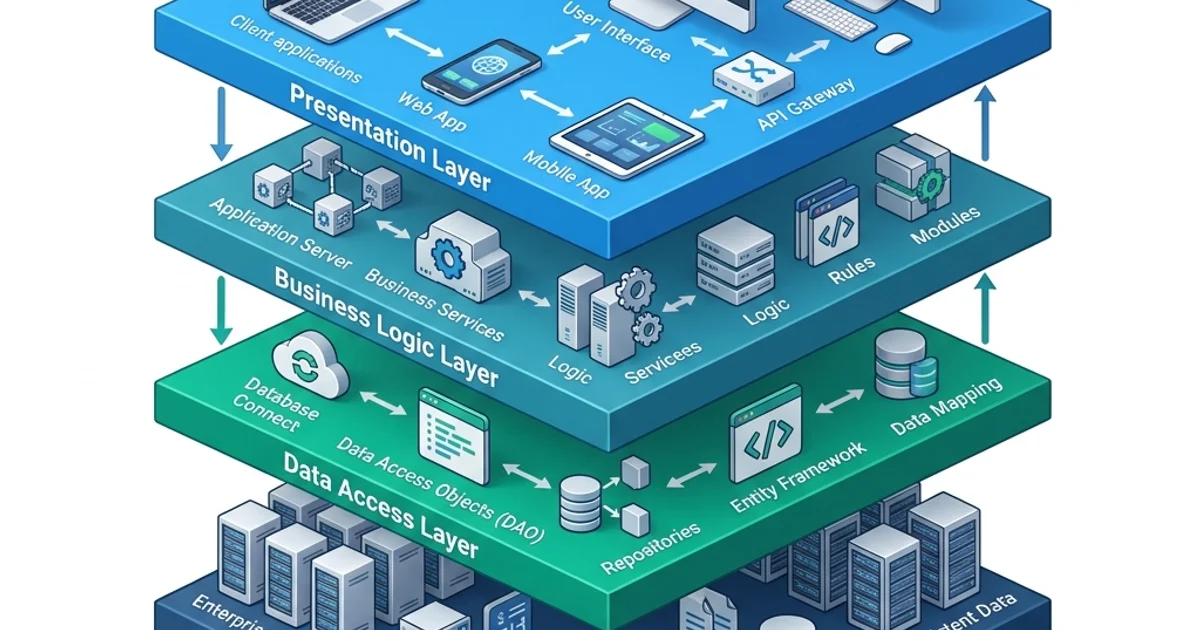
Layered Architecture: The N-Tier Pattern Explained
Layered architecture is the most common structural pattern in enterprise software. It organizes code into horizontal layers where each layer has a specific responsibility and a defined relationship with the layers above and below it. The goal is separation of concerns - changes to one layer should not cascade unnecessarily into others.
This guide explains the standard four-layer model, the rules that make it work, common violations, testing advantages, the sinkhole anti-pattern, and when to move to more sophisticated architectures like Hexagonal or Clean Architecture.
The Four Layers
Layer 1: Presentation Layer
The presentation layer handles all user interaction. Its sole responsibility is displaying data and capturing user input. It has zero business logic.
// presentation/UserController.ts - Express.js HTTP handler
import { Request, Response } from 'express';
import { UserService } from '../business/UserService';

export class UserController {
  constructor(private userService: UserService) {}

  async getUser(req: Request, res: Response): Promise<void> {
    const { id } = req.params;

    try {
      const user = await this.userService.getUserById(id);
      res.json({ success: true, data: user });
    } catch (err) {
      if (err instanceof UserNotFoundError) {
        res.status(404).json({ success: false, message: err.message });
      } else {
        res.status(500).json({ success: false, message: 'Internal server error' });
      }
    }
  }

  async createUser(req: Request, res: Response): Promise<void> {
    const { name, email, password } = req.body;

    // Only validation of request format here - NOT business rules
    if (!email || !name || !password) {
      res.status(400).json({ error: 'Missing required fields' });
      return;
    }

    const user = await this.userService.createUser({ name, email, password });
    res.status(201).json({ success: true, data: user });
  }
}
What the presentation layer must NOT do:
- Calculate business totals or apply discount rules
- Query the database directly
- Make decisions about data validity beyond basic format checks (that's business logic)
- Access environment variables for business configuration
Layer 2: Business Logic Layer (Service Layer)
The business layer contains the application's business rules and domain logic. This is the most important layer - it is the reason the application exists.
// business/UserService.ts - Business logic lives here
import { UserRepository } from '../persistence/UserRepository';
import { EmailService } from '../persistence/EmailService';
import { User } from '../domain/User';
import { bcrypt } from 'bcrypt';

export class UserService {
  constructor(
    private userRepository: UserRepository,
    private emailService: EmailService,
  ) {}

  async getUserById(id: string): Promise<User> {
    const user = await this.userRepository.findById(id);
    if (!user) {
      throw new UserNotFoundError(`User ${id} not found`);
    }
    return user;
  }

  async createUser(data: CreateUserDto): Promise<User> {
    // Business rule: email must be unique
    const existingUser = await this.userRepository.findByEmail(data.email);
    if (existingUser) {
      throw new EmailAlreadyExistsError(`${data.email} is already registered`);
    }

    // Business rule: minimum password length
    if (data.password.length < 8) {
      throw new WeakPasswordError('Password must be at least 8 characters');
    }

    // Business rule: password must be hashed
    const hashedPassword = await bcrypt.hash(data.password, 12);

    const user = await this.userRepository.save({
      name: data.name,
      email: data.email.toLowerCase(),
      password: hashedPassword,
      createdAt: new Date(),
    });

    // Business rule: send welcome email on registration
    await this.emailService.sendWelcomeEmail(user.email, user.name);

    return user;
  }

  async deactivateUser(id: string, requestingUserId: string): Promise<void> {
    // Business rule: users can only deactivate their own accounts (unless admin)
    const requestingUser = await this.userRepository.findById(requestingUserId);
    if (requestingUser.id !== id && !requestingUser.isAdmin) {
      throw new UnauthorizedError('Cannot deactivate another user\'s account');
    }

    await this.userRepository.updateStatus(id, 'deactivated');
  }
}
Layer 3: Persistence Layer (Data Access Layer)
The persistence layer handles all database interactions. It translates between the domain objects the business layer works with and the storage format the database requires.
// persistence/UserRepository.ts - Database access lives here
import { Pool } from 'pg';
import { User, UserStatus } from '../domain/User';

export class UserRepository {
  constructor(private db: Pool) {}

  async findById(id: string): Promise<User | null> {
    const result = await this.db.query(
      'SELECT id, name, email, status, created_at FROM users WHERE id = $1',
      [id]
    );

    if (result.rows.length === 0) return null;
    return this.mapToUser(result.rows[0]);
  }

  async findByEmail(email: string): Promise<User | null> {
    const result = await this.db.query(
      'SELECT id, name, email, status FROM users WHERE email = $1',
      [email]
    );

    if (result.rows.length === 0) return null;
    return this.mapToUser(result.rows[0]);
  }

  async save(data: CreateUserData): Promise<User> {
    const result = await this.db.query(`
      INSERT INTO users (name, email, password_hash, status, created_at)
      VALUES ($1, $2, $3, 'active', $4)
      RETURNING id, name, email, status, created_at
    `, [data.name, data.email, data.password, data.createdAt]);

    return this.mapToUser(result.rows[0]);
  }

  async updateStatus(id: string, status: UserStatus): Promise<void> {
    await this.db.query(
      'UPDATE users SET status = $1, updated_at = NOW() WHERE id = $2',
      [status, id]
    );
  }

  private mapToUser(row: any): User {
    return new User(row.id, row.name, row.email, row.status, row.created_at);
  }
}
Layer 4: Database
The database layer is the actual storage engine - PostgreSQL, MySQL, MongoDB, Redis. Your application code does not belong here. This layer is managed through the persistence layer above it.
The Strict Layering Rule
In strict layered architecture, each layer may only communicate with the layer directly below it:
Presentation -> Business -> Persistence -> Database
     ✅            ✅           ✅           ✅

Presentation -> Persistence (skipping Business) -> ❌
Presentation -> Database (skipping two layers)  -> ❌
Business -> Database (skipping Persistence)     -> ❌
Why this rule exists:
If your presentation layer queries the database directly, you tie your HTTP handlers to your SQL schema. When you need to change the database (migrate to a different engine, refactor the schema), you must update every HTTP handler that queries it. With proper layering, only the persistence layer changes.
The Dependency Rule: Why Business Logic Must Know Nothing
The most important constraint is the dependency rule: the business logic layer must not import or depend on anything in the presentation or persistence layers.
// ❌ WRONG - business layer importing from persistence layer
import { db } from '../persistence/database';   // Business layer should not do this

export class OrderService {
  async createOrder(userId: string, items: Item[]) {
    // Direct database access - business logic is now coupled to SQL
    await db.query('INSERT INTO orders ...', [...]);
  }
}// ✅ CORRECT - business layer depends on an interface (abstraction)
import { OrderRepository } from './OrderRepository.interface'; // Just an interface
export class OrderService {
constructor(private orderRepository: OrderRepository) {} // Injected from outside
async createOrder(userId: string, items: Item[]) {
// Uses the interface - doesn't know if data goes to SQL, MongoDB, or an in-memory store
return await this.orderRepository.save({ userId, items });
}
}By injecting dependencies through interfaces, the business layer has no runtime dependency on any specific database technology.
Testing Advantages of Layered Architecture
The primary practical benefit of layered architecture is testability. With proper layering:
// business/OrderService.test.ts - tests with no database
import { OrderService } from './OrderService';
import { InMemoryOrderRepository } from '../test-helpers/InMemoryOrderRepository';
import { MockEmailService } from '../test-helpers/MockEmailService';

describe('OrderService', () => {
  let orderService: OrderService;
  let orderRepository: InMemoryOrderRepository;

  beforeEach(() => {
    orderRepository = new InMemoryOrderRepository();
    orderService = new OrderService(orderRepository, new MockEmailService());
  });

  it('rejects orders with out-of-stock items', async () => {
    orderRepository.setStockLevel('product-123', 0);

    await expect(
      orderService.createOrder('user-456', [{ productId: 'product-123', qty: 1 }])
    ).rejects.toThrow('Product product-123 is out of stock');
  });

  it('sends confirmation email on successful order', async () => {
    const emailService = new MockEmailService();
    const service = new OrderService(orderRepository, emailService);

    await service.createOrder('user-456', [{ productId: 'product-789', qty: 1 }]);

    expect(emailService.sentEmails).toHaveLength(1);
    expect(emailService.sentEmails[0].template).toBe('order-confirmation');
  });
});
No database setup. No network calls. Tests run in milliseconds and are completely deterministic.
The Sinkhole Anti-Pattern
The sinkhole occurs when your service layer does nothing - it just passes calls straight through to the repository with no business logic added.
// SINKHOLE - this Service is doing nothing useful
export class ProductService {
  constructor(private productRepository: ProductRepository) {}

  // Just passing through - why does this layer exist?
  async getProduct(id: string) {
    return this.productRepository.findById(id);
  }

  async listProducts() {
    return this.productRepository.findAll();
  }

  async deleteProduct(id: string) {
    return this.productRepository.delete(id);
  }
}
If 80% of your service layer methods are pure pass-through calls, the layer is adding overhead without value.
How to identify sinkholes:
- Every service method maps 1:1 to a repository method
- No validation, no business rules, no calculations
- No decisions about which repository methods to call
What to do:
- If all operations are truly just CRUD with no rules, skip the service layer and call the repository from the controller directly - and document this decision
- More likely: you have business rules but they're hiding in the controller or repository. Move them to the service layer
When Layered Architecture Is Appropriate
Appropriate scenarios:
- Line-of-business applications (ERP, CRM, HR systems)
- Teams with 3-8 developers
- Applications where the domain is relatively simple
- When you need a consistent, understandable structure new developers can learn quickly
When to consider alternatives:
- Complex domain with many business rules -> Domain-Driven Design with Clean/Hexagonal Architecture
- High-performance requirements where database calls must be optimized carefully -> CQRS
- Multiple delivery mechanisms (REST API, GraphQL, CLI, message queue) -> Hexagonal Architecture (Ports and Adapters)
- Read-heavy applications with complex queries -> CQRS with separate read/write models
Layered vs. Clean Architecture vs. Hexagonal
| Aspect | Layered | Clean Architecture | Hexagonal |
|---|---|---|---|
| Dependency direction | Top-down | Always inward | Always inward |
| Database coupling | Medium (if rules broken) | Low (interfaces) | Low (ports) |
| Learning curve | Low | High | Medium |
| Testing ease | Good | Excellent | Excellent |
| Flexibility | Medium | High | High |
| Best for | Medium-complexity apps | Enterprise systems | Multiple I/O adapters |
All three architectures share the same core idea: keep business logic isolated from external tools. They differ in how rigorously they enforce this and the vocabulary they use.
Frequently Asked Questions
Q: Is layered architecture the same as MVC?
MVC (Model-View-Controller) is a pattern specifically for the presentation layer of an application. In a full layered architecture, MVC handles the user interface (View + Controller), but there are still separate Business Logic and Persistence layers beneath it. MVC without layering puts too much logic in the Controller.
Q: Can layers be skipped for simple cases?
Yes - this is called "relaxed layering" and is pragmatic for simple CRUD operations. However, document these bypass decisions so the team understands the tradeoff. As the application grows, bypasses tend to accumulate and make the codebase harder to refactor.
Q: Should each layer be a separate package or module?
In larger applications, yes - separate packages enforce the dependency rules at the build level. In smaller applications, separate directories in a monorepo provide enough separation. The key is that code in one layer cannot easily import from a layer it should not access.
Key Takeaway
Layered architecture provides a simple, learnable structure that most developers can understand and apply immediately. Its primary values are testability (business logic runs without a database), maintainability (changes to the database don't require changes to business logic), and separation of concerns (each layer has one job). Its main risk is the sinkhole anti-pattern - building layers that just pass data through without adding value. Use layered architecture as your default for medium-complexity applications, and graduate to Clean or Hexagonal Architecture when multiple delivery mechanisms or complex domain logic demand more rigorous isolation.
Read next: Hexagonal Architecture: Ports and Adapters ->
Part of the Software Architecture Hub - engineering the hierarchy.