
Python Conditionals & Logical Operators: Complete Guide
Master Python if-elif-else statements and logical operators. Learn to write efficient conditions, use truth tables, and avoid the most common beginner.
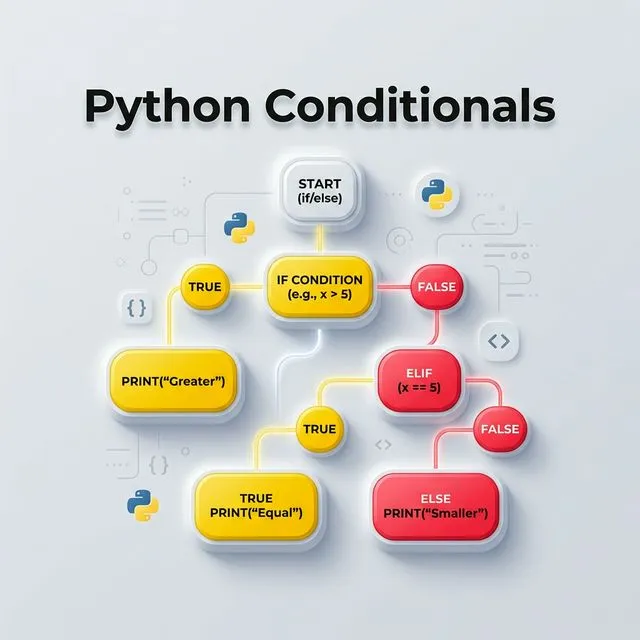
Python Conditional Statements: Quick Answer
Python conditional statements - if, elif, and else - let your program branch into different paths based on whether a condition evaluates to True or False. Combined with and, or, and not logical operators, they power all decision-making logic in Python applications.
Introduction to Conditional Statements
In programming, decision-making is essential. Conditional Statements allow your code to branch into different paths based on whether a specific condition is met.
Whether you're checking if a number is even or validating a user password, these statements are the backbone of program logic.
Relational Operators
Before making decisions, we need to compare values. Relational Operators are used to test the relationship between two entities.
| Operator | Name | Example | Result |
|---|---|---|---|
== | Equal | 5 == 5 | True |
!= | Not Equal | 5 != 3 | True |
> | Greater Than | 5 > 10 | False |
< | Less Than | 5 < 10 | True |
>= | Greater or Equal | 5 >= 5 | True |
≤ | Less or Equal | 5 ≤ 2 | False |
Python Trick: Chained Comparisons
In Python, you can chain comparisons! Instead of `(x < y and y < z)`, you can simply write `x < y < z` for cleaner, more readable code.
1. The if Statement
The if statement evaluates an expression. If it's True, the indented code block below it executes.
age = 20
if age >= 18:
    print("You are an adult.")
2. Using if-else for Alternatives
What if the condition is False? We use else to provide an alternative path.
score = 45
if score >= 50:
    print("You passed!")
else:
    print("Try again next time.")
3. Multiple Conditions: if-elif-else
When you have more than two possible outcomes, use elif (short for else if).
temperature = 25

if temperature > 30:
    print("It's a hot day.")
elif 20 <= temperature <= 30:
    print("The weather is perfect.")
else:
    print("It's a bit chilly.")
4. Logical Operators: and, or, not
Logical operators combine multiple conditions into a single Boolean value.
Truth Table Reference
| Condition A | Condition B | A and B | A or B | not A |
|---|---|---|---|---|
True | True | True | True | False |
True | False | False | True | False |
False | True | False | True | True |
False | False | False | False | True |
has_permission = True
is_logged_in = True

if has_permission and is_logged_in:
    print("Welcome to the dashboard!")
5. The is Operator vs ==
Many beginners confuse is with ==.
==checks for Equality: Do these variables have the same value?ischecks for Identity: Do these variables point to the same memory location?
list1 = [1, 2, 3]
list2 = [1, 2, 3]
list3 = list1

print(list1 == list2) # True (Same values)
print(list1 is list2) # False (Different objects in memory)
print(list1 is list3) # True (Point to the exact same object)
Falsy Values in Python
In Python, several values are considered Falsy, meaning they evaluate to False in a conditional context.
| Category | Falsy Values |
|---|---|
| Constants | None, False |
| Numbers | 0, 0.0, 0j |
| Sequences | '' (empty string), [] (empty list), () (empty tuple) |
| Mappings | {} (empty dictionary) |
username = "" # Empty strings are Falsy
if not username:
    print("Username cannot be empty!")
6. Ternary (Conditional) Expressions
Python supports a one-line conditional expression - often called a ternary operator - that is great for simple assignments:
age = 20
status = "adult" if age >= 18 else "minor"
print(status)  # adult
Use this when the logic is straightforward. For anything more complex, stick with a full if-elif-else block for readability.
7. Match-Case Statements (Python 3.10+)
Python 3.10 introduced match-case, a structural pattern matching statement similar to switch in other languages:
command = "quit"

match command:
    case "start":
        print("Starting...")
    case "quit":
        print("Quitting...")
    case _:
        print(f"Unknown command: {command}")
match-case is more readable than long if-elif chains when you are comparing a single variable against many fixed values.
Real-World Examples
Example 1: User Login Validation
username = "admin"
password = "secure123"
is_admin = True

if username and password and is_admin:
    print("Access granted to admin panel")
elif username and password:
    print("Access granted as standard user")
else:
    print("Access denied. Please check your credentials.")
Example 2: Grade Calculator
def calculate_grade(score):
    if score >= 90:
        return "A"
    elif score >= 80:
        return "B"
    elif score >= 70:
        return "C"
    elif score >= 60:
        return "D"
    else:
        return "F"

print(calculate_grade(85))  # B
Related Python Topics
- Python Loops and Iterations - combine conditions with loops to process data
- Python Functions and Parameters - wrap conditional logic into reusable functions
- Python Data Types - understanding truthy/falsy values depends on knowing Python's types
- Python Scope and LEGB Rule - variable visibility inside conditional blocks
For the official language reference, see Python's if statement documentation, the match-case documentation, and the Python boolean operations reference.
Common Mistakes
-
Using
=instead of==in conditions.if x = 5:is a syntax error in Python (unlike C, where it compiles and causes bugs). Python's strict syntax prevents this class of bug entirely. -
Confusing
iswith==.istests identity (same object in memory), not equality.1000 is 1000may returnFalsedepending on the Python implementation. Always use==for value comparison. -
Bare
if variable:on a number.if count:is False when count is 0, which may be a valid, expected value in your logic. Useif count is not None:orif count != 0:to be explicit. -
Deeply nested if-elif chains. More than 3-4 levels of nesting is a code smell. Refactor using early returns, dictionaries as dispatch tables, or the
match-casestatement. -
Short-circuit side effects. Python evaluates
andandorlazily - ina and b,bis never evaluated ifais False. This is a feature, but calling functions with side effects in conditions can lead to unexpected behaviour if the order or evaluation is not considered.
Best Practices
- Use early returns to reduce nesting. Instead of deeply nested
ifblocks, return early when a condition is not met. - Prefer explicit falsy checks.
if not items:is Pythonic for empty lists, butif items is None:is clearer whenNonespecifically means "not provided." - Use
match-casefor multiple fixed values (Python 3.10+) - it is cleaner than longelifchains when comparing a single variable. - Keep conditions readable - if a compound condition needs more than one line to read, extract it into a well-named boolean variable.
- Avoid negation chains.
not (a and b)is equivalent tonot a or not b(De Morgan's law). Choose the form that is easiest to read in context.
FAQ
What is short-circuit evaluation?
Python evaluates and and or from left to right and stops as soon as the result is known. For a and b, if a is False, b is never evaluated. For a or b, if a is True, b is never evaluated. This is useful for guard clauses like if items and items[0] == target: - the second condition only runs if items is not empty.
What is the difference between elif and a second if?
With elif, only one branch executes. If you use a second if, both conditions are checked independently and both blocks can run. Use elif when the conditions are mutually exclusive alternatives.
Does Python have a switch statement?
Python 3.10 introduced match-case, which provides structural pattern matching similar to switch in other languages. For earlier versions, the equivalent is a long if-elif-else chain or a dictionary dispatch: handlers = {"start": start_fn, "stop": stop_fn}; handlers.get(command, default_fn)().
Conclusion
Understanding conditional flow and logical operators is the key to writing smart, reactive Python applications. Combine these with Loops to create robust logic for your projects!
What's Next?
Now that you can make decisions in code, it's time to explore Python Functions to organize your logic into reusable blocks.
Common Mistakes with Python Conditionals and Logical Operators
1. Using == to compare against None, True, or False
if x == None works but is not idiomatic. Python style requires if x is None because None is a singleton - identity comparison is both faster and semantically correct. The same applies to True and False. See PEP 8 - Programming Recommendations for the official guidance.
2. Confusing and/or short-circuit return values
and returns the first falsy operand, or the last operand if all are truthy. or returns the first truthy operand, or the last operand if all are falsy. This means x = a or b sets x to a if a is truthy, otherwise b. This is a common Python idiom but surprises developers expecting a boolean result. Always test with actual values rather than assuming the result is True or False.
3. Mutable default values in conditional branches
Assigning a mutable object (list, dict) in a conditional default like config = config or {} creates a new dict on every call, which is correct. But defining it as a function parameter default def f(config={}) shares the same dict across calls - a separate and common bug. Keep these two patterns distinct.
4. Nested ternary expressions
Python allows a if x else b if y else c, but deeply nested ternary expressions are hard to read. Refactor into multi-line if/elif/else when more than two branches are needed. Readability counts - see The Zen of Python.
5. Forgetting that empty containers are falsy
An empty list [], empty dict {}, empty string —, and 0 are all falsy in Python. Writing if len(my_list) == 0 is correct but verbose; if not my_list is idiomatic. However, if not x is ambiguous when x could legitimately be 0 or False in addition to an empty container - use explicit is None checks in those cases.
Frequently Asked Questions
What is the difference between and and & in Python?
and is a logical operator that short-circuits: it stops evaluating as soon as the result is determined. & is a bitwise AND operator that always evaluates both operands and operates on the individual bits of integers. For boolean logic in if statements, always use and, or, and not. Use &, |, and ~ only for bitwise arithmetic or NumPy/Pandas boolean array operations. The Python operator documentation covers both.
How does Python's match statement (structural pattern matching) differ from if/elif?
Introduced in Python 3.10, match compares a value against structural patterns - including literal values, types, sequences, and mappings - in a single expression. It is more expressive than if/elif chains when dispatching on the shape of data (e.g., command parsing, AST traversal). For simple value comparisons, if/elif is still idiomatic. See the structural pattern matching PEP 634 for the full specification.
Can I use or as a default value substitution in Python?
Yes - value = user_input or "default" is a common Python idiom. If user_input is falsy (empty string, None, 0), Python evaluates the right side and returns "default". This is equivalent to value = user_input if user_input else "default". The caveat is that 0 and False are also falsy, so use explicit if user_input is None when 0 is a valid value. The Python truth value testing documentation lists every falsy built-in value.