
AI-Native Architecture: Designing for Intelligence
Master the intelligence. Learn how to build systems that integrate Large Language Models (LLMs) as core architectural components using Agentic workflows.
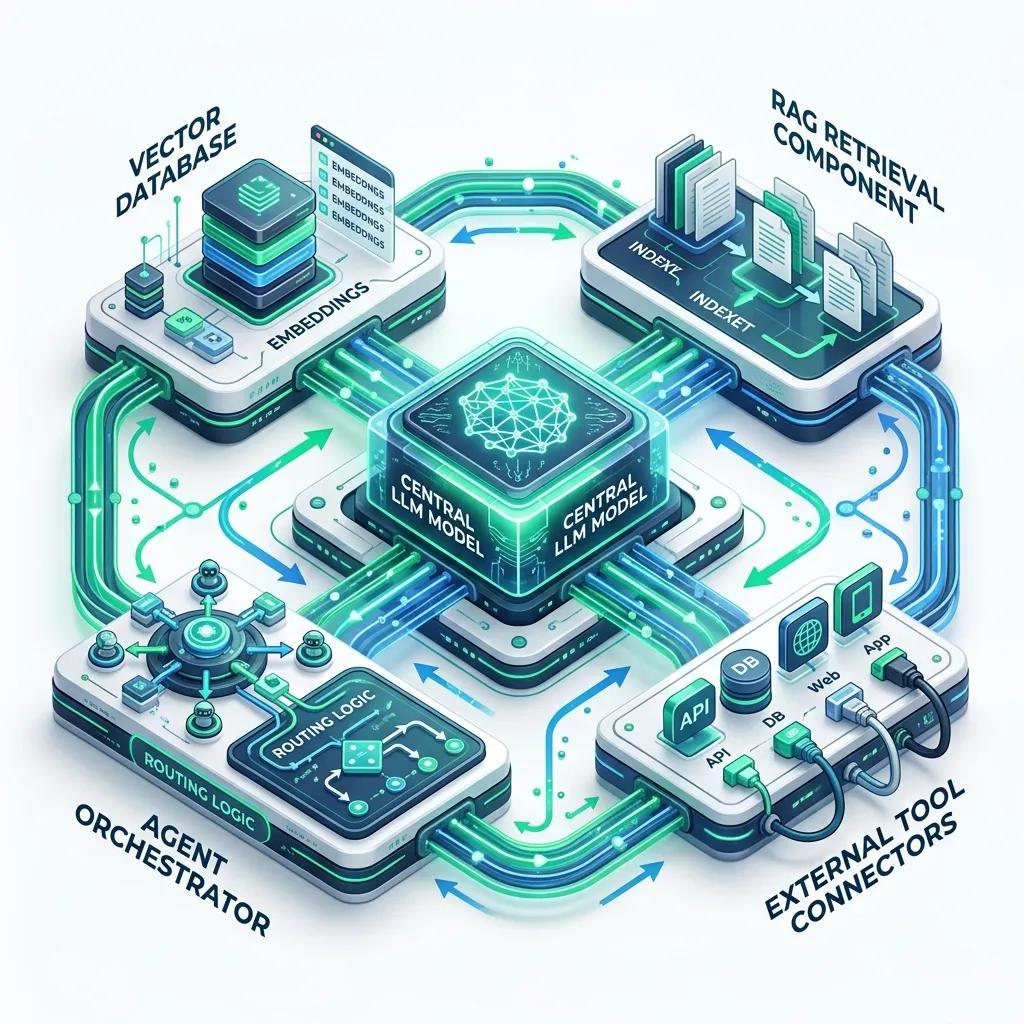
AI-Native Architecture: Designing for Intelligence
AI-native architecture treats language models as first-class infrastructure components - not a bolt-on feature, but a core part of how the system reasons, retrieves information, and acts. Building on LLMs requires rethinking fundamental assumptions: outputs are probabilistic rather than deterministic, latency is measured in seconds rather than milliseconds, cost is proportional to token volume, and the "logic" is partially opaque.
This guide covers the architectural patterns that make LLM-powered systems reliable and cost-effective: prompt engineering as interface design, Retrieval-Augmented Generation (RAG), agentic workflows with tool use, semantic caching, AI gateways for model orchestration, and evaluation frameworks for testing non-deterministic outputs.
The Core Architectural Differences
Before choosing patterns, understand what changes when an LLM is a core component:
| Traditional System | AI-Native System |
|---|---|
| Deterministic outputs | Probabilistic outputs |
| Sub-millisecond latency | 0.5s-30s latency |
| Negligible per-call cost | $0.001-$0.10+ per call |
| Logic in code | Logic in prompts + model weights |
| Unit-testable | Evaluation-based testing |
| Stateless or explicit state | Context window is ephemeral state |
| Scales with compute | Scales with token budget |
These differences require specific architectural responses at every layer.
Pattern 1: Prompt Engineering as Interface Design
A prompt is the interface to the LLM. Just as you design REST API contracts precisely, design prompts as structured, versioned interfaces.
// prompts/classify-support-ticket.ts
// Treat this as a versioned interface - changes are breaking changes

export const CLASSIFY_TICKET_PROMPT = `You are a customer support classifier for a SaaS product.

Classify the following support ticket into exactly one category:
- billing: questions about invoices, charges, or subscriptions
- technical: bugs, errors, or integration issues
- feature-request: requests for new functionality
- account: login issues, password resets, account settings
- other: anything that does not fit the above

Respond with a JSON object matching this schema exactly:
{
  "category": "<one of the categories above>",
  "confidence": <number between 0 and 1>,
  "reasoning": "<one sentence explanation>"
}

Do not include any text outside the JSON object.

Ticket: {TICKET_CONTENT}`;

export function buildClassifyPrompt(ticketContent: string): string {
  return CLASSIFY_TICKET_PROMPT.replace('{TICKET_CONTENT}', ticketContent);
}// Structured output with validation
import { z } from 'zod';
const TicketClassificationSchema = z.object({
category: z.enum(['billing', 'technical', 'feature-request', 'account', 'other']),
confidence: z.number().min(0).max(1),
reasoning: z.string()
});
async function classifyTicket(content: string) {
const response = await anthropic.messages.create({
model: 'claude-opus-4-7',
max_tokens: 256,
messages: [{ role: 'user', content: buildClassifyPrompt(content) }]
});
const text = response.content[0].type === 'text' ? response.content[0].text : '';
// Parse and validate - never trust raw LLM output
const parsed = JSON.parse(text);
return TicketClassificationSchema.parse(parsed);
}Pattern 2: Retrieval-Augmented Generation (RAG)
LLMs have a training cutoff and no access to your private data. RAG solves both problems: store your documents as vector embeddings, retrieve relevant context at query time, and inject it into the prompt.
Query: "What is the refund policy for annual plans?"
         |
         v
+------------------+
| Embedding Model  |  Converts query to vector [0.12, -0.34, 0.89, ...]
+------------------+
         |
         v
+------------------+
| Vector Database  |  Finds top-k most similar document chunks
| (Pinecone/pgvector) |
+------------------+
         |
         v Retrieved context chunks
+------------------+
| Prompt Builder   |  Injects chunks into system prompt
+------------------+
         |
         v
+------------------+
| LLM              |  Answers based on injected context
+------------------+
Implementation with pgvector
-- PostgreSQL with pgvector extension
CREATE EXTENSION IF NOT EXISTS vector;

CREATE TABLE documents (
  id          UUID PRIMARY KEY DEFAULT gen_random_uuid(),
  source      TEXT NOT NULL,         -- file path or URL
  chunk_index INTEGER NOT NULL,
  content     TEXT NOT NULL,
  embedding   vector(1536),          -- OpenAI text-embedding-3-small dimension
  metadata    JSONB DEFAULT '{}'
);

CREATE INDEX ON documents USING ivfflat (embedding vector_cosine_ops)
WITH (lists = 100);// Ingest documents
async function ingestDocument(filePath: string, content: string) {
// Split into chunks (overlap helps with context continuity)
const chunks = splitIntoChunks(content, { chunkSize: 512, overlap: 50 });
for (const [index, chunk] of chunks.entries()) {
const embedding = await openai.embeddings.create({
model: 'text-embedding-3-small',
input: chunk
});
await db.query(
`INSERT INTO documents (source, chunk_index, content, embedding)
VALUES ($1, $2, $3, $4)`,
[filePath, index, chunk, JSON.stringify(embedding.data[0].embedding)]
);
}
}
// Query
async function retrieveContext(query: string, topK = 5): Promise<string[]> {
const queryEmbedding = await openai.embeddings.create({
model: 'text-embedding-3-small',
input: query
});
const results = await db.query<{ content: string }>(
`SELECT content
FROM documents
ORDER BY embedding <=> $1
LIMIT $2`,
[JSON.stringify(queryEmbedding.data[0].embedding), topK]
);
return results.rows.map(r => r.content);
}
// Augmented generation
async function answerWithContext(question: string): Promise<string> {
const contexts = await retrieveContext(question);
const response = await anthropic.messages.create({
model: 'claude-opus-4-7',
max_tokens: 1024,
system: `You are a helpful assistant. Answer based only on the provided context.
If the context does not contain the answer, say so explicitly.
Context:
${contexts.map((c, i) => `[${i + 1}] ${c}`).join('\n\n')}`,
messages: [{ role: 'user', content: question }]
});
return response.content[0].type === 'text' ? response.content[0].text : '';
}RAG vs Fine-Tuning
| RAG | Fine-Tuning | |
|---|---|---|
| Updates knowledge | Add documents, no retraining | Retrain model (expensive) |
| Cost | Storage + embedding + retrieval | Training compute + base model cost |
| Transparency | Retrieved context is visible | Model weights are opaque |
| Latency | +50-200ms for retrieval | No change |
| Best for | Factual Q&A, documentation, search | Tone/style, specialised format, task performance |
Use RAG for private knowledge bases, documentation assistants, and support bots. Use fine-tuning for persistent personality, specialised reasoning, or when RAG's retrieval step adds unacceptable latency.
Pattern 3: Agentic Workflows and Tool Use
Agents extend LLMs beyond text generation to taking actions: calling APIs, querying databases, running code, browsing the web. The ReAct (Reasoning + Action) loop drives most agent implementations:
User: "Find all open GitHub issues assigned to alice and create a summary report"
         |
         v Reasoning
Agent: "I need to call the GitHub API to get issues. I'll use the list_issues tool."
         |
         v Action
Tool call: github.issues.list({ assignee: 'alice', state: 'open' })
         |
         v Observation
Returns: [{ id: 1, title: "Login bug", ... }, { id: 2, title: "API timeout", ... }]
         |
         v Reasoning
Agent: "I have the issues. Now I'll format them into a report."
         |
         v Final response: "Alice has 2 open issues: ..."
Tool definition (Anthropic SDK)
import Anthropic from '@anthropic-ai/sdk';

const anthropic = new Anthropic();

const tools: Anthropic.Tool[] = [
  {
    name: 'get_database_stats',
    description: 'Get current database metrics including connection count, query latency, and table sizes',
    input_schema: {
      type: 'object' as const,
      properties: {
        database_name: {
          type: 'string',
          description: 'Name of the database to query'
        }
      },
      required: ['database_name']
    }
  },
  {
    name: 'create_alert',
    description: 'Create a PagerDuty alert for a critical issue',
    input_schema: {
      type: 'object' as const,
      properties: {
        severity: { type: 'string', enum: ['critical', 'high', 'medium'] },
        message: { type: 'string' },
        service: { type: 'string' }
      },
      required: ['severity', 'message', 'service']
    }
  }
];

async function runAgent(userMessage: string) {
  const messages: Anthropic.MessageParam[] = [
    { role: 'user', content: userMessage }
  ];

  while (true) {
    const response = await anthropic.messages.create({
      model: 'claude-opus-4-7',
      max_tokens: 4096,
      tools,
      messages
    });

    if (response.stop_reason === 'end_turn') {
      // Agent is done
      const textBlock = response.content.find(b => b.type === 'text');
      return textBlock?.type === 'text' ? textBlock.text : '';
    }

    if (response.stop_reason === 'tool_use') {
      // Execute all tool calls in this response
      const toolResults: Anthropic.MessageParam = {
        role: 'user',
        content: []
      };

      for (const block of response.content) {
        if (block.type === 'tool_use') {
          const result = await executeTool(block.name, block.input);
          (toolResults.content as Anthropic.ToolResultBlockParam[]).push({
            type: 'tool_result',
            tool_use_id: block.id,
            content: JSON.stringify(result)
          });
        }
      }

      messages.push({ role: 'assistant', content: response.content });
      messages.push(toolResults);
    }
  }
}

async function executeTool(name: string, input: Record<string, unknown>) {
  // Dispatch to actual implementations
  switch (name) {
    case 'get_database_stats':
      return getDatabaseStats(input.database_name as string);
    case 'create_alert':
      return createPagerDutyAlert(input as { severity: string; message: string; service: string });
    default:
      throw new Error(`Unknown tool: ${name}`);
  }
}
Safety considerations: Always run agent-executed code in a sandbox. Implement a human-in-the-loop approval gate before any destructive actions (deletes, financial transactions, emails sent). Log every tool call for audit trails.
Pattern 4: Semantic Caching
LLM calls are expensive ($0.001-$0.10 per call) and slow (1-10 seconds). Many queries are semantically identical even if phrased differently. Semantic caching stores LLM responses and retrieves them for similar (not just identical) future queries.
import { createClient } from 'redis';

const redis = createClient({ url: process.env.REDIS_URL });
await redis.connect();

async function cachedLLMCall(query: string): Promise<string> {
  // Generate embedding for the query
  const queryEmbedding = await openai.embeddings.create({
    model: 'text-embedding-3-small',
    input: query
  });
  const vector = queryEmbedding.data[0].embedding;

  // Check cache for semantically similar query (cosine similarity > 0.95)
  const cacheKey = `llm-cache:${await findSimilarCacheKey(vector, threshold: 0.95)}`;
  const cached = cacheKey ? await redis.get(cacheKey) : null;

  if (cached) {
    return JSON.parse(cached).response;
  }

  // Cache miss - call the LLM
  const response = await anthropic.messages.create({
    model: 'claude-opus-4-7',
    max_tokens: 1024,
    messages: [{ role: 'user', content: query }]
  });

  const responseText = response.content[0].type === 'text'
    ? response.content[0].text
    : '';

  // Store in cache with embedding for future similarity lookups
  await storeInSemanticCache(vector, query, responseText);

  return responseText;
}
Production semantic caching tools: GPTCache, Momento, Zep, or a custom implementation on top of pgvector or Redis Stack with vector search.
Pattern 5: AI Gateway
An AI gateway is an infrastructure layer that sits between your application and LLM providers, handling:
- Model routing: route to Claude for reasoning tasks, GPT-4 for code, Llama for cost-sensitive queries
- Fallback: automatically retry on a different model if the primary is rate-limited or down
- Rate limiting: enforce per-user or per-endpoint token budgets
- Cost tracking: log token usage per request for chargeback or monitoring
- Caching: semantic cache at the gateway layer
// AI Gateway configuration (using LiteLLM as the gateway)
// litellm-config.yaml
model_list:
  - model_name: claude-fast
    litellm_params:
      model: anthropic/claude-haiku-4-5-20251001
      api_key: os.environ/ANTHROPIC_API_KEY

  - model_name: claude-smart
    litellm_params:
      model: anthropic/claude-opus-4-7
      api_key: os.environ/ANTHROPIC_API_KEY

  - model_name: gpt-fallback
    litellm_params:
      model: gpt-4o-mini
      api_key: os.environ/OPENAI_API_KEY

router_settings:
  routing_strategy: latency-based-routing
  fallbacks:
    - claude-smart: [gpt-fallback]

general_settings:
  master_key: os.environ/LITELLM_MASTER_KEY
database_url: os.environ/DATABASE_URL// Application uses the gateway instead of provider SDKs directly
const response = await fetch(`${process.env.AI_GATEWAY_URL}/chat/completions`, {
method: 'POST',
headers: {
'Authorization': `Bearer ${process.env.AI_GATEWAY_KEY}`,
'Content-Type': 'application/json'
},
body: JSON.stringify({
model: 'claude-smart',
messages: [{ role: 'user', content: userMessage }],
metadata: { userId, sessionId } // For cost tracking
})
});Evaluation: Testing Non-Deterministic Systems
You cannot unit test LLM outputs the same way you test deterministic code. Use evaluation frameworks:
// evals/classify-ticket.eval.ts
const TEST_CASES = [
  {
    input: "I was charged twice this month",
    expectedCategory: "billing",
    minConfidence: 0.9
  },
  {
    input: "The API returns 500 errors on /users endpoint",
    expectedCategory: "technical",
    minConfidence: 0.85
  },
  {
    input: "Can you add dark mode?",
    expectedCategory: "feature-request",
    minConfidence: 0.8
  }
];

async function runEval() {
  let passed = 0;
  const results = [];

  for (const testCase of TEST_CASES) {
    const result = await classifyTicket(testCase.input);
    const correct = result.category === testCase.expectedCategory
      && result.confidence >= testCase.minConfidence;

    results.push({ ...testCase, result, correct });
    if (correct) passed++;
  }

  console.log(`Passed: ${passed}/${TEST_CASES.length}`);
  return results;
}
Run evaluations in CI to catch prompt regressions when you update prompts or switch models. Use tools like Braintrust, Langsmith, or Promptfoo for larger evaluation suites.
Frequently Asked Questions
Q: When should I use RAG vs fine-tuning?
Use RAG when your knowledge changes frequently (documentation, product specs, customer data) and you need transparency about what the model is using to answer. Use fine-tuning when you need the model to adopt a specific tone or format, when you have thousands of high-quality examples of the exact task, or when RAG retrieval is adding unacceptable latency. In most production systems, RAG delivers 80% of the value at 10% of the cost of fine-tuning.
Q: How do I handle hallucinations in production?
Hallucinations (confident but incorrect outputs) are unavoidable with current LLMs. Architectural mitigations: use RAG to ground responses in retrieved facts, instruct the model to cite sources and say "I don't know" when unsure, validate structured outputs with Zod or Pydantic schemas, implement a separate verification step for high-stakes outputs, and build human review queues for critical decisions.
Q: What is the context window and how does it affect architecture?
The context window is the maximum text the model can process in one call (currently 128K-2M tokens depending on model). Architectural implication: you cannot stuff an entire document corpus into a prompt - this is why RAG exists. Longer contexts enable more complex multi-step reasoning and larger documents, but also cost more (pricing is per token). Design your context budget explicitly: system prompt, retrieved chunks, conversation history, and expected response all count.
Q: How should I handle LLM latency in user-facing applications?
Stream responses using server-sent events so users see output token by token rather than waiting for the full response. For background tasks (document analysis, report generation), use async patterns: accept the request, queue the LLM call, notify the user when complete. Set conservative timeouts and expose them to users as progress indicators. Pre-generate responses for predictable queries using batch processing.
Key Takeaway
AI-native architecture requires adapting your system design for probabilistic, expensive, slow components. The five foundational patterns - structured prompts, RAG for grounding, tool-using agents for action, semantic caching for cost efficiency, and AI gateways for model management - give you the building blocks for production-grade LLM systems. Always validate structured outputs, run evaluations in CI, implement human-in-the-loop for high-stakes actions, and design for graceful degradation when the LLM is unavailable or rate-limited.
Read next: Architecting for Stakeholders: The Soft Power of Design ->
Part of the Software Architecture Hub - engineering the intelligence.