
C Arrays & Buffer Management: Contiguous Memory, Strings & Buffer Safety
Complete guide to C arrays and buffer management. Learn contiguous memory layout, stack vs heap arrays, safe string handling with strncpy and strlcpy, VLAs, multidimensional arrays, and how to prevent buffer overflow vulnerabilities in C.
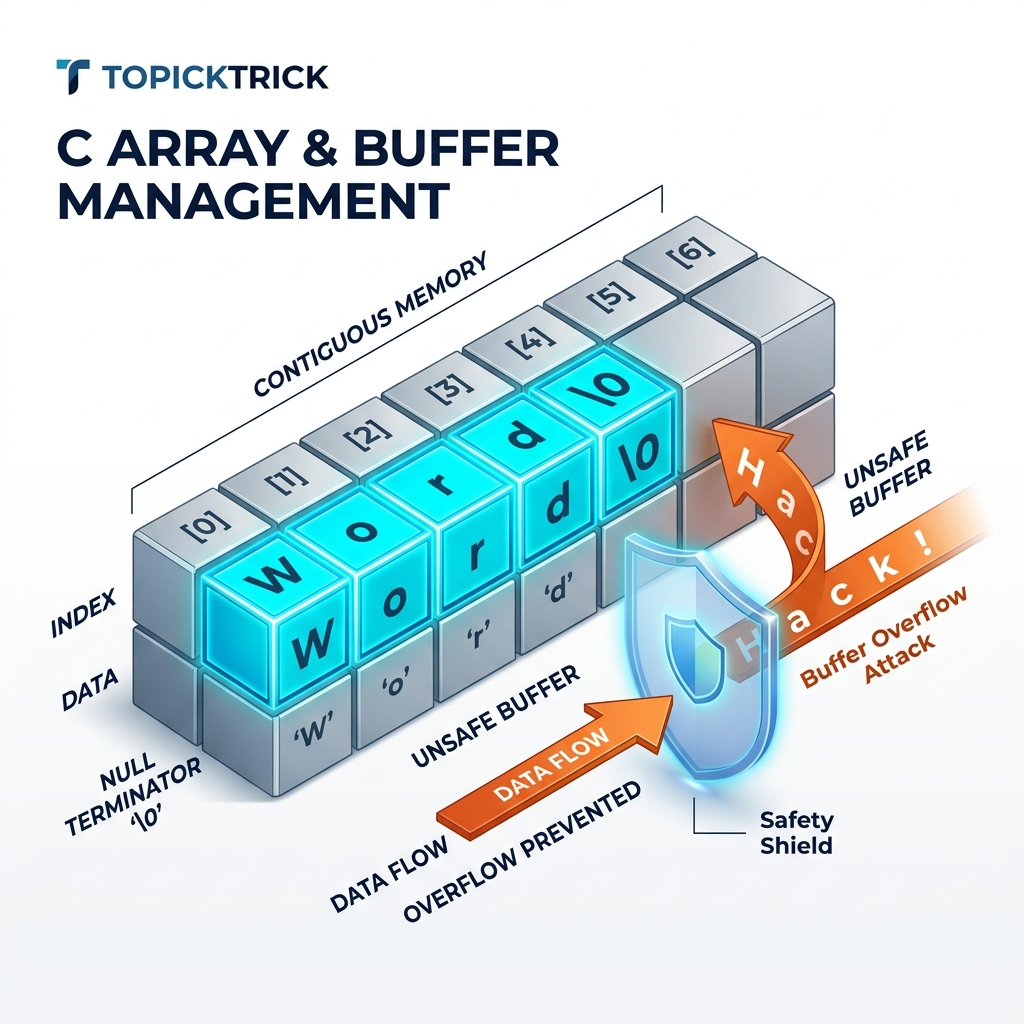
C Arrays & Buffer Management: Contiguous Memory, Strings & Buffer Safety
Table of Contents
- What Is a C Array at the Memory Level?
- Stack Arrays vs Heap Arrays
- Array Initialization Patterns
- Pointer Decay: Arrays Are Not Pointers
- Multidimensional Arrays
- C Strings: The Null-Terminator Contract
- Safe String Handling: strncpy, strncat, and strlcpy
- Variable-Length Arrays (VLAs)
- Buffer Overflow: The Most Dangerous Bug in C
- Bounds-Checked Access Patterns
- Frequently Asked Questions
- Key Takeaway
What Is a C Array at the Memory Level?
Unlike Python lists or JavaScript arrays - which are heap-allocated objects with dynamic sizes and type flexibility - a C array is the simplest possible data structure: a contiguous block of identically-sized elements in memory.
Accessing data[i] is an O(1) operation computed as: base_address + i * sizeof(element_type). This is why arrays have perfect "cache locality" - when the CPU reads data[0], it also loads data[1] through data[7] into its L1 cache automatically (64-byte cache line). Iterating over an array sequentially is one of the fastest operations a CPU can perform.
Stack Arrays vs Heap Arrays
#include <stdio.h>
#include <stdlib.h>
#include <string.h>
#include <stdint.h>

int main(void) {
    // === STACK ARRAY ===
    // Size must be a compile-time constant (or VLA, C99+)
    // Automatically freed when out of scope
    // Limited to ~8MB total stack size
    int32_t stack_data[100] = {0};
    printf("Stack array size: %zu bytes\n", sizeof(stack_data)); // 400

    // === HEAP ARRAY ===
    // Size can be computed at runtime
    // Persists until free() - or until program exit (memory leak)
    // Limited only by available virtual memory
    size_t n = 100000;
    int32_t *heap_data = malloc(n * sizeof(int32_t));
    if (!heap_data) return 1;

    memset(heap_data, 0, n * sizeof(int32_t)); // Zero-initialize

    heap_data[99999] = 42; // Accessing the last element
    printf("heap_data[99999] = %d\n", heap_data[99999]);

    free(heap_data);
    return 0;
}
Key differences:
| Stack Array | Heap Array | |
|---|---|---|
| Size | Compile-time constant | Runtime-determined |
| Speed | Extremely fast (RSP adjustment) | Slightly slower (malloc call) |
| Max size | ~1-8 MB (stack limit) | Limited by RAM/virtual memory |
| Lifetime | Current scope | Until free() is called |
| Safety | Automatic cleanup | Manual - must free |
Array Initialization Patterns
#include <stdint.h>
#include <string.h>

int main(void) {
    // 1. Explicit initializer list
    int32_t scores[5] = {90, 85, 78, 92, 88};

    // 2. Partial initialization - unspecified elements are zero
    int32_t partial[10] = {1, 2, 3}; // [1,2,3,0,0,0,0,0,0,0]

    // 3. Zero-initialize all elements
    int32_t zeroed[100] = {0};

    // 4. C23 designated initializers for arrays
    int32_t sparse[10] = {[0]=1, [5]=50, [9]=99}; // Others are 0

    // 5. Size deduced from initializer
    int32_t auto_size[] = {10, 20, 30, 40}; // Size is 4
    size_t n = sizeof(auto_size) / sizeof(auto_size[0]); // n = 4

    // 6. Runtime zero-init with memset
    int32_t runtime_array[256];
    memset(runtime_array, 0, sizeof(runtime_array));

    return 0;
}
The element count idiom (sizeof(arr) / sizeof(arr[0])) is the canonical way to compute an array's element count without hardcoding a magic number. Define it as a macro for reuse:
#define ARRAY_SIZE(arr) (sizeof(arr) / sizeof((arr)[0]))

int data[] = {1, 2, 3, 4, 5};
for (size_t i = 0; i < ARRAY_SIZE(data); i++) { ... }
Pointer Decay: Arrays Are Not Pointers
This is one of C's most commonly misunderstood rules: an array "decays" to a pointer to its first element in most expression contexts. The array and the pointer are not the same thing, but they behave similarly:
#include <stdio.h>
#include <stddef.h>

void process(int *arr, size_t count) {
    // Inside this function, 'arr' is just a pointer - sizeof(arr) = 8 bytes!
    // We MUST pass 'count' separately
    printf("sizeof arr inside function: %zu\n", sizeof(arr)); // 8 (pointer size)
    for (size_t i = 0; i < count; i++) {
        printf("%d ", arr[i]);
    }
}

int main(void) {
    int data[5] = {1, 2, 3, 4, 5};
    printf("sizeof data in main: %zu\n", sizeof(data)); // 20 (4*5 bytes)

    process(data, 5); // 'data' decays to &data[0]

    return 0;
}
The three contexts where arrays do NOT decay:
- When used with
sizeof-sizeof(arr)gives the full array size. - When used with
&-&arrgives the address of the entire array with typeint(*)[5]. - When used as a string literal initializer -
char name[] = "Alice".
Multidimensional Arrays
Multidimensional arrays in C are stored in row-major order - all elements of row 0 come first, then all of row 1, etc. This is a physical memory layout, not an abstraction:
#include <stdio.h>

int main(void) {
    // 3x4 matrix - stored as 12 contiguous ints
    int matrix[3][4] = {
        {1,  2,  3,  4},
        {5,  6,  7,  8},
        {9, 10, 11, 12},
    };

    // Access: matrix[row][col]
    printf("matrix[1][2] = %d\n", matrix[1][2]); // 7

    // Iterating in row-major order (cache-friendly)
    for (int r = 0; r < 3; r++) {
        for (int c = 0; c < 4; c++) {
            printf("%3d ", matrix[r][c]);
        }
        printf("\n");
    }

    return 0;
}
Cache-friendliness matters: Iterating matrix[row][col] (row-major) is fast because consecutive elements are adjacent in memory. Iterating matrix[col][row] (column-major) on a row-major array causes cache misses on every iteration - potentially 5-10x slower for large matrices.
C Strings: The Null-Terminator Contract
C does not have a built-in string type. A C "string" is simply a char array with a sentinel value - '\0' (null byte, ASCII 0) - marking the end:
#include <stdio.h>
#include <string.h>

int main(void) {
    // String literal: stored in read-only memory, auto null-terminated
    const char *readonly_str = "Hello"; // [H][e][l][l][o][\0]

    // Stack array: mutable, includes null terminator
    char mutable_str[] = "Hello"; // 6 bytes: [H][e][l][l][o][\0]
    mutable_str[0] = 'h'; // Legal - it's a mutable copy

    // Manual null-termination - always required when building strings manually
    char buffer[8];
    buffer[0] = 'A';
    buffer[1] = 'B';
    buffer[2] = 'C';
    buffer[3] = '\0'; // REQUIRED - otherwise strlen, printf, etc. will run past the end

    printf("readonly:  %s (length %zu)\n", readonly_str, strlen(readonly_str));
    printf("mutable:   %s (length %zu)\n", mutable_str, strlen(mutable_str));
    printf("manual:    %s (length %zu)\n", buffer, strlen(buffer));

    return 0;
}
Every C string function assumes the null terminator exists. strlen, printf("%s"), strcpy, strcat - all terminate when they find '\0'. Forgetting the null terminator causes reads far past the intended buffer boundary (undefined behavior).
Safe String Handling
The Problem with strcpy and strcat
strcpy(dest, src) copies until it finds a null terminator in src - with no regard for the size of dest. If src is larger than dest, adjacent memory is overwritten:
char buf[8];
strcpy(buf, "This string is way too long!"); // Buffer overflow! Corrupts memory
Safer Alternatives
#include <string.h>
#include <stdio.h>

int main(void) {
    char dest[16];
    const char *src = "Hello, World!";

    // strncpy: copies at most n bytes - but does NOT guarantee null termination
    strncpy(dest, src, sizeof(dest) - 1);
    dest[sizeof(dest) - 1] = '\0'; // Manual null-termination required

    // snprintf: the safest way to build strings
    // Always null-terminates, returns number of bytes that would have been written
    int written = snprintf(dest, sizeof(dest), "User: %s", "Alice");
    if (written >= (int)sizeof(dest)) {
        fprintf(stderr, "Warning: output was truncated\n");
    }
    printf("%s\n", dest);

    return 0;
}
The snprintf pattern is the modern, safe approach for string building in C. It always null-terminates, and the return value tells you if truncation occurred.
On BSD/macOS systems, strlcpy(dest, src, sizeof(dest)) is available and always null-terminates without the manual dest[n-1] = '\0' step. On Linux, include <bsd/string.h> or define your own.
Variable-Length Arrays (VLAs)
C99 introduced Variable-Length Arrays - stack-allocated arrays whose size is determined at runtime:
#include <stdio.h>

void process_data(int n) {
    int vla[n]; // Size determined at runtime - allocated on the stack
    for (int i = 0; i < n; i++) vla[i] = i * i;
    printf("vla[%d] = %d\n", n-1, vla[n-1]);
}
[!WARNING] VLAs are optional in C11/C23 (compiler may not support them). For sizes above a few KB, VLAs risk stack overflow without any warning. For production systems code, prefer
mallocfor dynamic sizing. VLAs are most useful in embedded system functions where the size is small and bounded.
Buffer Overflow: The Most Dangerous Bug in C
A buffer overflow occurs when you write more bytes into a buffer than it can hold, corrupting adjacent memory. It is the most common source of CVEs in C codebases and the root cause of countless security exploits:
#include <string.h>

void dangerous_function(const char *user_input) {
    char buffer[64];
    // If user_input is longer than 63 chars, this overwrites:
    // - local variables in the current stack frame
    // - the saved frame pointer
    // - the RETURN ADDRESS (exploitation target)
    strcpy(buffer, user_input); // CRITICAL vulnerability
}
A malicious user can craft an input that overwrites the return address to point to their own shellcode - this is a classic stack-smashing exploit. Modern mitigations include:
- Stack Canaries (
-fstack-protector-strong): Place a random value before the return address; check it before return. - ASLR: Randomize memory addresses to make exploitation unreliable.
- NX bit: Mark stack as non-executable (prevents shellcode execution).
- FORTIFY_SOURCE: Compile-time and runtime replacement of unsafe functions.
Bounds-Checked Access Patterns
#include <stddef.h>
#include <stdio.h>
#include <stdint.h>

// Safe array element access - returns -1 on out-of-bounds
int safe_get(const int32_t *arr, size_t arr_size, size_t index, int32_t *out) {
    if (index >= arr_size) {
        return -1; // Out of bounds
    }
    *out = arr[index];
    return 0;
}

// Safe array write - returns -1 on out-of-bounds
int safe_set(int32_t *arr, size_t arr_size, size_t index, int32_t value) {
    if (index >= arr_size) {
        return -1;
    }
    arr[index] = value;
    return 0;
}

int main(void) {
    int32_t data[10] = {0};
    int32_t val;

    if (safe_set(data, 10, 5, 99) == 0) {
        safe_get(data, 10, 5, &val);
        printf("data[5] = %d\n", val); // 99
    }

    if (safe_set(data, 10, 15, 1) != 0) {
        printf("Error: index 15 is out of bounds for array of size 10\n");
    }

    return 0;
}
Frequently Asked Questions
Why doesn't C check array bounds automatically? By design. C's philosophy is "trust the programmer and don't pay for what you don't need." Runtime bounds checking on every array access adds overhead. C gives you the tools (ASan, Valgrind, safe access wrappers) to check when you need to. Languages that check bounds by default (Java, Python, Rust) pay a constant performance cost that C avoids.
What is the difference between char[] and char* for strings?
char name[] = "Alice" creates a stack-allocated mutable copy of the string literal. const char *name = "Alice" creates a pointer to a string literal stored in the program's read-only data segment. Attempting to write to name[0] with the pointer form is undefined behavior (usually a segfault). Always use const char* for string literals you don't intend to modify.
Is gets() really banned?
Yes - gets() was removed from the C11 standard entirely. It reads into a buffer with absolutely no size limit, making buffer overflow guaranteed for any input longer than the buffer. It is the most dangerous function in the C standard library's history. Use fgets(buf, sizeof(buf), stdin) instead.
Can I use sizeof to get the length of an array passed to a function?
No. When an array is passed to a function, it decays to a pointer. sizeof a pointer is always 8 bytes on 64-bit systems, regardless of the original array size. You must always pass the element count as a separate argument.
Key Takeaway
C arrays represent the Physical Reality of Memory - raw, contiguous bytes with zero overhead. Their performance is unmatched precisely because there is no wrapper, no metadata, no reference counting. The trade-off is that safety is entirely your responsibility.
By using bounds checking wrappers, snprintf for string building, ARRAY_SIZE macros for element counting, and ASan during development, you get C's raw speed without sacrificing correctness. This discipline is what separates professional systems hackers from beginners.
Read next: Linked Lists: Building Dynamic Collections ->
Part of the C Mastery Course - 30 modules of expert C systems programming.