
Serverless Architecture: AWS Lambda and Beyond
Master the ephemeral. Learn how to build systems using AWS Lambda, Google Cloud Functions, and Firebase without managing a single server - including cold starts, pricing, database connections, and vendor lock-in strategies.
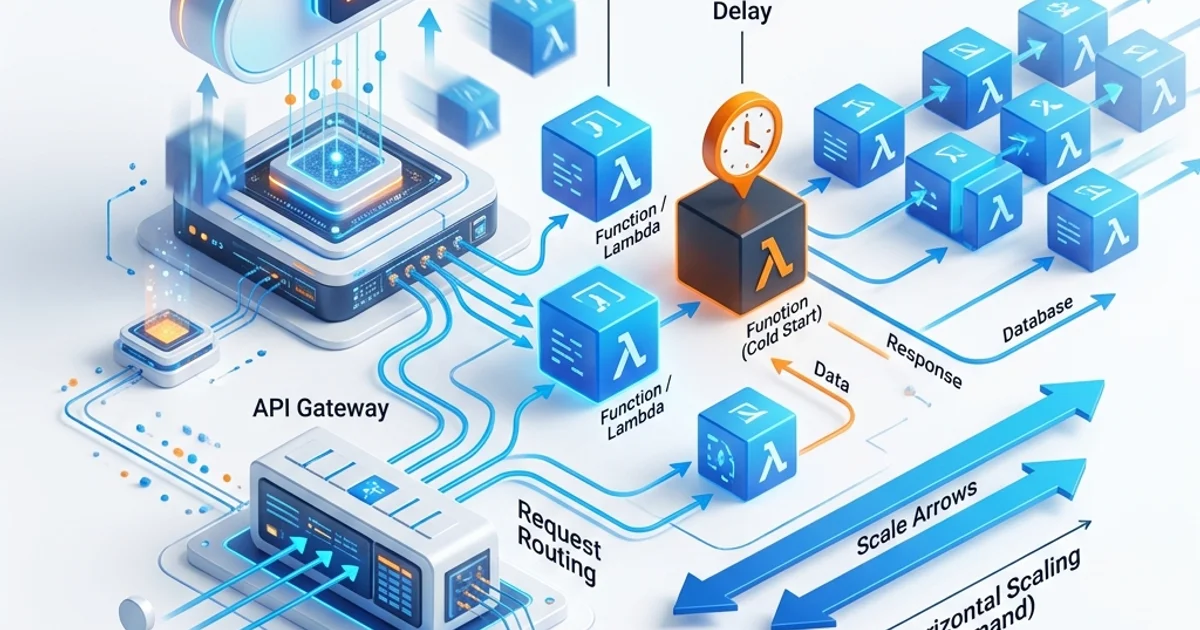
Serverless Architecture: AWS Lambda and Beyond
Serverless is one of the most misunderstood terms in software engineering. It does not mean "no servers" - it means "no servers you have to think about." The cloud provider manages all provisioning, patching, and scaling. You deploy a function and pay only when it runs.
This guide covers the complete picture: how AWS Lambda works internally, how to handle cold starts, when serverless is cheaper than containers and when it is not, how to connect a serverless function to a database without crashing it, and how to avoid catastrophic vendor lock-in.
How AWS Lambda Works Internally
When you deploy a Lambda function, AWS does not spin up a server. Instead, it stores your code in S3 and creates an execution environment specification. Here is what happens on the first invocation:
- AWS allocates a micro-VM using Firecracker (AWS's open-source lightweight virtualisation technology)
- The Lambda runtime (Node.js, Python, Go, Rust, etc.) is loaded into the VM
- Your function's deployment package is downloaded from S3 and extracted
- Your initialization code runs (everything outside the handler function)
- Your handler function executes
- The VM is frozen but kept warm for a short period to serve subsequent requests
If a second request arrives while the first VM is processing, AWS spins up a second identical VM. If 1,000 requests arrive simultaneously, AWS spins up 1,000 VMs. This is how Lambda achieves instant, infinite horizontal scaling.
The Execution Model
// handler.js - AWS Lambda Node.js function

// Initialization code - runs ONCE when the container starts (cold start)
import { Pool } from 'pg';
const db = new Pool({ connectionString: process.env.DATABASE_URL });

// Handler - runs on EVERY invocation (warm or cold)
export const handler = async (event) => {
  const { userId } = JSON.parse(event.body);

  const result = await db.query(
    'SELECT name, email FROM users WHERE id = $1',
    [userId]
  );

  return {
    statusCode: 200,
    headers: { 'Content-Type': 'application/json' },
    body: JSON.stringify(result.rows[0]),
  };
};
The key insight: initialization code (imports, database connections, SDK clients) runs once per container, not once per request. Moving heavy initialization outside the handler reduces per-request latency significantly.
Cold Starts: The Real Performance Cost
A cold start occurs when AWS needs to spin up a new VM because no warm instance is available. The total cold start time includes:
| Phase | Duration | Who controls it |
|---|---|---|
| VM allocation (Firecracker boot) | 50-100ms | AWS (fixed) |
| Runtime initialization (Node.js startup) | 50-500ms | Runtime choice |
| Your initialization code | Variable | You |
| Total cold start | 100ms - 2s+ | Mixed |
Cold Start Times by Runtime (2026 benchmarks)
| Runtime | Typical cold start |
|---|---|
| Rust (custom runtime) | 10-50ms |
| Go | 50-150ms |
| Python | 100-300ms |
| Node.js | 200-500ms |
| Java (JVM) | 500ms - 2s |
| Java (GraalVM native) | 50-200ms |
Strategies to Minimize Cold Starts
1. Choose a fast runtime: Go and Rust have the fastest cold starts. For JavaScript workloads, use nodejs20.x which is significantly faster than older Node versions.
2. Reduce deployment package size: Lambda downloads your package on cold start. A 50MB package is much slower than a 5MB package.
# Check your package size
zip -r function.zip . --exclude "*.test.js" "node_modules/.cache/*"
du -sh function.zip
3. Use Lambda SnapStart (Java): AWS can pre-initialize Java functions and snapshot the memory state, reducing cold starts from 2s to under 200ms.
4. Provisioned Concurrency: Reserve pre-warmed instances for latency-critical functions.
# serverless.yml - provision 5 always-warm instances
functions:
  api:
    handler: src/handler.handler
    provisionedConcurrency: 5
Provisioned Concurrency costs money even when idle (you pay for the reserved VMs), so use it only for latency-sensitive functions like synchronous API endpoints.
5. Minimize initialization code: Do not make HTTP requests or load large files during initialization. Load only what is needed for most invocations.
Serverless vs. Containers: When to Use Each
This is the most important architectural decision. Here is the honest comparison:
Use Serverless (Lambda/Cloud Functions) When:
- Infrequent, bursty traffic: A nightly batch job, a webhook handler, a form submission processor
- Event-driven workloads: S3 upload triggers, SNS notifications, DynamoDB streams
- Simple stateless APIs: REST endpoints with straightforward request/response patterns
- Variable traffic with quiet periods: A startup app that gets 10 requests/day Monday and 10,000 on Friday
Cost example: An API that gets 1 million requests/month, each taking 200ms at 256MB memory:
- Lambda cost: ~$0.42/month (free tier covers most of this)
- EC2 t3.micro equivalent: $8.47/month
Use Containers (ECS/Fargate/Kubernetes) When:
- Long-running processes: Video transcoding, ML model inference, complex report generation (Lambda max timeout is 15 minutes)
- High-traffic APIs: At millions of requests/day, per-execution pricing exceeds a reserved instance
- WebSockets or streaming: Lambda functions cannot maintain persistent connections
- Large runtime dependencies: Lambda has a 250MB unzipped deployment limit (10GB with container images)
- Predictable traffic: If your API gets a steady 1,000 req/min, a container is cheaper and simpler
The Break-Even Point
Lambda becomes more expensive than a container at approximately 40-50 million invocations per month for a typical REST API workload. Beyond that threshold, reserved instances win on cost. Calculate your break-even at AWS Lambda Pricing Calculator.
Database Connections: The Serverless Achilles Heel
Traditional relational databases (PostgreSQL, MySQL) use a connection-per-client model. Each client (your app server) maintains a persistent connection to the database. A typical PostgreSQL instance allows 100-400 simultaneous connections.
With serverless, you may have 1,000 Lambda instances running simultaneously - each trying to open a database connection. Your database crashes.
Solution 1: RDS Proxy
AWS RDS Proxy sits between your Lambda functions and your RDS database. It maintains a connection pool and multiplexes thousands of Lambda connections onto a small number of real database connections.
// Same connection code - RDS Proxy is transparent
const db = new Pool({
  connectionString: process.env.DATABASE_URL, // Points to RDS Proxy endpoint, not RDS directly
  max: 1,             // Lambda only needs 1 connection per instance
  idleTimeoutMillis: 0,
  connectionTimeoutMillis: 2000,
});
RDS Proxy adds ~3ms latency but prevents connection exhaustion. Essential for Lambda + PostgreSQL/MySQL architectures.
Solution 2: Serverless-Native Databases
Some databases are designed for serverless from the ground up:
| Database | Type | Key feature |
|---|---|---|
| PlanetScale | MySQL-compatible | Branching, HTTP API, serverless driver |
| Neon | PostgreSQL-compatible | Scales to zero, HTTP API |
| Supabase | PostgreSQL | Built-in REST API, real-time |
| DynamoDB | NoSQL | Lambda-native, unlimited connections |
| Upstash | Redis | Per-request pricing, HTTP API |
| Turso | SQLite (libSQL) | Edge-native, embedded replicas |
// Neon serverless PostgreSQL - HTTP-based, no connection pool issues
import { neon } from '@neondatabase/serverless';
const sql = neon(process.env.DATABASE_URL);

export const handler = async (event) => {
  const users = await sql`SELECT * FROM users WHERE active = true`;
  return { statusCode: 200, body: JSON.stringify(users) };
};
Solution 3: DynamoDB for Lambda-Native Architecture
DynamoDB was purpose-built by AWS for serverless workloads. It has no connection limit, scales to millions of requests per second, and integrates natively with Lambda triggers.
import { DynamoDBClient, GetItemCommand } from '@aws-sdk/client-dynamodb';
import { marshall, unmarshall } from '@aws-sdk/util-dynamodb';

const dynamo = new DynamoDBClient({ region: 'us-east-1' });

export const handler = async (event) => {
  const { userId } = event.pathParameters;

  const response = await dynamo.send(new GetItemCommand({
    TableName: process.env.USERS_TABLE,
    Key: marshall({ userId }),
  }));

  return {
    statusCode: 200,
    body: JSON.stringify(unmarshall(response.Item)),
  };
};
Avoiding Vendor Lock-in
Using 50 AWS Lambda functions means migrating to Google Cloud requires rewriting all deployment configurations and potentially your function signatures. Here are the strategies professionals use:
Strategy 1: The Serverless Framework
Serverless Framework provides a cloud-agnostic deployment layer. Write once, deploy to AWS, Azure, or Google Cloud.
# serverless.yml
service: my-api
provider:
  name: aws          # Change to: azure, google, cloudflare
  runtime: nodejs20.x
  region: us-east-1

functions:
  getUser:
    handler: src/users.getUser
    events:
      - httpApi:
          path: /users/{id}
          method: GET
Strategy 2: Abstraction Layer Pattern
Wrap cloud-specific code in an abstraction layer:
// src/storage/index.js - abstraction
export async function uploadFile(key, buffer, mimeType) {
  if (process.env.CLOUD === 'aws') {
    return uploadToS3(key, buffer, mimeType);
  }
  if (process.env.CLOUD === 'gcp') {
    return uploadToGCS(key, buffer, mimeType);
  }
  // local development
  return uploadToLocalDisk(key, buffer, mimeType);
}
Your Lambda functions call uploadFile() - never s3.putObject() directly.
Strategy 3: Containerize Your Functions
AWS Lambda supports container image deployment. Package your function as a standard Docker image and run it on Lambda, ECS, or any Kubernetes cluster:
FROM public.ecr.aws/lambda/nodejs:20
COPY package*.json ./
RUN npm ci
COPY src/ ./src/
CMD ["src/handler.handler"]
The same image runs on Lambda (serverless) or ECS (container). You can switch between them by changing a deployment configuration, not rewriting code.
Real-World Serverless Architecture: API + Event Processing
Here is a production-grade serverless architecture for a typical SaaS application:
User Request
    |
    v
API Gateway ----------------------------------------------+
    |                                                      |
    v                                                      v
Lambda: REST API          Lambda: Auth Validator      Lambda: Rate Limiter
  (CRUD operations)         (JWT verification)          (Redis/Upstash)
    |
    v
RDS Proxy
    |
    v
PostgreSQL (RDS)

Background Processing:
S3 Upload Event ---> Lambda: Image Resizer ---> S3 (resized images)
SQS Queue       ---> Lambda: Email Sender  ---> SES
DynamoDB Stream ---> Lambda: Audit Logger  ---> CloudWatch
EventBridge ---> Lambda: Daily Report ---> S3 (reports)# Complete serverless.yml for this architecture
service: saas-api
provider:
name: aws
runtime: nodejs20.x
environment:
DATABASE_URL: ${ssm:/myapp/db-url}
REDIS_URL: ${ssm:/myapp/redis-url}
iamRoleStatements:
- Effect: Allow
Action: [s3:GetObject, s3:PutObject]
Resource: arn:aws:s3:::my-uploads-bucket/*
- Effect: Allow
Action: [sqs:SendMessage, sqs:ReceiveMessage, sqs:DeleteMessage]
Resource: arn:aws:sqs:us-east-1:*:email-queue
functions:
api:
handler: src/api.handler
events:
- httpApi: '*'
timeout: 30
imageResizer:
handler: src/imageResizer.handler
events:
- s3:
bucket: my-uploads-bucket
event: s3:ObjectCreated:*
timeout: 300
memorySize: 1024 # Image processing needs more RAM
emailSender:
handler: src/emailSender.handler
events:
- sqs:
arn: arn:aws:sqs:us-east-1:*:email-queue
batchSize: 10
timeout: 60Monitoring Serverless Applications
Lambda functions have no persistent servers to SSH into. Observability is done entirely through logs and metrics.
Key Metrics to Monitor
| Metric | Warning threshold | Alert threshold |
|---|---|---|
| Error rate | >1% | >5% |
| Duration (P99) | >50% of timeout | >80% of timeout |
| Concurrent executions | >70% of limit | >90% of limit |
| Throttles | Any | >10/minute |
| Cold start rate | >10% | >30% |
Structured Logging for Lambda
// Use structured JSON logs - CloudWatch Insights can query them
const logger = {
  info: (msg, meta = {}) => console.log(JSON.stringify({
    level: 'info',
    message: msg,
    timestamp: new Date().toISOString(),
    requestId: process.env.AWS_REQUEST_ID,
    ...meta,
  })),
  error: (msg, meta = {}) => console.error(JSON.stringify({
    level: 'error',
    message: msg,
    timestamp: new Date().toISOString(),
    requestId: process.env.AWS_REQUEST_ID,
    ...meta,
  })),
};

export const handler = async (event) => {
  logger.info('Request received', { path: event.rawPath, method: event.requestContext.http.method });

  try {
    const result = await processRequest(event);
    logger.info('Request completed', { duration: Date.now() - start, statusCode: 200 });
    return result;
  } catch (err) {
    logger.error('Request failed', { error: err.message, stack: err.stack });
    return { statusCode: 500, body: JSON.stringify({ error: 'Internal server error' }) };
  }
};
Frequently Asked Questions
Q: Is serverless cheaper than containers?
For low-to-medium traffic (under 40 million requests/month for a typical API), serverless is significantly cheaper because you pay only for execution time, not idle capacity. At high traffic volumes (hundreds of millions of requests/month), reserved container instances become more cost-effective. Always model your expected traffic before choosing.
Q: How do you handle database connections in serverless?
Use one of three approaches: AWS RDS Proxy for existing PostgreSQL/MySQL databases, a serverless-native database like Neon, PlanetScale, or Supabase that handles connection management via HTTP, or DynamoDB for fully Lambda-native NoSQL workloads.
Q: What is the Lambda timeout limit and how do you handle long-running work?
Lambda's maximum timeout is 15 minutes. For work that takes longer (video processing, large data exports, complex ML inference), either break the work into smaller chunks chained via SQS/Step Functions, or move the workload to containers (ECS/Fargate). AWS Step Functions is specifically designed to orchestrate multi-step Lambda workflows that exceed the timeout limit.
Q: Can Lambda handle WebSockets?
Yes, via API Gateway WebSocket APIs. However, Lambda functions are still stateless and ephemeral - the WebSocket connection state must be stored in DynamoDB. When a message arrives on a connection, API Gateway triggers a Lambda function with the connection ID and message body. This works but adds complexity; for heavy WebSocket workloads (chat apps, real-time collaboration), consider a persistent container instead.
Q: How do you test Lambda functions locally?
Use the AWS SAM CLI (sam local invoke) or the Serverless Framework's serverless invoke local command. Both simulate the Lambda runtime locally. For integration tests, use LocalStack to emulate AWS services (S3, SQS, DynamoDB) on your local machine without incurring AWS costs.
Key Takeaway
Serverless is not a replacement for containers - it is a different tool for a different job. Lambda excels at event-driven, bursty, stateless workloads where you want infinite scaling with zero operational overhead. It struggles with long-running processes, massive connection pools, and predictable high-traffic scenarios where a reserved container is more cost-effective. Master the trade-offs in this guide and you will know exactly when to reach for Lambda and when to reach for Kubernetes - and how to build serverless architectures that stay maintainable as they grow.
Read next: Layered Architecture: The Classic Pattern ->
Part of the Software Architecture Hub - engineering the ephemeral.