
ArchiMate Modeling Language for Zachman: Visual Representation of Architecture
Use ArchiMate notation to visualize Zachman Framework architecture - elements, relationships, viewpoints, and how to create ArchiMate models for business/data/technology architecture.
ArchiMate Modeling Language for Zachman: Visual Representation of Architecture
Text descriptions (Zachman cells) are complete but hard to visualize. Architects need diagrams to understand and communicate. ArchiMate is the notation language for representing architecture visually.
This post shows how to use ArchiMate to visualize Zachman cells.
What is ArchiMate?
ArchiMate is a visual notation language for enterprise architecture. It's the standard (IEEE 1471) for representing architecture.
Think of it like:
- ER diagrams for data architecture (entities, relationships)
- BPMN for process architecture (activities, flows)
- ArchiMate for enterprise architecture (services, business processes, technology)
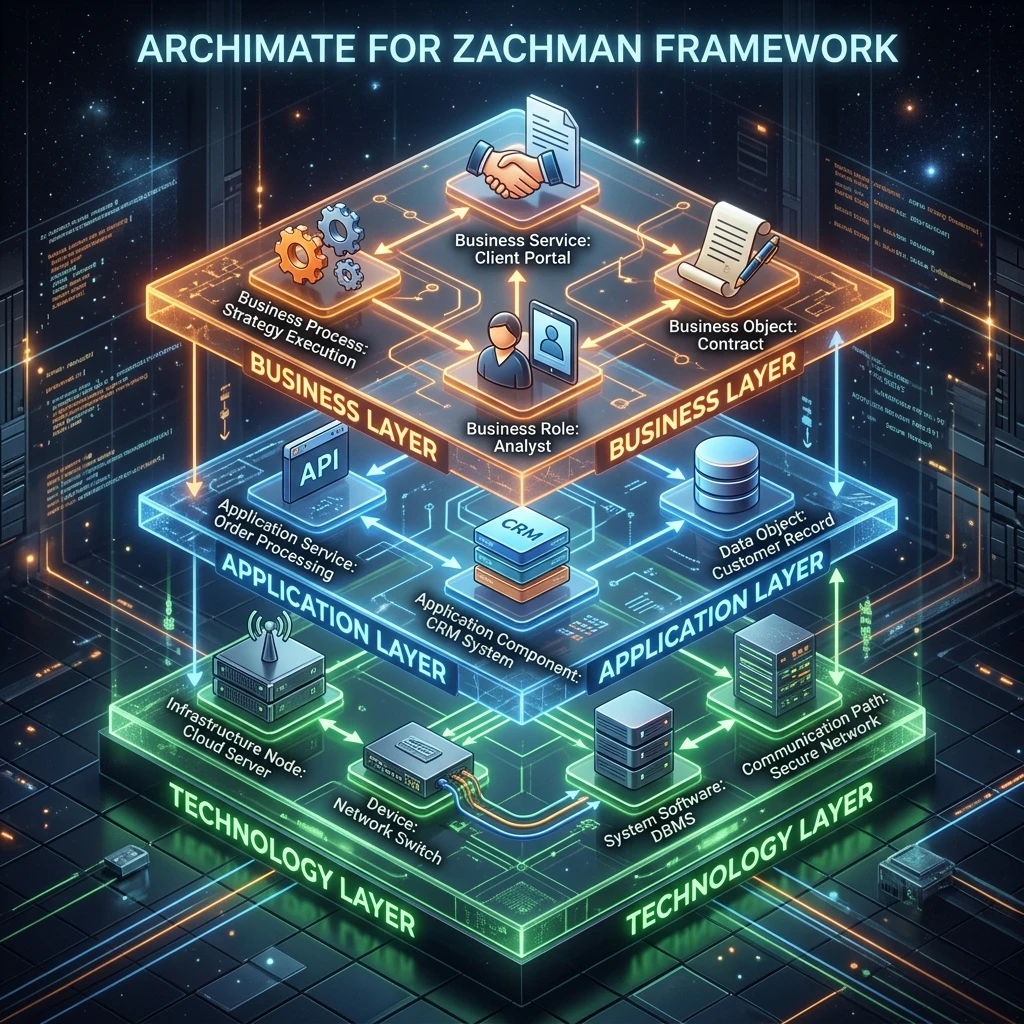
ArchiMate Core Elements
Three Layers
Business Layer: What the enterprise does
- Business processes (order processing)
- Business services (provide order status to customer)
- Business roles (fulfillment manager)
Application Layer: Systems that support business
- Application services (OrderService API)
- Application components (Order microservice)
- Data objects (Order data)
Technology Layer: Infrastructure
- Infrastructure services (Database hosting)
- Infrastructure components (AWS EC2, RDS)
- Artifacts (Docker image)
Key Relationships
| Relationship | Meaning | Example |
|---|---|---|
| Serves | A serves B (B depends on A) | OrderService app serves OrderProcessing process |
| Realizes | A implements B | OrderService realizes OrderProcessing |
| Triggers | A triggers B | CreateOrder event triggers ReduceInventory |
| Flows | Information flows from A to B | Order info flows from Customer to FulfillmentService |
Mapping Zachman Cells to ArchiMate Models
Row 1 Planner: Strategic Business Model (ArchiMate Business Layer)
Zachman Cell: Planner/What (business entities in scope)
ArchiMate Model:
Stakeholder: Customer
    ↓ interacts with
Business Service: "Place Order"
    ↓ realized by
Business Process: "Order Processing"
    ↓ uses
Business Object: Customer data, Product data
Diagram (textual representation):
Customer
   |
   | Place Order
   |
Order Service (from inventory)
   |
   | Process Order
   |
Fulfillment Service
   |
   | Create Shipment
   |
Shipping Notification
Row 2 Owner: Current State (ArchiMate Current State)
Zachman Cell: Owner/How (current processes)
ArchiMate Model:
Business Process: "Manual Order Entry"
    ├── Step 1: Customer calls sales (manual)
    ├── Step 2: Sales enters order in Salesforce
    ├── Step 3: Wait for Salesforce to sync to SAP (batch, overnight)
    ├── Step 4: Warehouse picks stock (manual)
    ├── Step 5: Create shipment in WMS
    └── Step 6: Send shipping confirmation (email, manual)

Problems identified (ArchiMate stereotypes):
    - Manual steps (inefficient)
    - Batch sync (delays)
    - No integration (data inconsistency)
Row 3 Designer: Target Architecture (ArchiMate Target Design)
Zachman Cell: Designer/How (target processes)
ArchiMate Model (ideal future state):
Actor: Customer
   ↓ accesses via
Application Service: Web Portal
   ↓ which calls
Business Service: "Place Order" (API)
   ↓ which orchestrates
   ├─→ InventoryService (check stock)
   ├─→ PaymentService (process payment)
   ├─→ FulfillmentService (create fulfillment task)
   └─→ NotificationService (send confirmation)

All via event-driven architecture:
   OrderCreated event → Published to message queue → Consumed by listeners

Result: Order processed end-to-end in seconds (vs. days)
Row 4 Builder: Technology Specifications (ArchiMate Technology Layer)
Zachman Cell: Builder/Where (technology infrastructure)
ArchiMate Model (AWS cloud architecture):
Technology Layer:

Infrastructure Services:
    - Database Hosting (AWS RDS)
    - Compute Hosting (AWS EC2)
    - Container Orchestration (AWS EKS - Kubernetes)
    - Message Queue (AWS SQS/Kafka)

Infrastructure Components:
    - RDS Instance (PostgreSQL, Multi-AZ)
    - EC2 instances (load-balanced)
    - S3 (storage)
    - ElastiCache (Redis caching)
    - VPC (network isolation)

Artifact Implementations:
    - Docker image (OrderService container)
    - Terraform code (infrastructure deployment)
    - SQL scripts (database initialization)
Row 5 Sub-Contractor: Implementation Code (ArchiMate Realizations)
Zachman Cell: Sub-Contractor/How (executable code)
ArchiMate Model (showing what implements what):
Application Services (APIs):
    - OrderService.createOrder() API
         ↑ implemented by
    - OrderService microservice (code)
         ↑ deployed in
    - Docker container
         ↑ running on
    - AWS EKS cluster
         ↑ backed by
    - RDS PostgreSQL database

Data Objects:
    - Order entity
         ↑ mapped to
    - "orders" table
         ↑ stored in
    - RDS database
Row 6 Enterprise: Live System (ArchiMate Operational Model)
Zachman Cell: Enterprise/How (live metrics)
ArchiMate Model (with operational metrics):
Application Service: OrderService
    Status: OPERATIONAL (99.94% uptime)
    Performance: 180ms p95 latency (target: <00ms)
    Throughput: 5,000 requests/min (capacity: 10,000)
    Errors: 0.1% (target: <.5%)

Infrastructure Service: RDS Database
    Status: OPERATIONAL
    CPU: 35% average
    Connections: 450/500 (91%)
    Storage: 63% full
    Replication: <00ms lag (acceptable)

Business Process: Order Processing
    Order completion time: 3 hours (target: < hours)
    Manual intervention: 5% (target: <%)
    Customer satisfaction: 81% (target: >95%)
ArchiMate Viewpoints (Different Perspectives)
ArchiMate defines standard viewpoints (combinations of architecture elements):
Business Process Viewpoint
Shows business processes, roles, services.
Customer → Places Order → Order Service
              ↓
         Fulfillment Manager
              ↓
         Fulfillment Process (pick, pack, ship)
              ↓
         Shipping Notification → Customer
Application Structure Viewpoint
Shows applications, services, data objects, and their relationships.
Web Portal (application)
    ↓
OrderService (service)
    ├─→ InventoryService
    ├─→ PaymentService
    └─→ NotificationService

Shared:
    - Customer Database
    - Product Database
Technology Deployment Viewpoint
Shows infrastructure, nodes, deployments.
Data Center (location)
    ├─ RDS Database (node)
    ├─ EKS Cluster (node)
    │   ├─ OrderService pod
    │   ├─ InventoryService pod
    │   └─ PaymentService pod
    └─ ElastiCache (node)
Integrated View
Shows all three layers together (business, application, technology).
Business Layer (top):
    Customer → Place Order Service

Application Layer (middle):
    OrderService ← PaymentService ← InventoryService

Technology Layer (bottom):
    AWS EKS ← RDS ← ElastiCache

Connections show which app supports which process,
which tech hosts which app.
Creating ArchiMate Models: Tools
Open Source:
- ArchiMate 3 (free modeling language spec)
- Archi (open-source tool, free)
- Draw.io (free online diagramming)
Commercial:
- Enterprise Architect (Sparx Systems, $1,000+)
- LucidChart (cloud-based, $200+/month)
- Miro (collaborative diagramming)
Best Practices for ArchiMate
-
One viewpoint per diagram: Don't cram all layers into one diagram; it becomes unreadable.
-
Layer separation: Keep business, application, technology layers visually distinct.
-
Consistent notation: Use ArchiMate standard symbols; don't invent your own.
-
Labeling: Every element should be labeled; avoid cryptic abbreviations.
-
Version control: Diagrams should be in git (as code or SVG) so changes are tracked.
-
Alignment with Zachman: Each diagram should map to specific Zachman cells.
Example: Complete Order-to-Cash with ArchiMate
Mapping Zachman Rows to ArchiMate:
Row 1 (Planner):
  Business Process View: High-level order → delivery

Row 2 (Owner):
  Business Process View: Current manual processes, pain points

Row 3 (Designer):
  Business Process View + Application Structure View:
  Target processes + which apps support them

Row 4 (Builder):
  Application Structure View + Technology Deployment View:
  Which services run where on what infrastructure

Row 5 (Sub-Contractor):
  Technology Deployment View: Actual containers, databases, networks

Row 6 (Enterprise):
  Operational View: Live metrics on each layer
Key Takeaways
-
ArchiMate complements Zachman: Zachman cells are documented in text/tables; ArchiMate visualizes them.
-
Three layers: Business (what we do), Application (systems), Technology (infrastructure).
-
Viewpoints matter: Different diagrams for different audiences.
-
Version control: Diagrams are architecture; they should be in git with version history.
-
Tool choice: Start with open-source (Archi, Draw.io); upgrade to commercial if you need advanced features.
Next Steps
- Download Archi (free ArchiMate modeling tool)
- Create first viewpoint: Business Process View of your current state
- Map to Zachman cells: Which row/column does each diagram represent?
ArchiMate makes Zachman's abstract matrix concrete and visual.
Meta Keywords: ArchiMate, architecture modeling, visualization, Zachman Framework, enterprise architecture diagrams.