
Zachman Designer Row (Row 3): Logical Architecture & System Design
Row 3 of the Zachman Framework — the architect's perspective: logical data models, system requirements, workflows, and technology-independent design decisions.
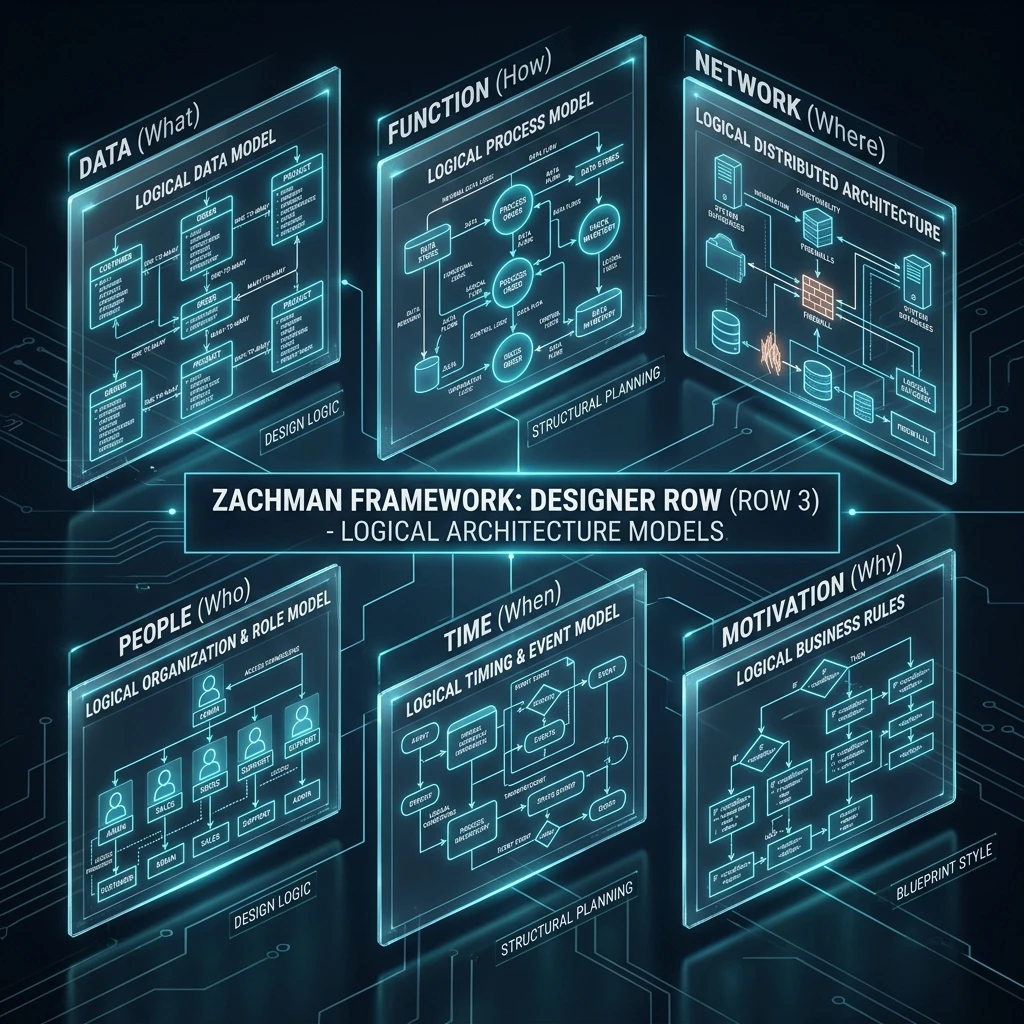
Zachman Designer Row: System Requirements and Architecture Design Explained
The Designer row (Row 3) is the third perspective in the Zachman Framework matrix. It represents the system architect's perspective - detailed system design independent of technology. If Row 2 describes "what we currently do," Row 3 describes "what the system must do" to achieve Row 1 objectives.
The Designer row is characterised by:
- Technology-independent: Describes requirements, not specific technologies
- Detailed: Logical data models, system workflows, business rules
- Comprehensive: Specifies exactly what the system must do
- System-focused: Ensures one team could implement using any technology
- Medium-term horizon: 1-3 years (reflects system requirements)
This row is critical: poor architecture design leads to systems that are slow, hard to maintain, or don't meet requirements.
What Does the Designer Row Cover?
The Designer row addresses all six interrogatives, at the system design level:
| Interrogative | Designer (Row 3) | Example |
|---|---|---|
| What | Logical data model (3NF) | Entity attributes, relationships, keys |
| How | Logical workflows & use cases | System functions, interfaces, state machines |
| Where | Logical system architecture | Tiers, components, data separation |
| Who | System roles and competencies | Data architect, software engineer, DBA roles |
| When | Event and timing architecture | When events trigger, timing constraints |
| Why | Requirements and business rules | "System must handle 100k concurrent users" |
The Six Columns in the Designer Row
Column 1: Designer/What - Logical Data Model
Question: What data must the system track, and how is it structured?
Artefacts:
- Entity-Relationship diagram (normalised to 3NF+)
- Logical entity definitions with attributes
- Data types (logical, not technology-specific)
- Keys and constraints
Characteristics:
- 10-30 pages including diagrams
- Technology-independent
- Normalised (minimises data anomalies)
Example:
Entity Definitions:

Customer Entity:
  - customer_id (unique identifier)
  - first_name (text, 100 chars, required)
  - last_name (text, 100 chars, required)
  - email (text, 255 chars, unique, required)
  - phone (text, 20 chars, optional)
  - customer_segment (text, references Segment entity)
  - created_date (date, required)
  - modified_date (date, required)

Account Entity:
  - account_id (unique identifier)
  - customer_id (foreign key → Customer)
  - account_type (text: Monthly, Annual)
  - status (text: Active, Suspended, Closed)
  - balance (number, 2 decimals)
  - created_date (date)
  - modified_date (date)

Transaction Entity:
  - transaction_id (unique identifier)
  - account_id (foreign key → Account)
  - amount (number, 2 decimals, required)
  - type (text: Charge, Payment)
  - status (text: Pending, Completed, Failed)
  - transaction_date (date, required)

Relationships:
  - Customer 1:M Account (customer has 0-many accounts)
  - Account 1:M Transaction (account has 1-many transactions)

Constraints:
  - Email must be unique across all customers
  - Account balance cannot be negative
- Transaction amount must be positiveWhy: Ensures data structure is sound before any code is written.
Column 2: Designer/How - Logical Workflows & Use Cases
Question: What are the system's key use cases and workflows?
Artefacts:
- Use case diagrams (actors and their interactions with system)
- Detailed use case descriptions
- State machines (entity state transitions)
- Business rule specifications
Characteristics:
- 15-40 pages
- Technology-independent
- Specifies required functionality
Example Use Case:
Use Case: Place Order

Actors: Customer, System, Payment Gateway

Preconditions:
  - Customer must be authenticated
  - Customer must have valid payment method on file

Main Flow:
  1. Customer selects items for purchase
  2. Customer reviews order (items, total price, taxes)
  3. Customer selects delivery address
  4. Customer submits order
  5. System validates order:
     - Each item has inventory available
     - Payment method is valid
     - Delivery address is valid
  6. System charges payment method
  7. If payment succeeds:
     a. System creates order record (status: CONFIRMED)
     b. System sends confirmation email to customer
     c. System notifies warehouse (pick-and-pack)
     d. Use case ends successfully
  8. If payment fails:
     a. System creates order record (status: PAYMENT_FAILED)
     b. System sends failure email to customer
     c. Customer can retry with different payment method

Postconditions:
  - Order record created in system
  - Customer notified of success or failure
  - Warehouse (if successful) has order to fulfil

Business Rules:
  - Order must contain at least 1 line item
  - Order must include delivery address
  - Orders over $10,000 require manager approval (separate use case)

Alternative Flows:
  - If inventory insufficient: Offer backorder
  - If payment method invalid: Ask customer to update
State Machine for Order:
OrderCreated
  ↓ (inventory check)
  ├─ Valid → PaymentPending
  │   ├─ (payment captured)
  │   └─ PaymentConfirmed → ReadyForShipment
  │       ├─ (picking starts)
  │       └─ PickedAndPacked → Shipped
  │           ├─ (in transit)
  │           └─ Delivered
  │
  └─ Invalid (out of stock) → BackorderCreated
      ├─ (inventory replenished)
└─ ReadyForShipment → ...Why: Specifies exactly what the system must do, without tying to specific technology.
Column 3: Designer/Where - Logical System Architecture
Question: How should the system be architected logically?
Artefacts:
- Logical architecture diagram (tiers, components, interfaces)
- Data separation strategy (what data goes where)
- Integration points with external systems
- Non-functional requirements (performance, scalability)
Characteristics:
- 10-25 pages including diagrams
- Technology-independent (could be implemented on any stack)
- Addresses scalability, reliability, security
Example:
Logical Architecture:

Presentation Tier:
  - Web browser (customer-facing)
  - Mobile app (iOS, Android)
  - Admin portal (internal)
  - External APIs (partner integrations)

Business Logic Tier:
  - Order service (manage orders)
  - Payment service (process payments)
  - Inventory service (manage stock)
  - Customer service (manage customers)
  - Notification service (emails, SMS, push)

Data Tier:
  - Transactional database (orders, transactions, customers)
  - Reference data (products, categories, pricing)
  - Event log (audit trail of all actions)
  - Cache layer (frequently accessed data)

Integration Points:
  - External: Payment gateway (Stripe, PayPal)
  - External: Shipping carrier API (UPS, FedEx)
  - External: Email service (SendGrid, SES)

Non-Functional Requirements:
  - Performance: Page load < sec (p95), API response <00ms (p95)
  - Scalability: Support 100k concurrent users, 1B database records
  - Availability: 99.9% uptime (27 min downtime/month)
  - Security: Encrypt data at rest & transit, GDPR/HIPAA compliance

Data Separation:
  - Transactional data: Real-time required, replicated to backup
  - Historical data: Can be archived (slower access acceptable)
  - Customer data: Encrypted, separate per customer (multi-tenancy)
- Admin data: Separate access controlsWhy: Ensures architecture is sound before developers start coding.
Column 4: Designer/Who - System Roles and Competencies
Question: What roles and competencies are needed for system design and implementation?
Artefacts:
- Role definitions (data architect, software engineer, DBA, etc.)
- Required competencies for each role
- Interfaces between roles
Characteristics:
- Simple, 2-5 pages
- Specifies skill requirements
- Not tied to specific people (just roles)
Example:
Roles Required:

Data Architect:
  - Responsibility: Design logical data model, ensure data integrity
  - Required skills: 10+ years database design, SQL, normalisation
  - Interfaces: Works with business analysts, software engineers

Solution Architect:
  - Responsibility: Design system architecture, ensure it meets requirements
  - Required skills: 10+ years system design, scalability, performance
  - Interfaces: Works with data architect, engineers, stakeholders

Lead Software Engineer:
  - Responsibility: Design detailed implementation, lead development team
  - Required skills: 8+ years software development, language(s), patterns
  - Interfaces: Works with architects, other engineers, QA

DBA (Database Administrator):
  - Responsibility: Database administration, backup/recovery, performance
  - Required skills: 8+ years DBA, disaster recovery, tuning
  - Interfaces: Works with data architect, operations

Quality Assurance:
  - Responsibility: Test system, ensure requirements met
  - Required skills: 5+ years QA, test design, automation
- Interfaces: Works with engineers, stakeholdersWhy: Ensures team has skills to implement the design.
Column 5: Designer/When - Event and Timing Architecture
Question: When do events occur and what are timing requirements?
Artefacts:
- Event model (what events exist)
- Event sequence diagrams
- Timing requirements (real-time vs. batch)
- State transition triggers
Characteristics:
- 10-20 pages including diagrams
- Specifies timing constraints
- Technology-independent
Example:
Critical Events:

OrderPlaced (Real-time, <00ms)
  - Published by: Customer checkout
  - Consumed by: Inventory service, Payment service
  - Timing: Must process within 100ms

InventoryValidated (Real-time, <00ms)
  - Published by: Inventory service
  - Consumed by: Payment service
  - If out-of-stock: Offer backorder or cancel

PaymentProcessed (Real-time, < seconds)
  - Published by: Payment service
  - Consumed by: Order service, Notification service
  - If failed: Retry or notify customer

OrderShipped (Batch, within 48 hours)
  - Published by: Warehouse system
  - Consumed by: Customer notification, Revenue accounting
  - Timing: Must ship within 48 hours of order

Timing Constraints:
  - Real-time: <00ms for customer-facing operations
  - Near-real-time: < minutes for internal operations
- Batch: Nightly processing acceptable for historical dataWhy: Ensures system is designed to meet timing requirements.
Column 6: Designer/Why - Requirements and Business Rules
Question: What are the system requirements and business rules?
Artefacts:
- Functional requirements (what system must do)
- Non-functional requirements (performance, security, availability)
- Business rules (constraints on system behaviour)
- Architecture decision records (why were choices made?)
Characteristics:
- 20-50 pages
- Detailed and comprehensive
- Traceable to business needs (Row 1 and Row 2)
Example:
Functional Requirements:

User Management:
  - FR-001: System must support user roles (Admin, Manager, User, Guest)
  - FR-002: System must support SSO (SAML, OAuth)
  - FR-003: System must enforce role-based access control

Order Management:
  - FR-010: System must accept customer orders
  - FR-011: System must validate inventory before confirming
  - FR-012: System must process payments
  - FR-013: System must notify warehouse of new orders

Non-Functional Requirements:

Performance:
  - NFR-100: Page load time < seconds (p95)
  - NFR-101: API response time <00 ms (p95)
  - NFR-102: Database query <00 ms (p95)

Scalability:
  - NFR-110: Support 100,000 concurrent users
  - NFR-111: Support 1 billion database records
  - NFR-112: Support 10x growth without architecture changes

Availability:
  - NFR-120: 99.9% uptime
  - NFR-121: Automatic failover < minutes
  - NFR-122: Zero data loss

Security:
  - NFR-130: Encrypt all data at rest (AES-256)
  - NFR-131: Encrypt all data in transit (TLS 1.2+)
  - NFR-132: GDPR compliance mandatory
  - NFR-133: Annual penetration testing

Business Rules:

Pricing Rules:
  - BR-001: Monthly billing on 1st of month
  - BR-002: If payment fails, retry daily for 5 days
  - BR-003: Discount codes limited to 20% maximum
  - BR-004: Volume discounts only (min order: $1,000)

Data Rules:
  - BR-010: Customer data must never be visible to other customers
  - BR-011: Deleted data must be permanently deleted in 90 days
  - BR-012: All changes must be audited (who, what, when)
  - BR-013: EU customer data must stay in EU

Architecture Decisions:

Decision: Microservices architecture
Rationale:
  - NFR-110/111/112 require massive scalability
  - Services can scale independently
  - Reduces deployment risk

Decision: Event-driven architecture
Rationale:
  - BR-012 requires audit trail of all changes
  - Events decouple services (loose coupling)
  - Enables complex workflows

Decision: Multi-region deployment
Rationale:
  - BR-013 requires EU data in EU
  - NFR-110 requires 100k concurrent users (single region insufficient)
- Improves performance (serve from nearest region)Why: Ensures system design is driven by clear, documented requirements.
Designer Row in Practice
In a real enterprise architecture initiative:
- Requirements gathering: From business owners, identify gaps between Row 2 (current) and Row 1 (desired).
- Design: Architects design system to close gaps and meet requirements (Row 3).
- Validation: Stakeholders validate: "Will this design solve our problems?"
- Technology selection: Row 4 chooses specific technologies to implement Row 3 design.
- Implementation: Developers implement Row 3 design using Row 4 technology choices.
Designer Row vs. Builder Row
Important distinction:
- Designer (Row 3): "What system do we need?" (technology-independent)
- Builder (Row 4): "How do we build it with specific technology?"
Row 3 could be implemented with Java/Spring, Python/Django, C#/.NET, or any other technology. Row 4 chooses specific technology and specifies how Row 3 will be implemented using that technology.
Common Mistakes in the Designer Row
-
Too much detail too early: Trying to specify every line of code. Keep it at architecture level.
-
Technology-specific too early: "Use PostgreSQL for..." It's Row 4's job to choose databases, not Row 3.
-
Skipping non-functional requirements: Performance and scalability are just as important as functionality.
-
No traceability to requirements: Each requirement should trace to design decision.
-
Ignoring constraints: "The system must fit in 2 GB of RAM" is a constraint that affects design.
Designer Row Best Practices
-
Keep technology-independent: Design should be implementable by any competent team using any tech stack.
-
Normalise data to 3NF minimum: Reduces anomalies and maintainability issues.
-
Document business rules explicitly: Not just in code comments; in separate business rule specifications.
-
Design for failure: What happens if external services fail? If database is down? Design resilience.
-
Get stakeholder validation: Business and IT should agree that design will solve the problems.
Example: Designer Row for E-commerce
Logical Data Model:
  - Customers, Orders, OrderItems, Products, Inventory
  - Payments, Invoices, Returns
  - All in 3NF

System Architecture:
  - 3-tier: Presentation, Business Logic, Data
  - Microservices: Order, Payment, Inventory, Customer, Notification
  - Event bus for asynchronous communication

Key Use Cases:
  - Place order (with inventory validation, payment processing)
  - Manage customer account
  - Track order status
  - Process returns
  - Generate reports

Non-Functional Requirements:
  - Support 100k concurrent users
  - 99.9% uptime
  - < sec page load time
  - GDPR compliance

Business Rules:
  - No overbooking (inventory reserved when order placed)
  - Payment must be captured before order confirmed
  - Returns allowed within 30 days
  - Customer data must be encrypted
Key Takeaways
-
Designer row is system architecture design: Specifies what system must do, technology-independent.
-
Data model should be normalised: To 3NF minimum to prevent data anomalies.
-
Requirements must be documented clearly: Non-functional requirements (performance, security, availability) are as important as functional.
-
Business rules must be captured: Not just in code; in explicit requirements.
-
Traceability is critical: Each design decision should trace back to a requirement.
Next Steps
- Explore Builder Row (Row 4) to see specific technology implementations.
- Read Requirements Traceability for linking requirements to implementation.
- Jump to Complete Matrix to see all perspectives together.
The Designer row is where rigorous architecture begins. Master it, and you ensure systems are designed to meet business needs before any code is written.
Meta Keywords: Zachman Designer row, system architecture, logical data model, requirements, system design, technology-independent.