
CQRS + Event Sourcing: A Practical Guide to Scalable Data Architectures
Complete practical guide to CQRS and Event Sourcing. Understand why CRUD fails at scale, how to design separate command and query models, implement projectors to build read models, use EventStoreDB for write-side storage, handle eventual consistency in REST APIs, design compensating transactions for failures, implement event versioning and upcasting, and use the Outbox Pattern for atomicity between the command and message bus.
CQRS + Event Sourcing: A Practical Guide to Scalable Data Architectures
Table of Contents
- Why CRUD Fails at Scale
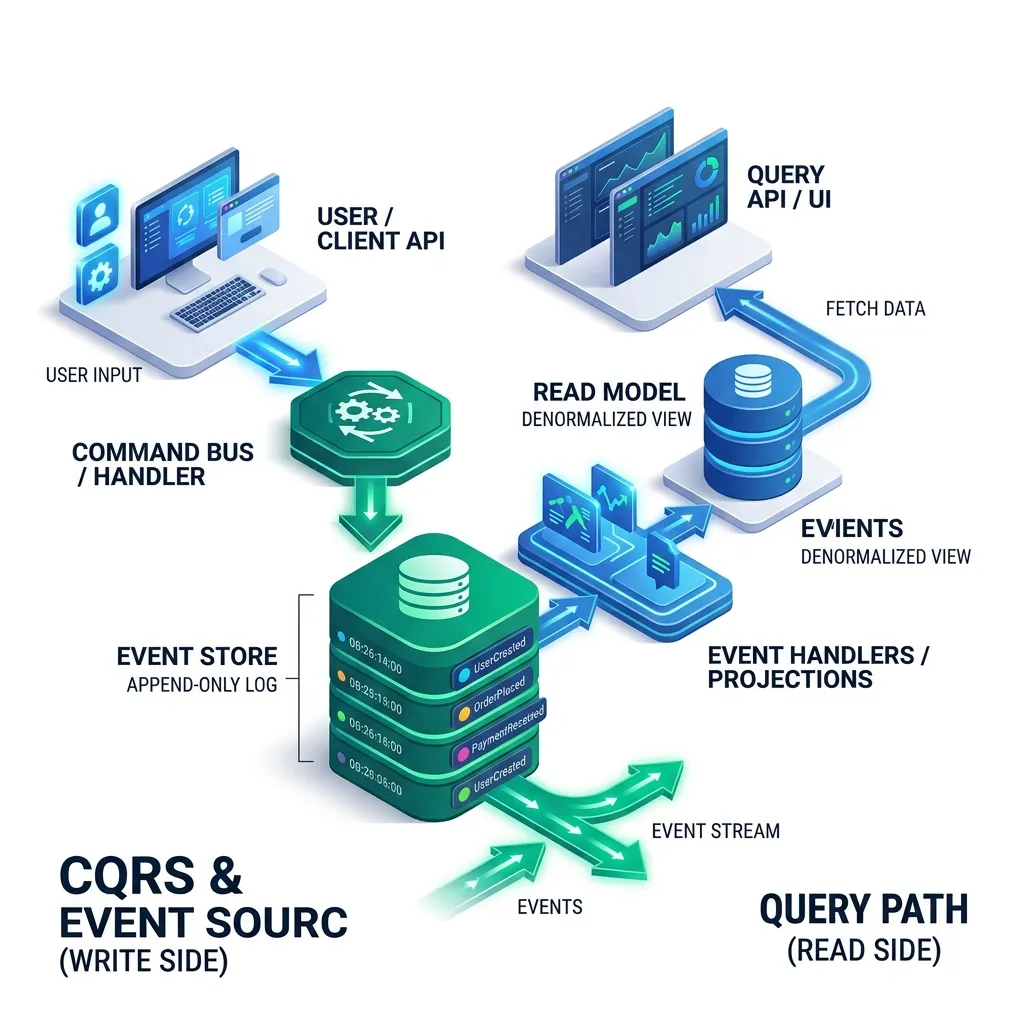
- CQRS: The Core Concept
- Command Side: The Write Model
- Event Sourcing: Storing Events Not State
- Query Side: Building Read Models with Projectors
- The Outbox Pattern: Atomic Commands + Events
- Eventual Consistency: Handling the Delay
- Event Versioning and Upcasting
- Tooling: EventStoreDB, Axon Framework, Marten
- When to Apply CQRS + Event Sourcing
- Frequently Asked Questions
- Key Takeaway
Why CRUD Fails at Scale
Standard CRUD (Create, Read, Update, Delete) uses a single model for all data operations:
-- CRUD: The same users table serves writes AND reads:
UPDATE users SET email = 'new@email.com' WHERE id = 1; -- Write
SELECT u.*, o.order_count, p.total_spent                -- Read (complex join!)
FROM users u
LEFT JOIN (SELECT user_id, COUNT(*) order_count FROM orders GROUP BY user_id) o ON o.user_id = u.id
LEFT JOIN (SELECT user_id, SUM(amount) total_spent FROM payments GROUP BY user_id) p ON p.user_id = u.id
WHERE u.id = $1;
Problems at scale:
- Lock contention: Write locks on
usersblock reads during updates - Index bloat: Adding indexes to speed reads slows writes
- Schema coupling: The table must serve all query shapes (dashboard, API, reports)
- Audit limitations: You can see current state, but not history of changes
CQRS: The Core Concept
The fundamental insight: commands and queries have completely different access patterns and optimization requirements. Stop fighting over the same data model.
Command Side: The Write Model
The command side validates business rules and records what happened as an immutable event:
// Command: an intent to change state (no return value - fire and forget):
public record CreateOrderCommand(
    @NotNull UUID customerId,
    @NotEmpty List<OrderItemDto> items,
    @NotNull ShippingAddress shippingAddress
) {}

// Command Handler: validates and produces events
@CommandHandler
public class CreateOrderCommandHandler {
    private final CustomerPolicyService policy;

    public OrderId handle(CreateOrderCommand cmd) {
        // 1. Load aggregate (reconstruct current state by replaying events):
        Customer customer = customerRepo.load(cmd.customerId());

        // 2. Apply business rules:
        policy.validateCreditLimit(customer, cmd.totalAmount());
        policy.validateShippingRestrictions(cmd.items(), cmd.shippingAddress());

        // 3. Create domain event (facts about what happened):
        OrderCreatedEvent event = new OrderCreatedEvent(
            UUID.randomUUID(),
            cmd.customerId(),
            cmd.items(),
            cmd.shippingAddress(),
            Instant.now()
        );

        // 4. Append event to Event Store (this IS the write):
        eventStore.append("order-" + event.orderId(), event);

        return new OrderId(event.orderId());
    }
}
Event Sourcing: Storing Events Not State
In a traditional system, you store current state: orders.status = 'SHIPPED'.
In Event Sourcing, you store the history of facts:
// Event Store: "order-550e8400-e29b-41d4-a716-446655440000"
[
  {"type": "OrderCreated", "timestamp": "2026-04-01T10:00:00Z", "customerId": "...", "items": [...]},
  {"type": "PaymentReceived", "timestamp": "2026-04-01T10:01:00Z", "amount": 149.99, "method": "CARD"},
  {"type": "OrderShipped", "timestamp": "2026-04-02T09:00:00Z", "trackingNumber": "1Z999AA"},
  {"type": "DeliveryConfirmed", "timestamp": "2026-04-03T14:23:00Z", "signature": "John D."}
]
To get current state: Replay all events:
public Order reconstruct(List<DomainEvent> events) {
    Order order = new Order(); // empty shell
    for (DomainEvent event : events) {
        order.apply(event); // mutate state based on event type
    }
    return order; // fully hydrated from history
}
The superpowers this gives you:
| Feature | CRUD | Event Sourcing |
|---|---|---|
| Audit log | Add extra audit table (often forgotten) | Built-in - every change is an event |
| Time travel | Cannot see past states | Replay up to any point in time |
| Debug production | "Why does this record look like this?" | Read the event history - the entire story |
| Business analytics | Aggregate from current snapshots | Query event stream directly |
| Undo | Complex compensating logic | Apply reverse event |
Query Side: Building Read Models with Projectors
A Projector (also called Event Handler or Read Model Builder) listens to events and builds optimized views for reads:
@EventHandler // Subscribes to OrderCreatedEvent from Event Store
public class OrderSummaryProjector {
    private final OrderSummaryRepository readModelRepo; // MongoDB or Redis

    public void on(OrderCreatedEvent event) {
        // Build a flat, denormalized view optimized for the dashboard query:
        OrderSummaryView view = OrderSummaryView.builder()
            .orderId(event.orderId())
            .customerName(customerLookup.getDisplayName(event.customerId()))
            .itemCount(event.items().size())
            .totalAmount(event.calculateTotal())
            .status("PENDING")
            .createdAt(event.timestamp())
            .build();

        readModelRepo.save(view); // Fast: just one document write
    }

    public void on(OrderShippedEvent event) {
        // Update just the status field when order ships:
        readModelRepo.updateStatus(event.orderId(), "SHIPPED", event.trackingNumber());
    }
}

// Query: no joins, no aggregation - just fetch pre-computed view:
public OrderSummaryView getOrderSummary(UUID orderId) {
    return readModelRepo.findById(orderId); // Single document lookup - sub-millisecond
}
Multiple read models from the same events:
OrderDashboardProjector-> MongoDB for order management UIOrderAnalyticsProjector-> Elasticsearch for search and filteringOrderRevenueProjector-> Separate PostgreSQL table for finance reporting
The Outbox Pattern: Atomic Commands + Events
A critical challenge: how do you ensure the event is published to a message bus only if the command succeeded?
Problem: Two separate operations = potential inconsistency:
// ❌ WRONG: event published even if DB commit fails
eventStore.save(event);       // What if this succeeds...
messageBus.publish(event);    // ...but this fails? Or vice versa?
Outbox Pattern Solution: Write the event to an outbox table in the same database transaction, then relay it asynchronously:
@Transactional
public void handle(CreateOrderCommand cmd) {
    // Both writes in ONE transaction:
    eventStore.append(event);         // In-DB event store
    outboxRepository.save(event);     // Also write to outbox table (same TX)
}

// Separate relay process (CDC or polling):
@Scheduled(fixedDelay = 100) // Every 100ms
public void relayOutboxEvents() {
    List<OutboxEvent> pending = outboxRepository.findPending();
    for (OutboxEvent e : pending) {
        messageBus.publish(e);        // This is safe to retry if it fails
        outboxRepository.markRelayed(e.id());
    }
}
// Result: message is published EXACTLY ONCE, even if service crashes
Eventual Consistency: Handling the Delay
Between a command being accepted and the read model being updated, there's a short delay. REST APIs need to handle this gracefully:
// Option 1: Return 202 Accepted + polling location:
POST /orders -> 202 Accepted
Location: /orders/status-check/{commandId}

GET /orders/status-check/{commandId} -> {"status": "PROCESSING"} or {"orderId": "..."}

// Option 2: Optimistic UI update (return the expected read-model state immediately):
POST /orders -> 200 OK {orderId: "...", status: "PENDING"} // Synthesized from command
// Background: projector catches up and read model matches within < 500ms

// Option 3: Synchronous projection (for low-latency requirements):
@TransactionalEventListener(phase = AFTER_COMMIT)
public void projectInline(OrderCreatedEvent event) {
    // Runs in same thread, after TX commits - consistent query possible immediately
    readModelRepo.save(buildView(event));
}
When to Apply CQRS + Event Sourcing
Apply when you have:
- Complex domain with many business rules that change state
- Strict audit requirements (finance, healthcare, legal)
- Read and write loads differ by 10:1 or more
- Multiple downstream consumers need notifications of state changes
- "What was the state at time T?" is a real business requirement
Do NOT apply for:
- Simple CRUD apps (todo lists, basic CMS, admin dashboards)
- Small teams without distributed systems experience
- Greenfield projects where the domain is not yet understood
- Systems without audit or compliance requirements
Frequently Asked Questions
Does CQRS always require Event Sourcing? No - they are complementary but independent patterns. You can use CQRS with a traditional relational database on the write side (just update the table and also update a separate read model). Event Sourcing provides the best write-side storage for CQRS, but it's not required. Many teams apply CQRS first, then introduce event sourcing as the auditing/replay requirements emerge.
What happens if a Projector crashes mid-update? Projectors should be idempotent - processing the same event twice produces the same result. Event stores assign each event a sequence number. Projectors track the last processed sequence number in their own store. On restart, they resume from where they stopped. This guarantees at-least-once processing, and idempotency ensures at-most-once effect.
Key Takeaway
CQRS + Event Sourcing is the architectural pattern for systems where data history, audit, and scale matter. The event log becomes the single source of truth - current state is just a materialized view. The complexity cost is real: you need to handle eventual consistency, design projectors, manage event schemas, and deal with the Outbox pattern. But for banking, healthcare, trading, and logistics systems - where the history of why data is in a state is as important as the state itself - there is no alternative that scales as elegantly.
Read next: Sharding Patterns: How to Scale Your Database to Terabytes ->
Part of the Software Architecture Hub - comprehensive guides from architectural foundations to advanced distributed systems patterns.