
Pipe and Filter: Processing Pipelines
Master the flow. Learn how to build systems that transform data through a series of independent Filters connected by Pipes.
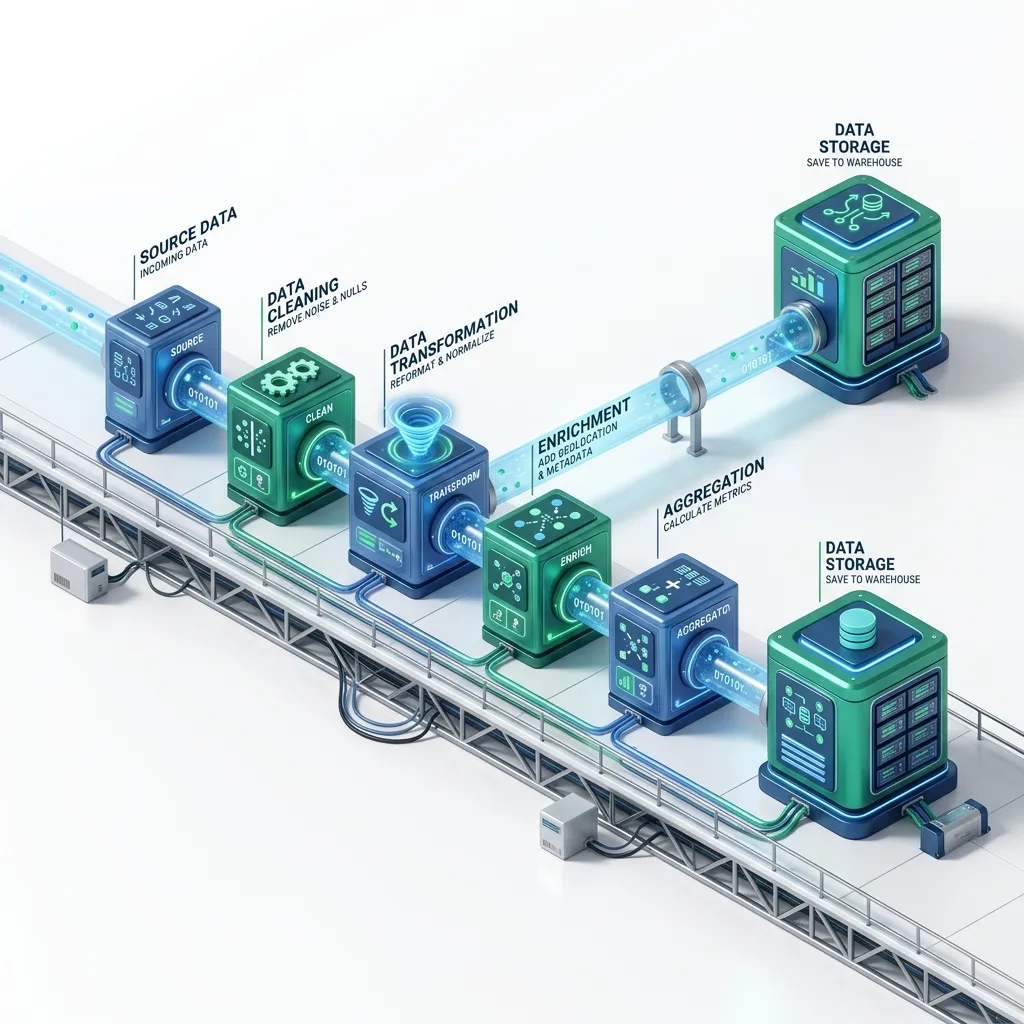
Pipe and Filter: Processing Pipelines
The Pipe and Filter architectural pattern structures a processing task as a sequence of independent transformation steps (filters) connected by channels that pass data between them (pipes). Each filter receives input, transforms it, and produces output - without knowing anything about the upstream or downstream filters.
This pattern powers Unix command lines, HTTP middleware stacks, ETL data pipelines, stream processing systems, and image processing pipelines. It is one of the oldest and most practical architectural patterns in software engineering.
Core Concepts
Input Data
    |
    v
+---------+     pipe     +---------+     pipe     +---------+
| Filter  | -----------> | Filter  | -----------> | Filter  | ---> Output
|  (Parse)|             |(Validate|             |(Enrich) |
+----------+             +----------+             +----------+

Each filter:
- Reads from its input pipe
- Transforms the data
- Writes to its output pipe
- Has no knowledge of other filtersFilter: A processing component that performs one specific transformation. It is stateless, reusable, and independently testable.
Pipe: The channel between filters. It can be in-memory (a function call or queue), a file, a message broker (Kafka), a Unix pipe, or a network socket.
The defining property: filters are independent. You can replace, reorder, or add filters without modifying any other filter. You can run multiple copies of a slow filter in parallel to increase throughput.
Unix: The Original Pipe and Filter
The Unix shell demonstrates the pattern at its purest. Each command is a filter; | is the pipe:
# Find the top 5 endpoints generating errors in a log file
cat access.log \
  | grep " 5[0-9][0-9] " \
  | awk '{print $7}' \
  | sort \
  | uniq -c \
  | sort -rn \
  | head -5

# Each stage is a filter:
# grep:   keeps only lines with 5xx status codes
# awk:    extracts the URL (7th field)
# sort:   sorts for uniq to work
# uniq -c: counts occurrences
# sort -rn: sorts by count descending
# head:   takes top 5
The power: each component (grep, awk, sort) was written independently decades ago. They compose into arbitrary processing pipelines because they share a common data format (lines of text) and a common pipe interface (stdin/stdout).
HTTP Middleware: Pipe and Filter in Web Servers
Express.js middleware is a direct implementation of the Pipe and Filter pattern. Each middleware function is a filter; the request/response cycle is the pipe:
import express from 'express';
const app = express();

// Filter 1: Parse request body
app.use(express.json());

// Filter 2: Log all requests
app.use((req, res, next) => {
  const start = Date.now();
  res.on('finish', () => {
    console.log(`${req.method} ${req.path} ${res.statusCode} ${Date.now() - start}ms`);
  });
  next();
});

// Filter 3: Authenticate
app.use((req, res, next) => {
  const token = req.headers.authorization?.replace('Bearer ', '');
  if (!token) return res.status(401).json({ error: 'Unauthorized' });

  try {
    req.user = jwt.verify(token, process.env.JWT_SECRET!);
    next();
  } catch {
    res.status(401).json({ error: 'Invalid token' });
  }
});

// Filter 4: Rate limit
app.use(rateLimit({ windowMs: 60_000, max: 100 }));

// Filter 5: Route handler (final filter)
app.get('/users', async (req, res) => {
  const users = await db.users.findAll();
  res.json(users);
});
Each filter either calls next() to pass control to the next filter, or short-circuits the pipeline by sending a response directly. Adding a new cross-cutting concern (CORS, request ID tracing) means adding one middleware function - no changes to existing filters.
ETL Data Pipelines
ETL (Extract, Transform, Load) is the data engineering implementation of Pipe and Filter:
Source Systems -> Extract -> Transform -> Load -> Data Warehouse
                 (Filter)  (Filters)   (Filter)
Building a TypeScript ETL pipeline
// Generic pipe-and-filter pipeline
type Filter<TIn, TOut> = (input: TIn) => Promise<TOut>;

class Pipeline<T> {
  private filters: Array<Filter<unknown, unknown>> = [];

  pipe<TNext>(filter: Filter<T, TNext>): Pipeline<TNext> {
    this.filters.push(filter as Filter<unknown, unknown>);
    return this as unknown as Pipeline<TNext>;
  }

  async execute(input: T): Promise<T> {
    let result: unknown = input;
    for (const filter of this.filters) {
      result = await filter(result);
    }
    return result as T;
  }
}

// Define individual filters
type RawRecord = { email: string; name: string; createdAt: string; revenue: string };
type CleanRecord = { email: string; name: string; createdAt: Date; revenue: number };
type EnrichedRecord = CleanRecord & { tier: 'free' | 'pro' | 'enterprise' };

async function parseTypes(record: RawRecord): Promise<CleanRecord> {
  return {
    ...record,
    email: record.email.toLowerCase().trim(),
    createdAt: new Date(record.createdAt),
    revenue: parseFloat(record.revenue)
  };
}

async function validateRecord(record: CleanRecord): Promise<CleanRecord> {
  if (!record.email.includes('@')) throw new Error(`Invalid email: ${record.email}`);
  if (isNaN(record.revenue)) throw new Error(`Invalid revenue for ${record.email}`);
  if (record.createdAt > new Date()) throw new Error(`Future date: ${record.createdAt}`);
  return record;
}

async function enrichWithTier(record: CleanRecord): Promise<EnrichedRecord> {
  return {
    ...record,
    tier: record.revenue > 10000 ? 'enterprise'
          : record.revenue > 1000 ? 'pro'
          : 'free'
  };
}

// Compose the pipeline
const userPipeline = new Pipeline<RawRecord>()
  .pipe(parseTypes)
  .pipe(validateRecord)
  .pipe(enrichWithTier);

// Process records
const rawData: RawRecord[] = await extractFromDatabase();
const results = await Promise.allSettled(
  rawData.map(record => userPipeline.execute(record))
);

const successful = results
  .filter(r => r.status === 'fulfilled')
  .map(r => (r as PromiseFulfilledResult<EnrichedRecord>).value);

const failed = results
  .filter(r => r.status === 'rejected')
  .map(r => (r as PromiseRejectedResult).reason);

console.log(`Processed: ${successful.length} OK, ${failed.length} failed`);
await loadToWarehouse(successful);
Stream Processing: Real-Time Pipe and Filter
For continuous data (events, logs, sensor readings), stream processing applies the Pipe and Filter pattern in real time:
Events -> Kafka Topic -> Filter (parse) -> Filter (enrich) -> Filter (aggregate) -> Output
         (pipe)         (consumer)       (consumer)         (consumer)
Apache Kafka Streams example
// Java Kafka Streams - real-time fraud detection pipeline
StreamsBuilder builder = new StreamsBuilder();

KStream<String, Transaction> transactions = builder
    .stream("transactions", Consumed.with(Serdes.String(), transactionSerde));

transactions
    // Filter 1: Parse and validate
    .filter((key, tx) -> tx.getAmount() > 0 && tx.getUserId() != null)

    // Filter 2: Enrich with user risk score
    .mapValues(tx -> {
        double riskScore = riskScoreService.getScore(tx.getUserId());
        return tx.withRiskScore(riskScore);
    })

    // Filter 3: Flag suspicious transactions
    .filter((key, tx) ->
        tx.getRiskScore() > 0.8 ||
        tx.getAmount() > 10000 ||
        fraudPatternDetector.isSuspicious(tx)
    )

    // Sink: write flagged transactions to alerts topic
    .to("fraud-alerts", Produced.with(Serdes.String(), transactionSerde));

KafkaStreams streams = new KafkaStreams(builder.build(), config);
streams.start();
Each .filter() and .mapValues() call is a filter stage. The Kafka topic is the pipe. Processing happens at the rate events arrive - sub-second latency.
Parallel Execution: Processing Multiple Records
The Pipe and Filter pattern allows parallelising slow filters:
// Sequential processing (slow)
for (const record of records) {
  const result = await slowFilter(record);
  await loadToDatabase(result);
}

// Parallel processing (fast) - multiple records through the slow filter simultaneously
const CONCURRENCY = 10;

async function processBatch<T, R>(
  items: T[],
  filter: Filter<T, R>,
  concurrency: number
): Promise<R[]> {
  const results: R[] = [];

  for (let i = 0; i < items.length; i += concurrency) {
    const batch = items.slice(i, i + concurrency);
    const batchResults = await Promise.all(batch.map(filter));
    results.push(...batchResults);
  }

  return results;
}

const processed = await processBatch(records, enrichmentFilter, CONCURRENCY);
Apache Airflow: Orchestrating Complex Pipelines
For multi-step data pipelines with dependencies, retries, and scheduling, Apache Airflow provides a pipeline orchestrator:
# Airflow DAG (Directed Acyclic Graph) - a Pipe and Filter pipeline
from airflow import DAG
from airflow.operators.python import PythonOperator
from datetime import datetime

def extract_data():
    """Filter 1: Extract from source databases"""
    records = query_all_source_databases()
    return records

def validate_data(ti):
    """Filter 2: Validate and clean records"""
    records = ti.xcom_pull(task_ids='extract')
    valid = [r for r in records if validate_record(r)]
    return valid

def enrich_data(ti):
    """Filter 3: Add derived fields"""
    records = ti.xcom_pull(task_ids='validate')
    return [enrich(r) for r in records]

def load_to_warehouse(ti):
    """Filter 4: Load to data warehouse"""
    records = ti.xcom_pull(task_ids='enrich')
    warehouse.bulk_insert(records)

with DAG('daily_user_etl', schedule_interval='@daily', start_date=datetime(2026, 1, 1)) as dag:
    extract = PythonOperator(task_id='extract', python_callable=extract_data)
    validate = PythonOperator(task_id='validate', python_callable=validate_data)
    enrich = PythonOperator(task_id='enrich', python_callable=enrich_data)
    load = PythonOperator(task_id='load', python_callable=load_to_warehouse)

    # Pipe: define execution order
    extract >> validate >> enrich >> load
Airflow handles retries, scheduling, monitoring, and failure notifications. Each task is a filter; the >> operator defines the pipe.
Frequently Asked Questions
Q: How is the Pipe and Filter pattern different from a regular function chain?
A function chain couples the functions together - function A calls function B directly. Pipe and Filter decouples them: each filter only knows about the pipe protocol (input format and output format), not the identity of adjacent filters. This means you can swap, add, or remove filters without modifying existing code. The testability also differs: each filter can be unit-tested completely independently with any input, without needing the full pipeline.
Q: What data format should the pipes carry?
The pipe's data format is the contract between filters. Use the simplest format that meets your needs: structured JSON or Protobuf for typed data (machine-to-machine), line-delimited text for Unix-compatible pipelines, Arrow for high-performance columnar data, and domain event objects for event-driven pipelines. The format must be agreed on across all filters - changing it is a breaking change.
Q: When should I use Pipe and Filter instead of a simple for-loop?
Use Pipe and Filter when: (1) the same transformation is reused in multiple pipelines, (2) filters need to be swappable based on configuration, (3) some filters need to run in parallel, (4) the pipeline is long enough that a flat function would be hard to read and maintain, or (5) you need to monitor, retry, or alert on individual stages. For a three-step transformation that never changes, a simple function chain is usually sufficient.
Q: Is Node.js stream processing the same as this pattern?
Yes. Node.js Transform streams implement the Pipe and Filter pattern at the OS level. transform.pipe(encrypt).pipe(compress).pipe(writeStream) composes three filters. Node.js streams handle backpressure automatically - if a downstream filter is slow, the upstream filter pauses instead of overwhelming memory. This makes Node streams ideal for large file processing and network data transformation.
Key Takeaway
Pipe and Filter is one of the most composable patterns in software: independent filters that do one thing well, connected by pipes that move data between them. Unix commands, Express middleware, Kafka Streams, and Apache Airflow all implement this pattern at different scales and latencies. The key discipline is keeping filters genuinely independent - a filter that reaches into adjacent filters or holds state that affects other filters has abandoned the pattern's core property. When filters are pure transformations with a clear contract, they become reusable, testable, and replaceable building blocks for arbitrarily complex data processing systems.
Read next: Software Architect Career Path: From Senior to Staff ->
Part of the Software Architecture Hub - engineering the flow.